

How to Make the Babydoll Dance AI Video (2026)
How to Make the Babydoll Dance AI Video With Up to Three Friends Using Just Their Photos
The Babydoll dance AI video generator puts the people from your photos into the bouncy two-step routine that took over TikTok in late 2026. Upload one to three photos, and the tool returns a 12-second MP4 of your crew doing the full dance on a sunny city street. This guide walks you through every step, from picking your trio to posting the finished clip.
What Is the Babydoll Dance Trend?
The Babydoll dance is a bouncy two-step set to "Babydoll," a song by Welsh singer Jamie Miller, who is 29 and from Cardiff. On August 16, 2026, he posted a TikTok of himself and two friends in black suits and sunglasses doing the steps on a sunny street, captioned "Had to hit the babydoll two step." That first clip has passed 7 million views.
Dance tutorials, families and friend groups picked the routine up through September and October 2026. In late October the song went to number one on the UK singles chart. BBC Wales reported that Jamie Miller was the first Welsh artist to top it in 15 years.
The first clip is a trio: three people in a row, facing the camera, doing the routine together. Our Babydoll dance AI video template keeps that line-up and puts the people from your photos in it.
Made on AI Trend Video from three photos of made-up people: centre, left and right each keep their own outfit. 12 seconds, 9:16, Standard 480p.
What the Babydoll Dance AI Video Keeps From Your Photos
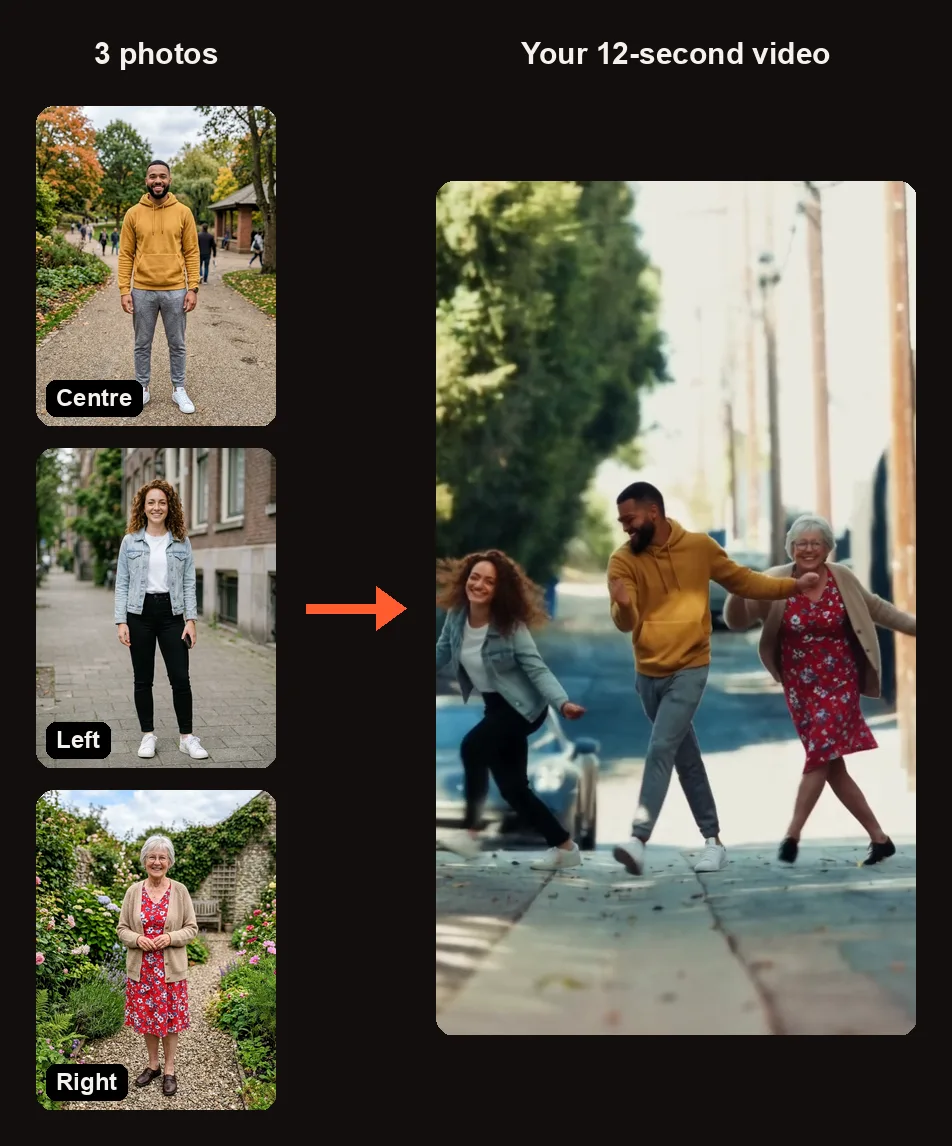
The three test photos and a frame from the finished clip. Everyone keeps the face and the outfit from their photo.
Every person in the video keeps the face, hairstyle, skin tone and the exact outfit from their photo. If someone wears a mustard hoodie in their photo, they wear a mustard hoodie in the dance. Nobody gets sunglasses added unless they are already wearing sunglasses in the photo. Each person stays in their assigned spot for the whole clip.
The template has three spots in a row. You only need to fill the centre one. Any spot you leave empty is danced by a made-up adult friend in a black suit, white shirt and dark sunglasses, just like Jamie Miller's original clip.
| Spot | Photo | Who dances it if empty |
|---|---|---|
| Centre | Required | — |
| Left | Optional | A made-up friend in a black suit, white shirt and dark sunglasses |
| Right | Optional | A made-up friend in a black suit, white shirt and dark sunglasses |
The Babydoll Dance Moves, Shot by Shot
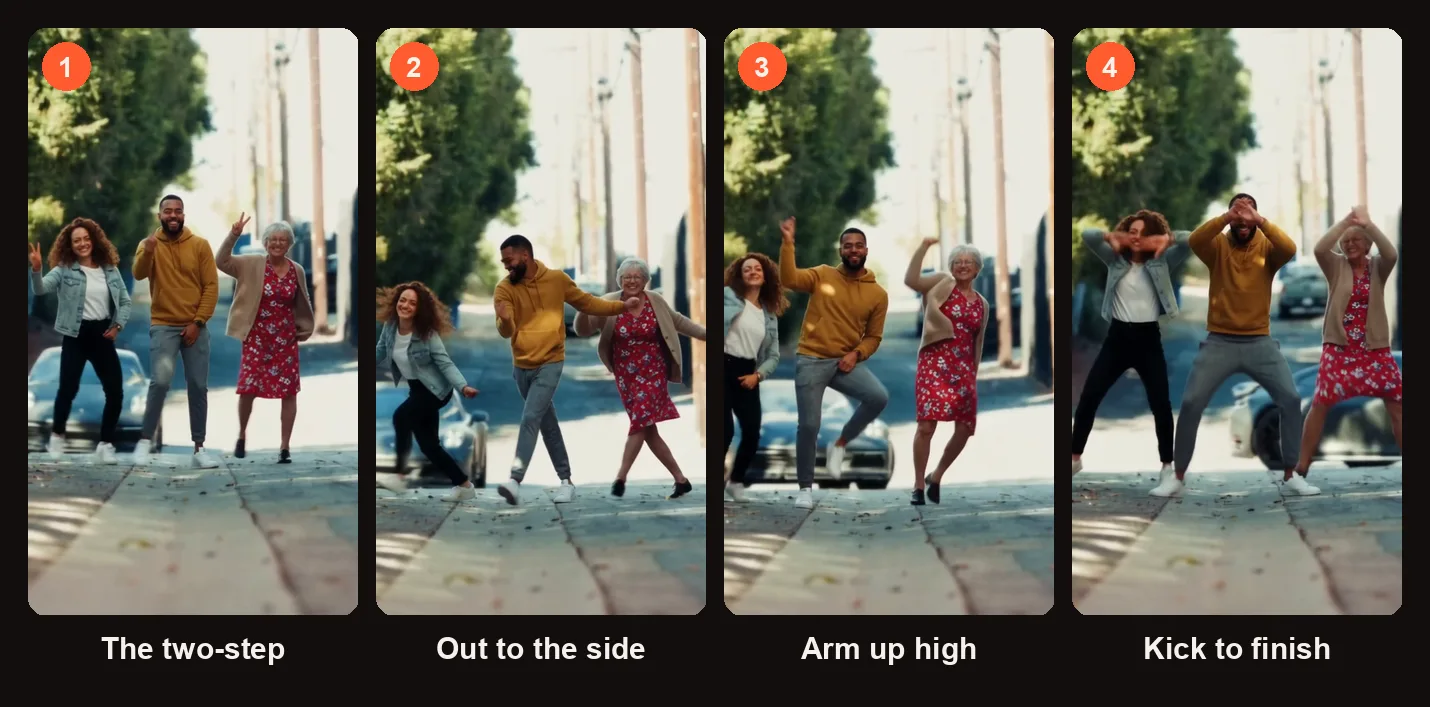
Four moments from the 12-second sample clip above.
The camera stays at eye level, full-body distance, on a sunny, tree-lined city street with parked cars. The three dancers face the camera in a row and run through the moves together:
- Bouncy two-steps toward the camera
- Chugs forward
- Arm circles
- Steps out to the side
- Ball changes with an arm thrown up high
The whole sequence is done in a row and with big smiles, matching the energy of the original clip.
How to Make a Babydoll Dance AI Video
The Babydoll dance AI video generator runs in your browser. There is no app to install and no prompt to write. When you press Create for the first time, it asks you to sign in with Google.
Step 1: Pick Your Trio
Decide who will stand in the centre, on the left and on the right. The centre spot is required and gets the most screen time. The left and right spots are optional — leave one or both empty and a made-up friend in a black suit fills in.
Only use photos of adults (18 or older) who agreed to appear. No children, celebrities or public figures.
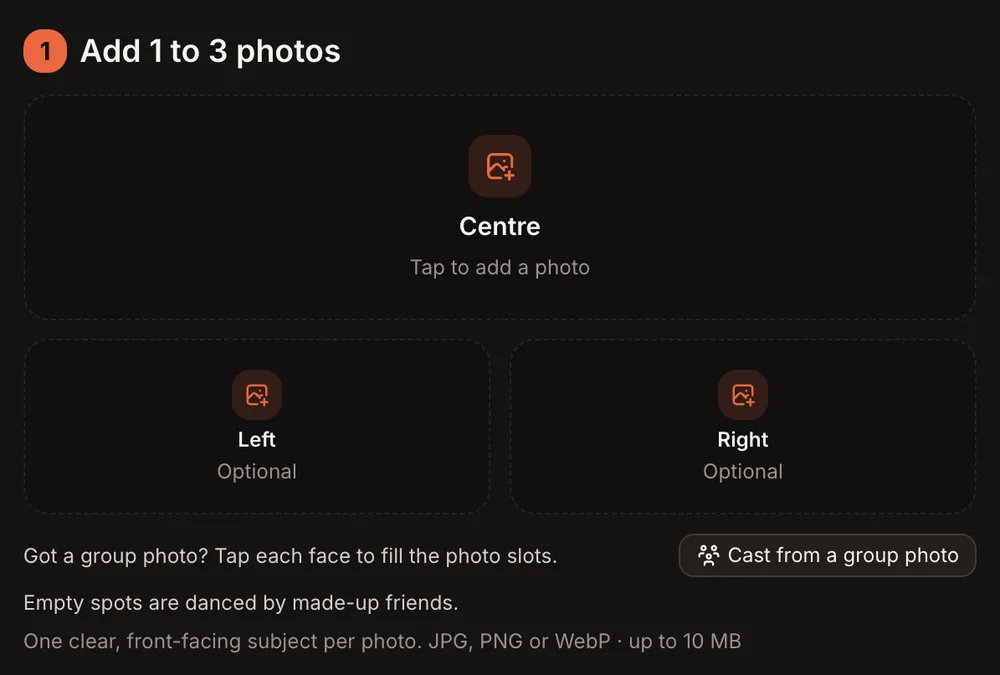
The three spots in the studio. Only Centre needs a photo.
Step 2: Add the Photos, or Cast From One Group Photo
Each spot shows "Tap to add a photo." You can upload a separate photo for each spot. Full-body photos with one face work best.
If you only have a group photo, press Cast from a group photo. You will see all the faces in the photo. Tap each face to cut it out and assign it to a spot. A slider sets the crop size. Only the cut-out faces are uploaded, never the full group photo. If a face is very small in the group shot, the studio warns that a closer photo works better.
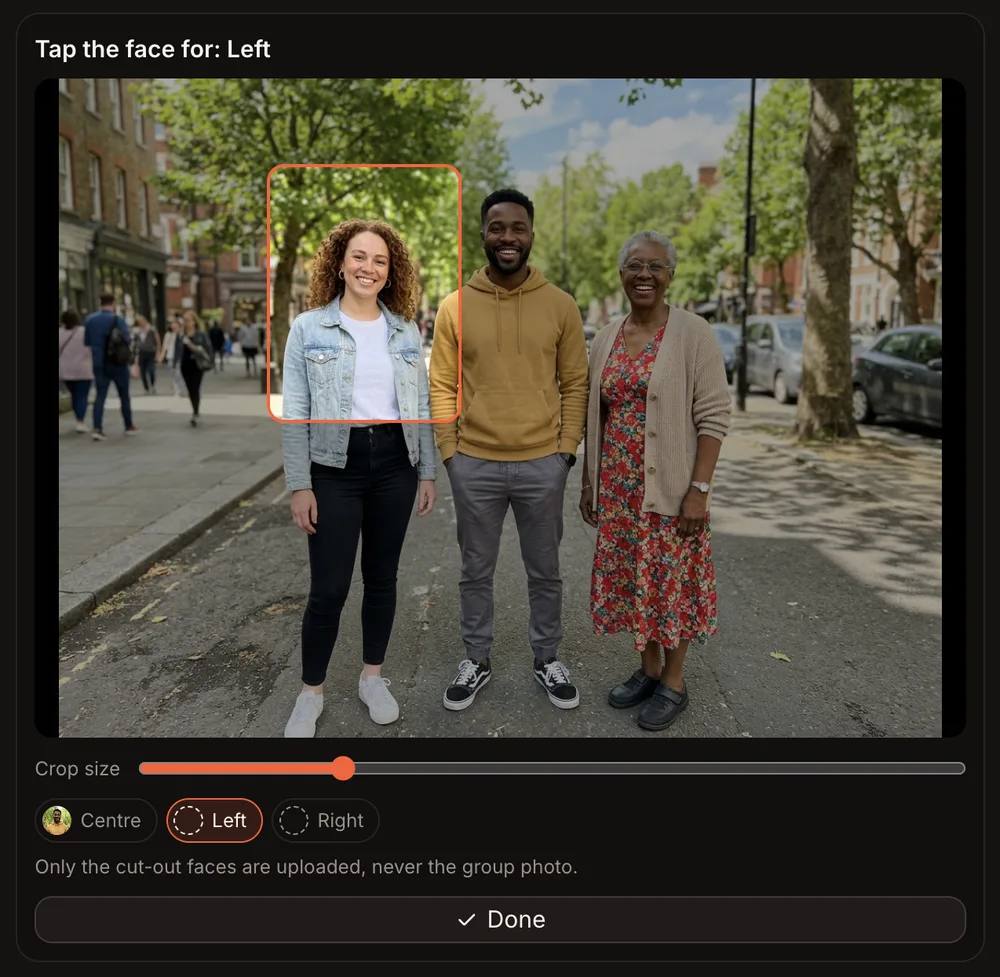
Cast from a group photo: Centre is filled and the crop box shows the next face for Left. Only the cut-outs are uploaded.
Step 3: Choose the Format and Quality
Below the photos, the Format and quality step sets the shape and sharpness of your Babydoll dance AI video.
| Option | What You Get |
|---|---|
| 9:16 (TikTok · Reels) | Vertical video for TikTok and Instagram Reels |
| 1:1 (Feed) | Square video for Instagram feed posts |
| 16:9 (YouTube) | Horizontal video for YouTube |
| Standard (480p) | 12-second clip, 10 credits |
| HD (720p) | 12-second clip, 20 credits |
| Sound | Original upbeat two-step beat with handclaps (not the Babydoll song) |
After choosing, tick the consent checkbox. The orange button updates to read Create · 10 credits for Standard or Create · 20 credits for HD.
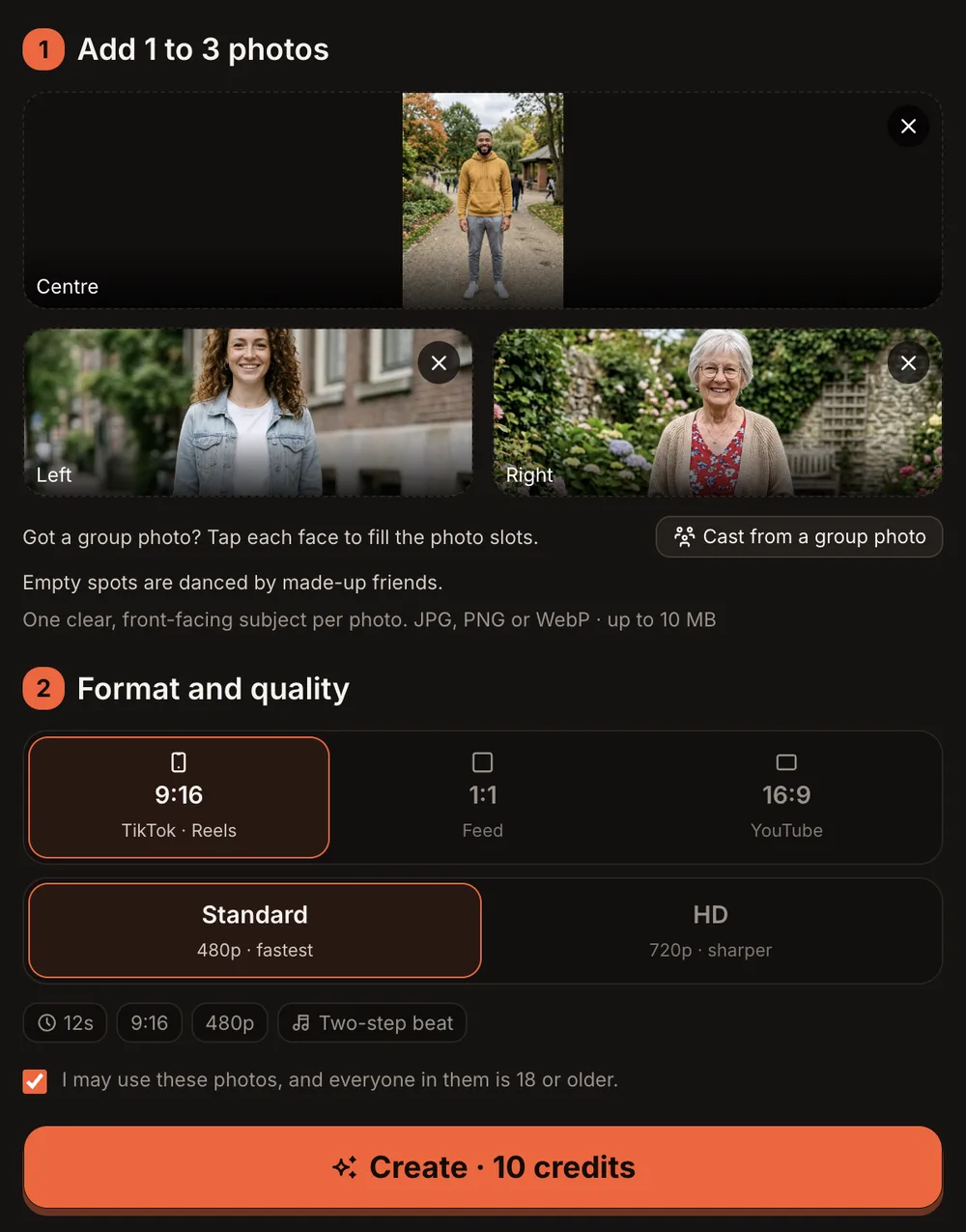
Three photos in, 9:16 and Standard picked: the button reads Create · 10 credits.
Step 4: Press Create and Wait for the Email
Tap the orange button. Rendering usually takes 3 to 12 minutes. You can close the tab — the site sends you an email when the video is ready. In our tests, a three-photo Babydoll dance AI video at Standard 480p took about seven minutes. A one-photo version took about four minutes.
If a render fails, the credits come back to your account automatically.
Step 5: Check the Clip and Post It
Open My videos. Your clip is there as a downloadable MP4 with no watermark. Before you post, run through this checklist:
- Faces — does each person look like their photo?
- Outfits — are the clothes from the photos showing correctly?
- Positions — is everyone in the right spot?
- Format — did you pick the right aspect ratio for where you are posting?
- Sound — the clip uses an original beat, not the Babydoll song. Add the Babydoll sound in TikTok or Instagram when you post.
If the finished video clearly did not work, press Report a problem in My videos within 7 days. Every report is reviewed, and credits are returned or the payment for that video is refunded.
One photo, two made-up friends: the grandmother takes the centre spot, and the empty spots are danced by friends in black suits and sunglasses.
The clip above was made from a single photo of a grandmother in a red floral dress placed in the centre spot. The two spots beside her were left empty, so two made-up friends in black suits and sunglasses joined the dance. Rendered in about four minutes at Standard 480p, straight out of the studio with no editing.
Babydoll Dance AI Video Ideas
- Three generations of a family — a grandparent, a parent and an adult child, each in their everyday clothes.
- The group chat — pick the three friends who always talk about learning the dance but never do.
- Coworkers — upload office-outfit photos and let the two-step do the rest.
- A couple plus one made-up friend — fill the centre and one side, and the third dancer appears in the black suit.
- Just you — put your photo in the centre and let two suited-up friends flank you.
Best Photos for the Babydoll Dance AI Video
- Show the full body. The dance is head-to-toe, so a full-body photo gives the best result.
- One face per photo. Upload a single-person photo for each spot, unless you are using the group-photo cutter.
- Outfits carry over. Whatever the person wears in the photo is what they wear in the video. Pick a photo with the outfit you want to see dancing.
- Even lighting. A photo taken in natural or even indoor light helps the tool read the face and clothing clearly.
- Adults who said yes. Only use photos of people 18 or older who gave you permission.
Common Problems and What to Try
| Problem | What to Try |
|---|---|
| A face looks wrong or blurry | Use a closer, well-lit photo with one face clearly visible. Avoid photos where the face is small or partly hidden. |
| The wrong person is in the wrong spot | Check that you placed each photo in the correct slot (Centre, Left or Right). Remove and re-add if needed. |
| The video did not render | Credits return automatically on a failed render. Try again, or use a different photo. |
| The outfit looks different from the photo | Use a brighter photo where the whole outfit is visible, ideally full body. |
| The finished video clearly did not work | Press Report a problem in My videos within 7 days. Every report is reviewed, and credits are returned or the payment for that video is refunded. |
Babydoll Dance AI Video FAQ
How many photos do I need?
One. Only the centre spot is required. Leave the left and right spots empty, and a made-up friend in a black suit and sunglasses dances in each empty spot.
Can I use a group photo instead of separate photos?
Yes. Press Cast from a group photo, tap each face to cut it out, adjust the crop slider, and assign each face to a spot. If a face is very small, the studio warns that a closer photo works better.
Does the video include the Babydoll song?
No. The clip plays an original upbeat two-step beat with handclaps. Add the Babydoll sound yourself in TikTok or Instagram when you post. AI Trend Video is independent and not affiliated with any artist, label, brand or platform named.
How long is the video, and how long does it take?
Each Babydoll dance AI video is 12 seconds long. Rendering usually takes 3 to 12 minutes. You can close the tab and wait for the email. The finished MP4 appears in My videos with no watermark.
How much does a Babydoll dance AI video cost?
Every trend costs the same. A Standard video (480p) is 10 credits and an HD video (720p) is 20 credits. One-time credit packs start at $9.99 for 10 credits and never expire. Monthly plans start at $39.99 for 50 credits a month. There is no free trial. Your photos and videos are private to your account and never shown in a public gallery.
Can I use a photo of my pet?
The Babydoll dance template is people only for now. Other trends on the site support pets.
Make Your Own Babydoll Dance AI Video
Pick your favourite photo, open the Babydoll dance AI video generator, and have your trio doing the two-step in a few minutes. We email you when the MP4 is in My videos; add the Babydoll sound in TikTok or Instagram and post it.
Looking for more group trends? The Outstanding Tiny Desk AI video fits up to five people, and the Hotel Lobby AI video is a two-person rap booth. Both work the same way: upload photos, pick a format, and download the clip.