

Babydoll Dance AI Video Generator
Do the Babydoll dance with your friends, no rehearsal needed: the bouncy two-step, the chugs toward the camera, the arm circles and the arm thrown up high, three in a row on a sunny street. Add one to three photos and Babydoll dance AI makes a 12-second video of you dancing it in sync.
- 1 to 3 photos
- 12 seconds
- 9:16 · 1:1 · 16:9
- Two-step beat
What People Are Making
Every Babydoll dance AI video below came out of this studio from the photos in its corner, with no editing afterwards. The people in them are made up.
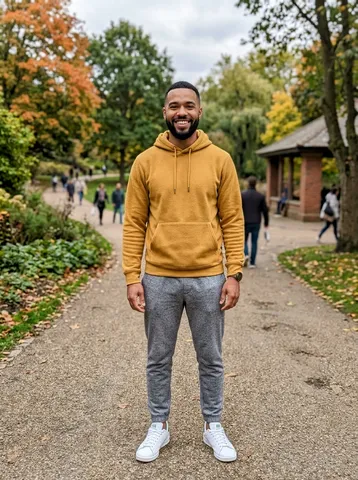
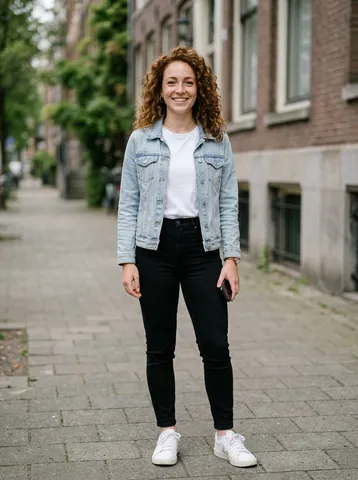
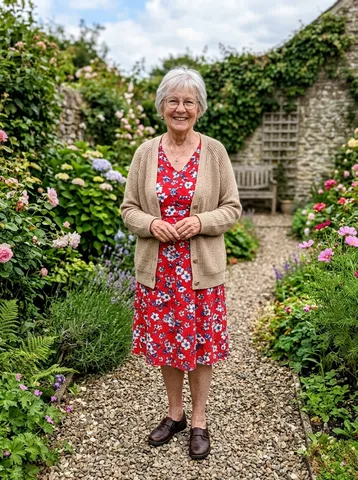
Babydoll dance AI video of three friends
Three photos, three spots: a man in a mustard hoodie dances in the centre, a woman in a denim jacket on the left and a grandmother in a red floral dress on the right, each in their own outfit. 12 seconds in 9:16, about seven minutes at 480p.
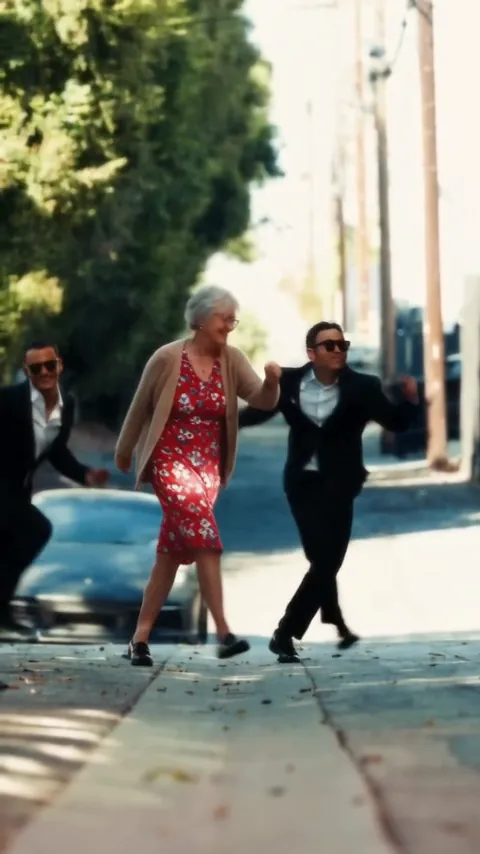
Babydoll dance AI video from one photo
One photo of a grandmother in a red floral dress takes the centre spot, and two made-up friends in black suits and sunglasses dance beside her in this Babydoll dance AI video. 12 seconds in 9:16, about four minutes at 480p.
How to Make a Babydoll Dance AI Video
- 1
Line up your trio
The centre spot of your Babydoll dance AI video needs a photo; left and right are optional. A spot you leave empty is danced by a made-up friend in a black suit and sunglasses, like in the first Babydoll clip.
- 2
Choose the format
Pick the format of your Babydoll dance AI video: 9:16 for TikTok and Reels, 1:1 for the feed, 16:9 for YouTube. Standard is 10 credits, HD 20.
- 3
Download and post
Your Babydoll dance AI video lands in My videos as an MP4, and we email you when it is ready. Add the Babydoll sound in TikTok or Instagram when you post.
Best Photos for a Babydoll Dance AI Video
Full body, please
The two-step is all footwork, so photos that show legs and shoes make the best Babydoll dance AI video.
One face per photo
Got a group photo? Tap "Cast from a group photo" in the studio and tap each face to cut it out for a spot.
Outfits come along
Everyone in a Babydoll dance AI video keeps the outfit from their own photo, so matching black suits are optional.
Adults who said yes
Only upload photos of adults who agreed to it. No children, celebrities or public figures.
What Is the Babydoll Dance Trend?
The Babydoll dance is a bouncy two-step to "Babydoll", a song by Welsh singer Jamie Miller. On August 16, 2026 he posted a TikTok of himself and two friends in black suits and sunglasses doing the steps in the street, captioned "Had to hit the babydoll two step"; that clip has passed 7 million views.
Dance tutorials, families and friend groups picked the routine up through September and October, and in late October 2026 "Babydoll" went to number one on the UK singles chart, which made Miller the first Welsh artist to top it in 15 years.
Babydoll dance AI follows the steps of that first clip and puts the people from your photos in the line, with an original two-step beat instead of the song. AI Trend Video is independent and not affiliated with Jamie Miller or his label.
Babydoll Dance AI FAQ
How many photos does a Babydoll dance AI video need?
One. A Babydoll dance AI video needs a photo for the centre spot; the left and right spots are optional and are danced by made-up friends when you leave them empty.
Can I make a Babydoll dance AI video from one group photo?
Yes. Tap "Cast from a group photo" in the studio, then tap each face to cut it out for a spot. Only the cut-out faces are uploaded.
How long is a Babydoll dance AI video?
Twelve seconds, in 9:16, 1:1 or 16:9, at 480p in Standard or 720p in HD, as an MP4 with no watermark.
Does the Babydoll dance AI video include the song?
No. It comes with an original two-step beat. Add the Babydoll sound in TikTok or Instagram when you post.
How much does a Babydoll dance AI video cost?
Every trend costs the same: 10 credits for a Standard video and 20 for HD. One-time packs start at $9.99 for 10 credits and never expire; monthly plans start at $39.99 for 50 credits a month. There is no free trial.
What if my Babydoll dance AI video looks wrong?
A failed render returns its credits automatically. If a finished video clearly did not work, report it from My videos within 7 days and we return the credits or refund the payment.
Who can see my photos and videos?
Only you. Photos and videos stay private in your account, and your photo goes to our video provider only to make the video.
Still have a question? support@aitrendvideo.io