

How to Make the Hit the Road Dude AI Video (2026)
How to Put Yourself or Your Pet in the Hit the Road Dude AI Video With One Photo and No Editing
Upload one photo to the Hit the Road Dude AI video generator, pick Person or Pet, and the tool puts your face (or your dog's face) into a 10-second clip where you lean out of a white pickup and tell whoever's fishing to hit the road. This tutorial covers where the meme comes from, what the template does, and how to make your own Hit the Road Dude AI video step by step.
What Is the Hit the Road Dude Meme?
On August 21, 2025, TikTok user @bird28thegr8 posted a video captioned "Angry grandpa kicks me out my fishing spot." In the clip, an older man in a white pickup truck pulls up to a pond and confronts the people fishing. When one of them says he thought it was state property, the man fires back: "State? Hit the road, dude. This ain't no state property." The video has passed 20 million views.
Google searches for "hit the road dude" in the US rose from late September 2026 and peaked around October 20, 2026, as people started making Hit the Road Dude AI video versions with themselves, friends, and pets in the driver's seat.
Made on AI Trend Video from one photo of a made-up woman: she asks "State?", says the line and points down the road. 10 seconds, 9:16, Standard 480p.
The Line, Second by Second
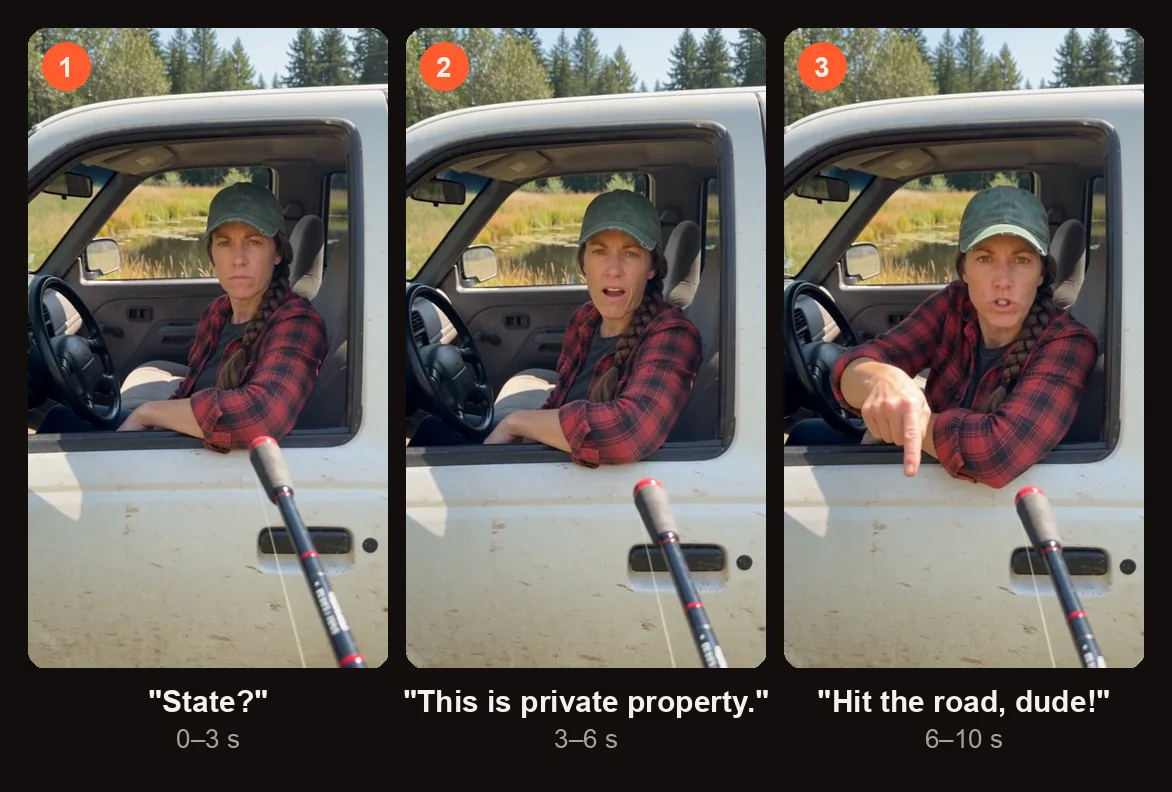
The three beats of the 10-second script, from the sample above.
The template is 10 seconds long. Here is what happens in each beat:
| Time | What happens | Line |
|---|---|---|
| 0–3 s | The driver looks at the camera, unimpressed | "State?" |
| 3–6 s | A scoff and a shake of the head | "This is private property." |
| 6–10 s | Points down the road, then a deadpan stare | "Hit the road, dude!" |
For the pet version, the animal says every line in a gruff voice while sitting upright with its front paws on the window frame.
Person or Pet: Which Hit the Road Dude AI Video to Make
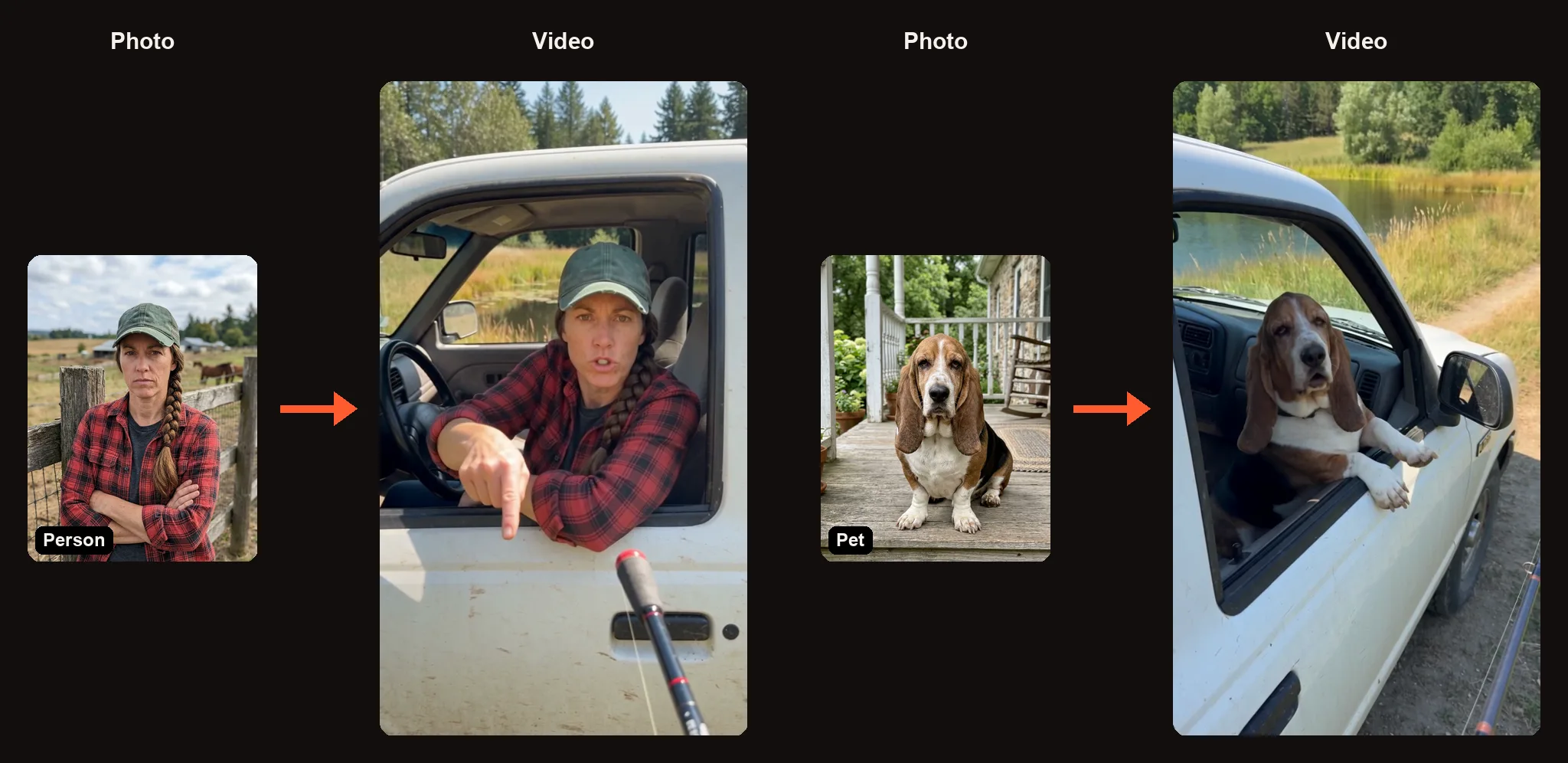
Person and Pet: one photo in, a driver at the pickup window out.
You pick one of two options before you upload anything:
| Option | Photo | Voice |
|---|---|---|
| Person | One photo of an adult (face toward camera) | AI-generated voice delivers all three lines |
| Pet | One photo of your dog or cat (eyes and nose visible) | Gruff AI voice, same lines |
Both versions place your photo into the same scene: a sunny rural afternoon by a small fishing pond, a dusty white pickup parked on the grass. The camera angle looks like handheld phone footage shot from outside the truck, as if by the person holding a fishing rod — you can see the rod tip at the edge of the frame.
The scene is generated new around your photo. Nobody from the original TikTok appears, and the line is voiced by AI, not the original voice. There is no music, just the voice, birds, and a light breeze.
How to Make a Hit the Road Dude AI Video
Open the Hit the Road Dude AI video generator in your browser. No app to install and no prompt to write. When you press Create for the first time, you sign in with Google.
Step 1: Choose Person or Pet
Pick the option that matches your photo. Person puts a human in the driver's seat. Pet puts an animal there instead, paws on the window frame, delivering the line in a gruff voice.
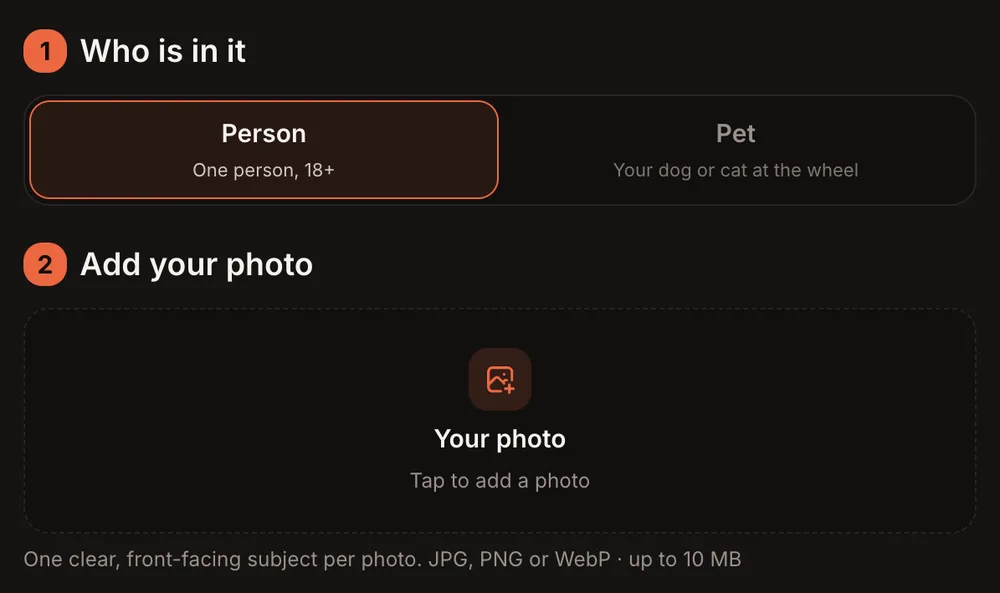
Pick Person or Pet first. Each takes one photo.
Step 2: Upload One Clear Photo
Tap the slot labeled "Tap to add a photo" and upload one photo.
For a person: face toward the camera, waist-up is enough because only the truck window shows in the final video. Use a well-lit photo where the face is easy to see.
For a pet: make sure the eyes and nose are visible. A front-facing shot works best.
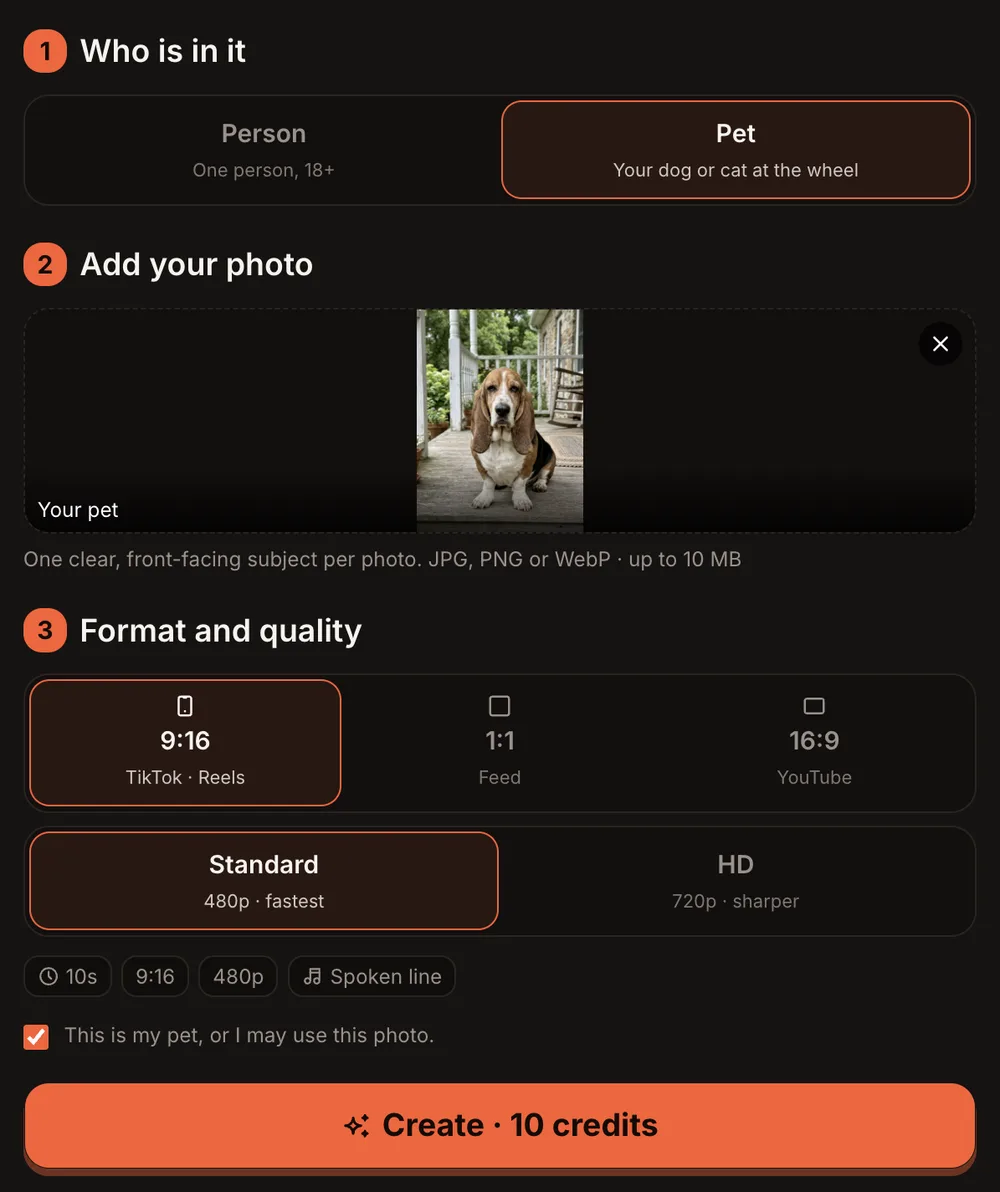
A pet photo in place: the consent line switches to the pet version and the button reads Create · 10 credits.
Step 3: Choose the Format and Quality
The Format and quality step comes right after the photo. Here are your choices for the Hit the Road Dude AI video:
| Option | What You Get |
|---|---|
| 9:16 (TikTok · Reels) | Vertical, fills a phone screen |
| 1:1 (Feed) | Square, good for Instagram feed posts |
| 16:9 (YouTube) | Widescreen, good for YouTube |
| Standard (480p) | 10 credits per video |
| HD (720p) | 20 credits per video |
| Length | 10 seconds |
| Sound | AI voice, birds, light breeze — no music |
Step 4: Press Create and Wait for the Email
Check the consent checkbox, then press the orange button. It reads "Create · 10 credits" for Standard or "Create · 20 credits" for HD.
Rendering usually takes 3 to 12 minutes. You can close the tab — the site emails you when the video is ready. If the render fails, the credits come back automatically.
Our sample clips took about four minutes at 480p for the person version (a woman in a plaid flannel shirt and a green cap) and about six minutes at 480p for the pet version (a basset hound at the wheel).
Step 5: Check the Line and Post It
Open My videos to find your finished MP4. It downloads with no watermark. Before you post, run through this quick checklist:
- The face — Does the driver look like the photo you uploaded?
- "State?" — Is the first line clear at the start of the clip?
- "This is private property" — Does the second line land with the head shake?
- The point — Does the driver point down the road on "Hit the road, dude!" and hold the deadpan stare?
If the finished video clearly did not work, press "Report a problem" in My videos within 7 days. Every report is reviewed, and you get the credits back or a refund for that video.
After the video looks right, tap "Download MP4" to save it, or press "Make another" to try a different photo.
Pet mode: a basset hound at the wheel, paws on the window frame, saying all three lines in a gruff voice.
Hit the Road Dude AI Video Ideas
The joke works best when the person (or pet) telling you to hit the road is the last one you would expect. A few ideas:
- Your grandma. Upload a photo of grandma looking stern and let her deliver the deadpan stare.
- Your sweetest friend. The nicest person you know, suddenly territorial about a fishing pond.
- The dog guarding the couch. A golden retriever or chihuahua sitting at the wheel, growling "Hit the road, dude!" in a gruff voice — same energy as when they won't let you sit down.
- Your boss. Send it to the group chat on Friday afternoon.
- Your roommate. Caption it "when I leave one dish in the sink."
Best Photos for the Hit the Road Dude AI Video
- Face the camera. The driver leans on the truck window, so a straight-on or slightly angled shot gives the best result.
- Good lighting. Natural daylight or bright indoor light. Avoid heavy shadows across the face.
- Waist-up is enough. Only the open window shows, so a head-and-shoulders or waist-up photo works fine.
- Pets: eyes and nose visible. A front-facing shot where the animal is looking at the camera. Avoid side profiles or photos where fur covers the eyes.
Common Problems and What to Try
| Problem | What to Try |
|---|---|
| Face looks wrong or blurry | Use a sharper photo with the face centered and well lit |
| Pet's mouth doesn't move naturally | Try a photo where the mouth and nose are fully visible, not tucked behind paws |
| Video is still rendering after 15 minutes | Close the tab and wait for the email — rendering can sometimes take longer than usual |
| Wrong aspect ratio for your platform | Go back and pick the right format: 9:16 for TikTok and Reels, 1:1 for feed posts, 16:9 for YouTube |
| Video finished but looks broken | Press "Report a problem" in My videos within 7 days; every report is reviewed and credits are returned or the payment is refunded |
Hit the Road Dude AI Video FAQ
Does it actually say the line?
Yes. The AI voice says all three lines — "State?", "This is private property," and "Hit the road, dude!" — timed to the head movements and the pointing gesture.
Is the original man from the TikTok in my video?
No. The scene is generated new around your photo. Nobody from the original video appears, and the voice is AI-generated, not the original voice. AI Trend Video is independent and not affiliated with any artist, label, brand, or platform named.
Can a cat or dog do it?
Yes. Pick the Pet option and upload a clear photo of your pet with eyes and nose visible. The pet sits upright at the truck window with its front paws on the frame and delivers the line in a gruff voice.
How long is the video, and how long does it take?
Each Hit the Road Dude AI video is 10 seconds long. Rendering usually takes 3 to 12 minutes. You can close the tab and the site will email you when the video is ready. The finished clip lands in My videos as an MP4 with no watermark.
How much does a Hit the Road Dude AI video cost?
Every trend costs the same: 10 credits for Standard (480p) and 20 credits for HD (720p). One-time credit packs start at $9.99 for 10 credits and never expire. Monthly plans start at $39.99 for 50 credits a month. There is no free trial.
Can I change the words?
No. The script is fixed to the three lines of the template. You choose the face and the format, but the dialogue and timing stay the same.
Make Your Own Hit the Road Dude AI Video
Pick a photo, pick Person or Pet, and let the truck do the talking. Open the Hit the Road Dude AI video generator to get started. Your photos and videos are private to your account and never shown in a public gallery. Only photos of adults (18+) who agreed to appear, or your own pets — no children, celebrities, or public figures.
If you like talking-character trends, try the Hotel Lobby AI video next, or go big with the Outstanding Tiny Desk AI video.