

How to Make an AI Diss Track Video of You and a Friend (2026)
Turn a Photo of You and a Friend Into a 12-Second AI Diss Track Video, Complete With a Beat, Rhyming Bars, and Lip Sync
The AI diss track generator on AI Trend Video gives you a video, not just lyrics. You upload one or two photos, type one sentence about what you roast the person for, and the tool writes four rhyming lines and renders a 12-second rap clip with your faces, an original beat, and lip-synced AI voices. No app to install, no prompt to write. This tutorial walks you through every step in the studio, shows you what topics work, and explains what to do if something goes wrong.
What Is an AI Diss Track?
A diss track is a song that verbally attacks someone, usually another artist. The format has deep roots in hip-hop. The Roxanne Wars, which began in 1984, are described as the first known hip-hop feud. Famous examples include Tupac Shakur's "Hit 'Em Up" (1996), Jay-Z's "Takeover" (2001), Nas's answer "Ether" (2001), and Kendrick Lamar's "Not Like Us" (released May 4, 2024).
Most AI diss track generators online give you only lyrics, or an audio file at best. The AI diss track generator on AI Trend Video goes further: it puts your face in a full video scene, writes the bars for you, generates voices that rap those bars in sync with your likeness, and lays it all over an original beat. The result is a downloadable MP4 you can post right away.
Made on AI Trend Video from two photos of made-up friends and the topic "diss track on Dev, who eats everyone's leftovers from the fridge". 12 seconds, 9:16, Standard 720p.
The 12 Seconds, Bar by Bar
Every AI diss track from this template follows the same 12-second structure. Here is what happens beat by beat.
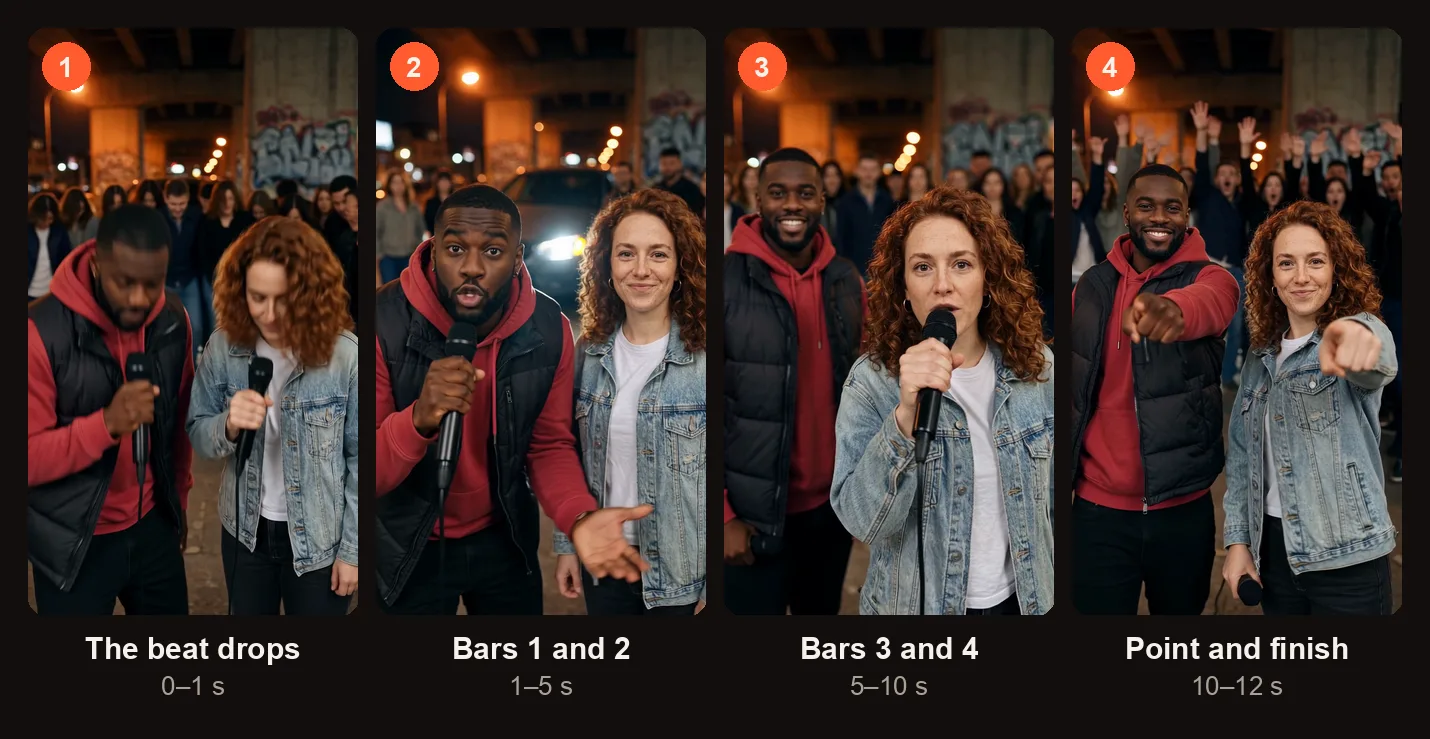
The four beats of the 12-second diss track, from the sample on this page.
| Time | What Happens |
|---|---|
| 0–1 s | The beat drops and both rappers nod. |
| 1–5 s | Rapper 1 raps lines 1 and 2 straight at the camera. |
| 5–10 s | Rapper 2 (or a made-up friend) steps up and raps lines 3 and 4 while Rapper 1 hypes them up. |
| 10–12 s | Both point at the camera as the crowd reacts. |
The scene is a rap cypher at night under a concrete overpass. Graffiti covers the pillars, orange street lights glow overhead, the headlights of a parked car cut through the dark, and a crowd of friends stands behind, out of focus. Both rappers are shown waist up, each holding a microphone, and they keep the face, hairstyle, skin tone, body shape, and outfit from their photos.
The sound is an original boom-bap hip-hop beat with the two rappers rapping the lines in AI-generated voices, lip-synced to their faces. The voices are generated from scratch and are not cloned from any artist.
From Topic to Video: What the Diss Track Generator Does
You handle the easy part. The tool handles everything else.
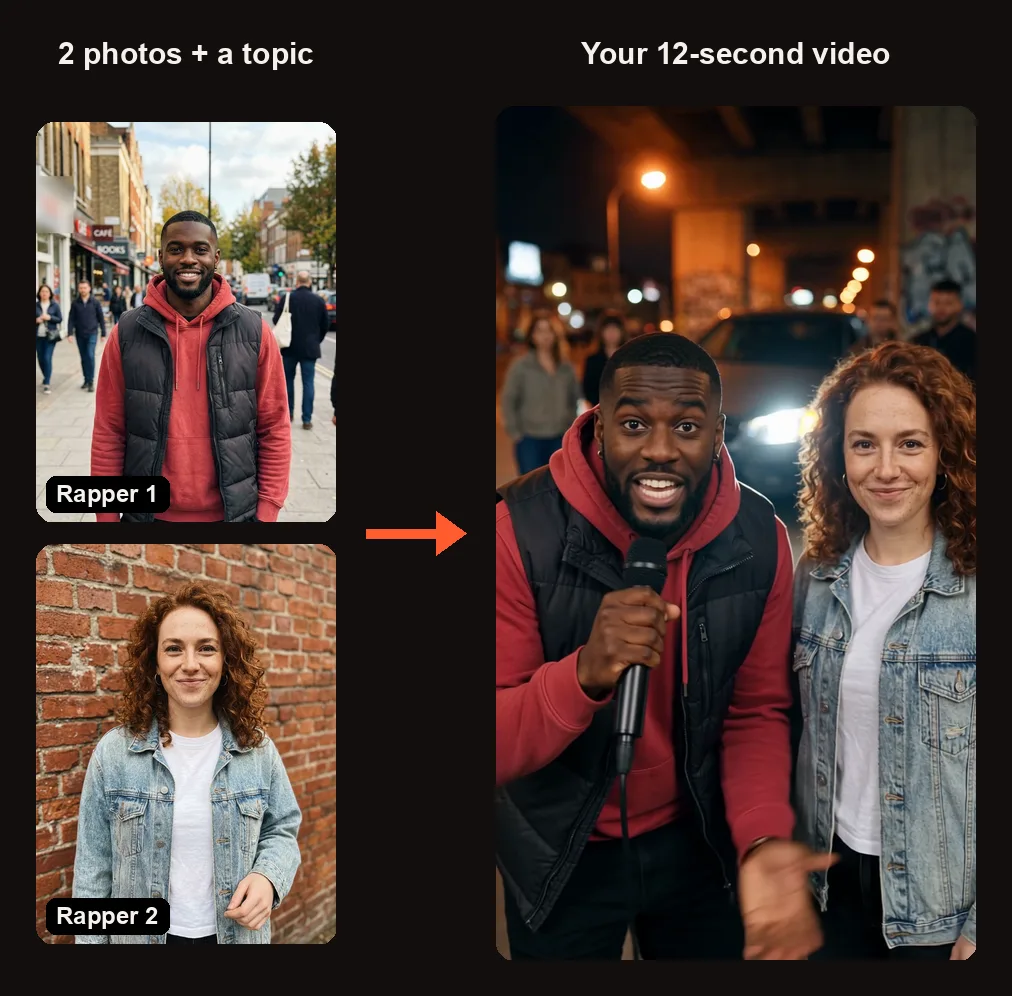
Two photos and one topic in, one rap video out. Each rapper keeps their own outfit.
| You Give | We Make |
|---|---|
| 1 or 2 photos of the rappers | A video scene with your faces, outfits, and builds |
| A name and one thing everyone roasts them for | Four rhyming lines built from that topic |
| Your format and quality choice | A 12-second MP4 with beat, rap, and lip sync |
When you press Create, an AI text model writes four rhyming bars from your topic in a few seconds, before any credits are taken. If the topic is hateful, threatening, or sexual, or if it jokes about race, religion, gender, sexuality, disability, or looks, or makes up accusations against real public figures, it is refused with a message. Nothing is charged. Change the topic and try again.
You cannot type your own lyrics yet, and you do not see the lyrics until the finished video lands in My videos.
How to Make an AI Diss Track Video
Open the AI diss track generator in your browser. Sign in with Google when you press Create. Here is each step in the studio.
Step 1: Add the Rappers
The studio shows two photo slots under "Add 1 to 2 photos."
- Rapper 1 ("Tap to add a photo") — required. This person raps lines 1 and 2.
- Rapper 2 ("Optional"). This person raps lines 3 and 4. Leave Rapper 2 empty and a made-up friend raps the second half.
If you and a friend are in the same group photo, press "Cast from a group photo" and tap both faces in the image. Only the cut-out faces are uploaded.
Use a clear, front-facing photo where the face is easy to see. The video will carry over the hairstyle, skin tone, body shape, and outfit from whatever is in the photo.
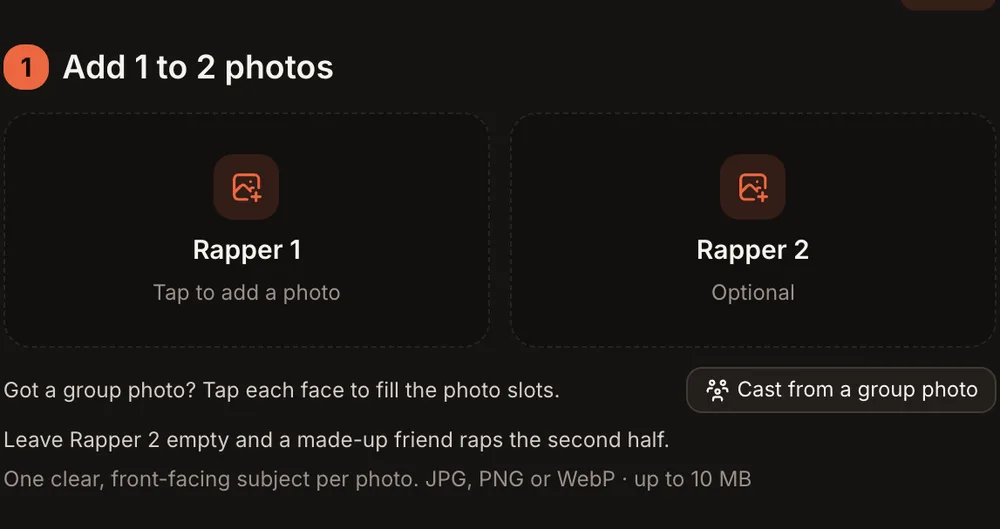
Rapper 1 needs a photo; leave Rapper 2 empty and a made-up friend raps the second half.
Step 2: Write Who the Diss Is For
Below the photos is a text box labeled "Who is the diss for?" Type the target's name and the one thing everyone roasts them for. The box holds up to 120 characters, and a counter shows how many you have left.
Not sure what to write? Four example chips fill the box in one tap:
- "Leftover thief"
- "Always late"
- "Left on read"
- "Last place"
Under the box, a note reads: "We write four rhyming lines from it. Friendly roasts only: no hate, threats or sexual content."
Until you write a topic, the orange button reads "Write the topic." Once photos are added and a topic is filled in, the button updates to "Create · 10 credits" (or "Create · 20 credits" for HD).
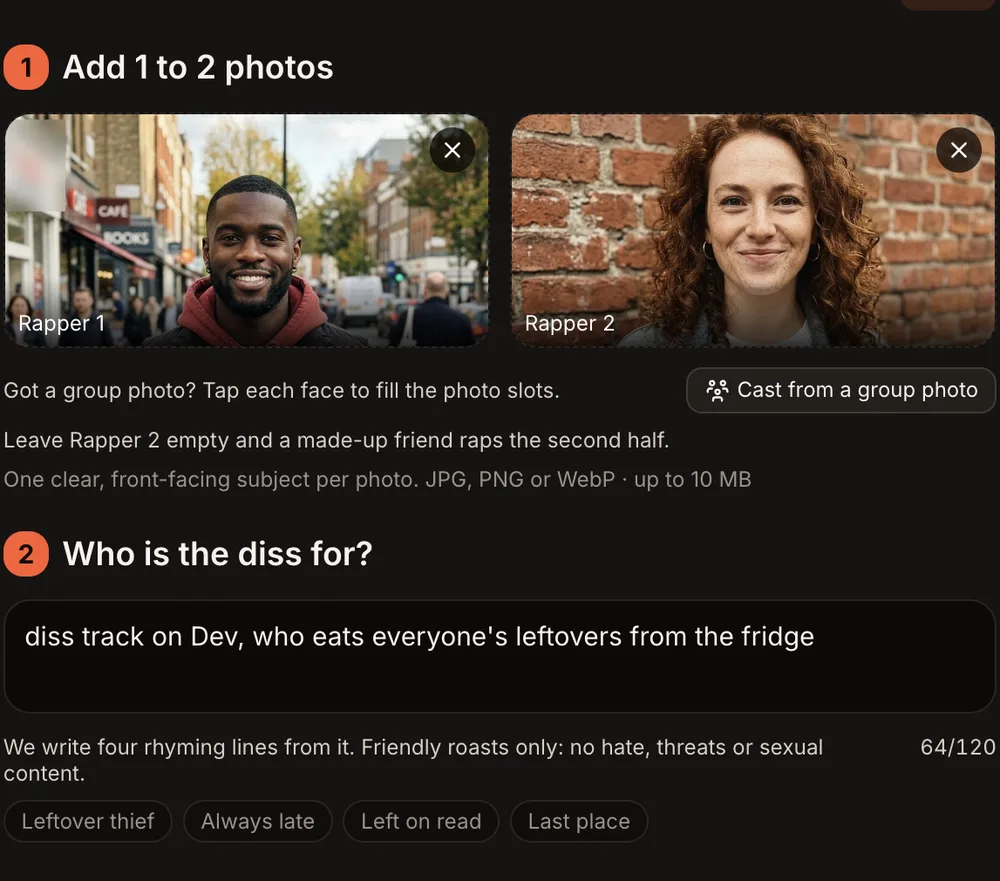
Both rappers added and the topic written: four example chips fill it in one tap.
Step 3: Choose the Format and Quality
Under "Format and quality," pick the aspect ratio and resolution.
| Option | What You Get |
|---|---|
| 9:16 (TikTok · Reels) | Vertical video for TikTok and Instagram Reels |
| 1:1 (Feed) | Square video for Instagram feed posts |
| 16:9 (YouTube) | Widescreen video for YouTube |
| Standard | 720p · sharp — 10 credits |
| HD | 1080p · sharpest — 20 credits |
| Length | 12 seconds |
| Sound | Original boom-bap beat, AI-generated voices, lip-synced |
On this trend, Standard is 720p and HD is 1080p, sharper than most other trends on the site.
Step 4: Press Create and Wait for the Email
Tick the consent checkbox, then press the orange "Create · 10 credits" button (or "Create · 20 credits" for HD).
The AI text model writes four rhyming lines from your topic in a few seconds, then the video starts rendering. Rendering usually takes 3 to 12 minutes. You can close the tab; an email arrives when the video is ready.
If the render fails, the credits come back automatically.
Step 5: Check the Bars and Post It
Open My videos and watch the clip. Run through this quick checklist before you post:
- The faces — Do both rappers look like the photos you uploaded?
- The words — Listen to the four lines. Do they match the topic you typed?
- The lip sync — Are the mouths moving in time with the words?
- The ending — Both rappers should point at the camera while the crowd reacts.
If something clearly did not work, press "Report a problem" in My videos within 7 days. Every report is reviewed, and you will either get the credits back or a refund of the payment for that video.
When the video looks good, press "Download MP4." The file has no watermark. Post it to TikTok, Reels, or YouTube directly.
AI Diss Track Topics That Land
The best AI diss track topics are specific, personal to your friend group, and short enough to fit in 120 characters. Here are six examples:
- "Diss track on Marcus, who has never once taken out the trash"
- "Diss track on Priya, who shows up 20 minutes late to everything"
- "Diss track on Tyler, who leaves every group chat message on read"
- "Diss track on Jordan, whose fantasy football team finished last again"
- "Diss track on Aisha, who steals fries off your plate every single time"
- "Diss track on Kevin, who reply-alls to company-wide emails about lunch"
Pick the one thing the whole friend group already jokes about. The more specific the detail, the funnier the bars.
How to Keep It a Roast, Not a Fight
An AI diss track lands when everyone laughs, including the target. A few ground rules:
- Make sure your friends are in on the joke. Send the video to them first before you post it publicly. If someone does not think it is funny, do not post it.
- Stick to jokes, not accusations. Roasting someone for eating leftovers is funny. Making up something that could hurt their reputation is not. The tool refuses made-up accusations against real public figures for this reason.
- Get permission for faces. Only use photos of adults (18+) who agreed to appear. No children, celebrities, or public figures.
- Keep real beefs out of it. If there is actual tension between two people, an AI diss track is not the way to handle it.
Common Problems and What to Try
| Problem | What to Try |
|---|---|
| Topic refused | The topic may contain hate, threats, sexual content, jokes about race, religion, gender, sexuality, disability, or looks, or accusations against a public figure. Rewrite it as a lighthearted roast about an everyday habit. |
| A line sounds off | The AI writes the bars, and you cannot edit them yet. Try a slightly different topic wording and create a new video. |
| A face looks wrong | Use a clearer, front-facing photo with good lighting. Avoid sunglasses, heavy filters, or side angles. |
| Wrong person raps first | Rapper 1 always raps lines 1 and 2. Swap which photo goes in which slot and create again. |
| Video clearly did not work | Press "Report a problem" in My videos within 7 days. Every report is reviewed, and credits are returned or the payment is refunded. |
AI Diss Track FAQ
Is it just lyrics?
No. Most diss track generators online give you only text or an audio file. This tool produces a 12-second video with your face, an original beat, AI-generated voices, and lip sync, delivered as an MP4 with no watermark.
Can I write my own lyrics?
Not yet. You write the topic (a name and one roast-worthy detail), and the AI writes four rhyming lines from it. You do not see the lyrics until the video is finished.
Do I need two photos?
No. Rapper 1 is required, but Rapper 2 is optional. If you leave the second slot empty, a made-up friend raps the second half of the track.
What topics are refused?
Topics that are hateful, threatening, or sexual. Jokes about race, religion, gender, sexuality, disability, or looks. Made-up accusations against real public figures. The tool shows a message explaining the refusal, and nothing is charged. Change the topic and try again.
Can it copy a famous rapper's voice or song?
No. The voices are AI-generated from scratch. They are not cloned from any artist or existing recording. The beat is original. AI Trend Video is independent and not affiliated with any artist, label, brand, or platform.
How much does it cost?
Every AI diss track costs 10 credits for Standard (720p) or 20 credits for HD (1080p). There is no free trial. One-time credit packs start at $9.99 for 10 credits and never expire. Monthly plans start at $39.99 for 50 credits a month. A failed render returns credits automatically. Photos and videos are private to your account and never shown in a public gallery.
Make Your Own AI Diss Track
Pick a friend, pick their most roastable habit, and let the diss track generator build the bars and the video for you. Open the AI diss track generator and have a clip in your camera roll in a few minutes.
If you want another two-person rap video, try the hotel lobby rap trend. For a different kind of clip with spoken lines, check out the Cardo dinner trend.