

How to Make the Bicep Heart AI Video (2026)
Turn Your Photo Into a Bicep Heart AI Video — One Photo, One Flex, and the Hand-on-Muscle Heart Pose Ready for TikTok or Reels
The Bicep Heart AI video generator takes a single photo of a person or a pet and turns it into an 8-second clip where the subject flexes one arm, curls the other hand against the bicep, and forms a heart. No app to install, no prompt to write — just a browser. This tutorial walks through every step, from choosing Person or Pet to downloading the finished MP4.
What Is the Bicep Heart Trend?
The bicep heart is a TikTok trend from late October 2026. You flex one arm and curl the other hand against the inside of the bicep so the hand and the curve of the muscle make a heart shape. It turns a gym flex into a small message of affection.
The trend spread fast. On October 30, @hunnybakes posted his take, which reached 1.7 million views by November 4. On October 31, @mckennacrisp posted hers, hitting 4.3 million views. And on November 1, @kavithageorge posted hers, pulling 4.8 million views and 1.1 million likes by November 4. Google searches for "bicep heart trend" in the US took off in the same days.
You don't need to film anything yourself. The Bicep Heart AI video puts the person or pet from your photo into the pose automatically.
Made on AI Trend Video from one photo of a made-up man: sleeve up, flex, the hand curled into a heart and a wink. 8 seconds, 9:16, Standard 720p.
The Bicep Heart, Second by Second
The clip is 8 seconds long. Here is what happens in each beat.
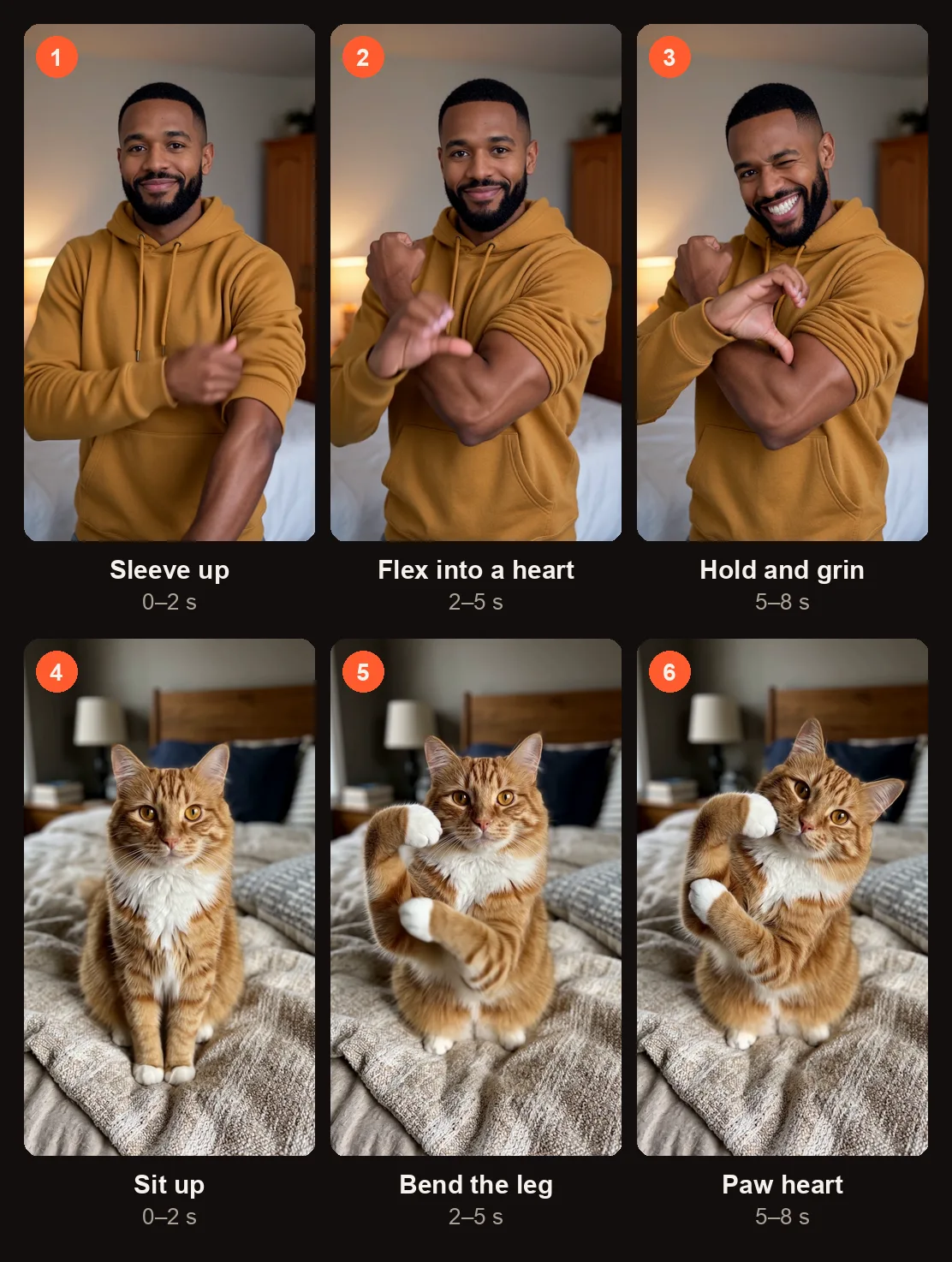
The three beats of the 8-second clip, for Person (top) and Pet (bottom), from the two samples on this page.
| Time | What happens |
|---|---|
| 0–2 s | A shy smile. One sleeve pushed up above the elbow. |
| 2–5 s | That arm flexes and the other hand curls against the inside of the bicep, forming a heart shape held toward the camera. |
| 5–8 s | The heart held steady, a head tilt, and a playful grin. |
For pets, the timing is the same: the animal sits up, bends one front leg at the elbow like a flexed bicep, tucks the other paw against the elbow to outline a heart, holds the pose, tilts its head, and looks pleased with itself.
Person or Pet: What the Bicep Heart AI Video Keeps From Your Photo
The generator matches the look from your photo closely. Here is what each option preserves.
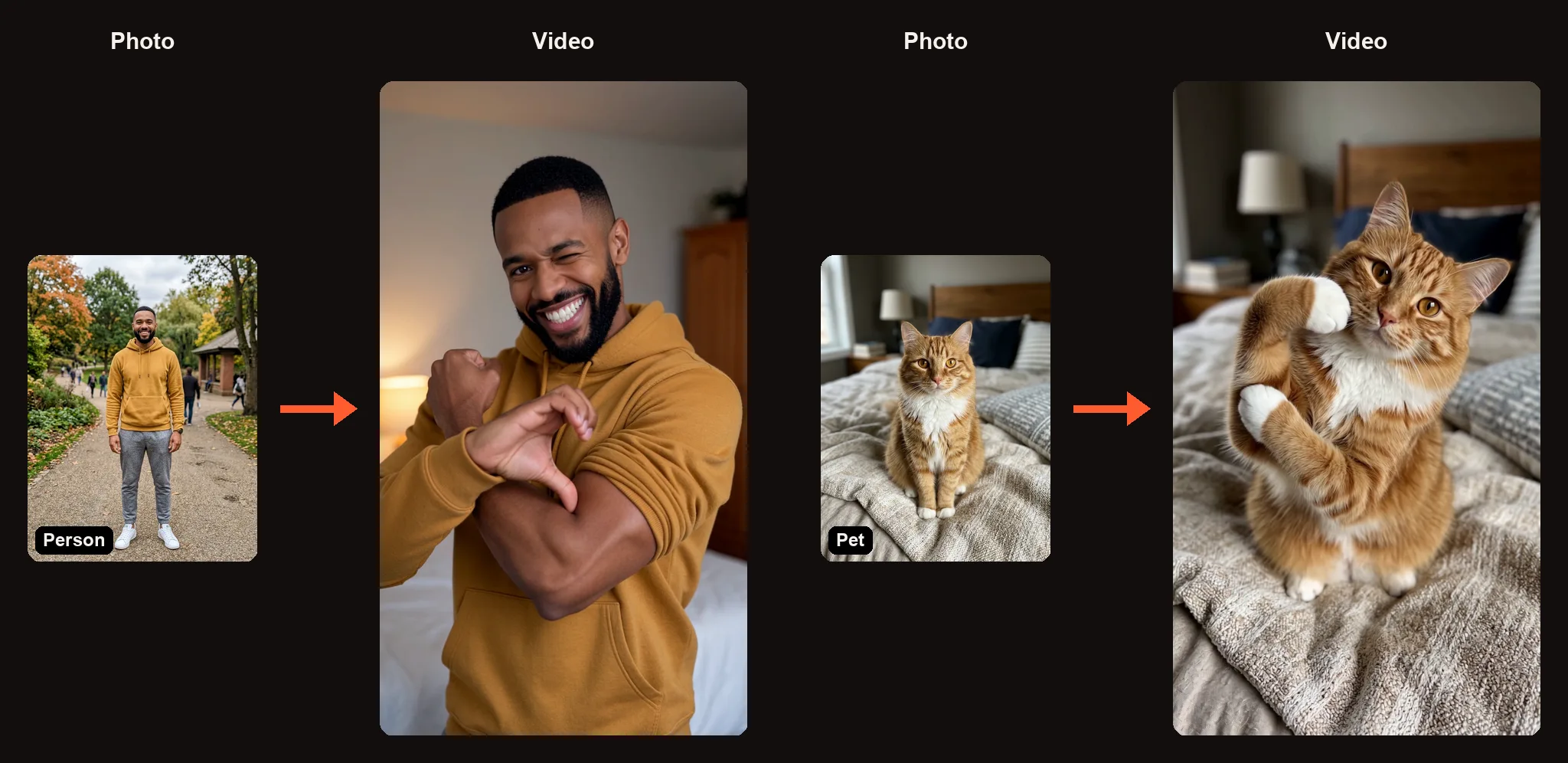
Person and Pet: one photo in, one heart out.
| Option | Photo | What it does |
|---|---|---|
| Person | One waist-up photo | Keeps the face, hairstyle, skin tone, body shape, and the exact outfit. Places the person in a cozy, softly lit bedroom with vertical phone framing. |
| Pet | One photo of the pet sitting up | Keeps the face, fur colour, and markings. Places the pet on a bed. |
The setting is the same for every Bicep Heart AI video — a warm bedroom scene — so the focus stays on the subject and the heart pose. Long sleeves are fine; the video will push the sleeve up on the flexing arm.
How to Make a Bicep Heart AI Video
Open the Bicep Heart AI video generator in any browser. When you press the Create button, you will sign in with Google if you are not already signed in.
Step 1: Choose Person or Pet
The studio shows two options at the top: Person and Pet. Pick the one that matches your photo. Each option uses one photo slot.
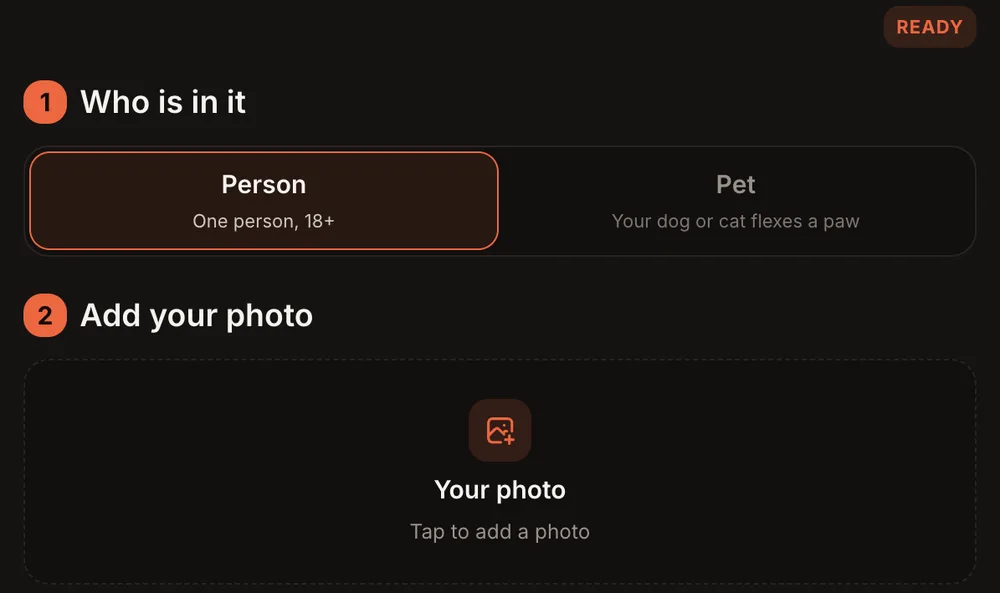
Pick Person or Pet first. Each takes one photo.
Step 2: Upload One Clear Photo
Tap the slot that reads "Tap to add a photo" and upload your image.
For a person, use a waist-up photo with both arms in view. The face should point toward the camera. Long sleeves work — the video handles the sleeve push. For a pet, use a photo of the animal sitting up and looking at the camera.
Avoid group photos, heavy filters, or photos where the arms are hidden behind other people or objects. One clear subject gives the best result.
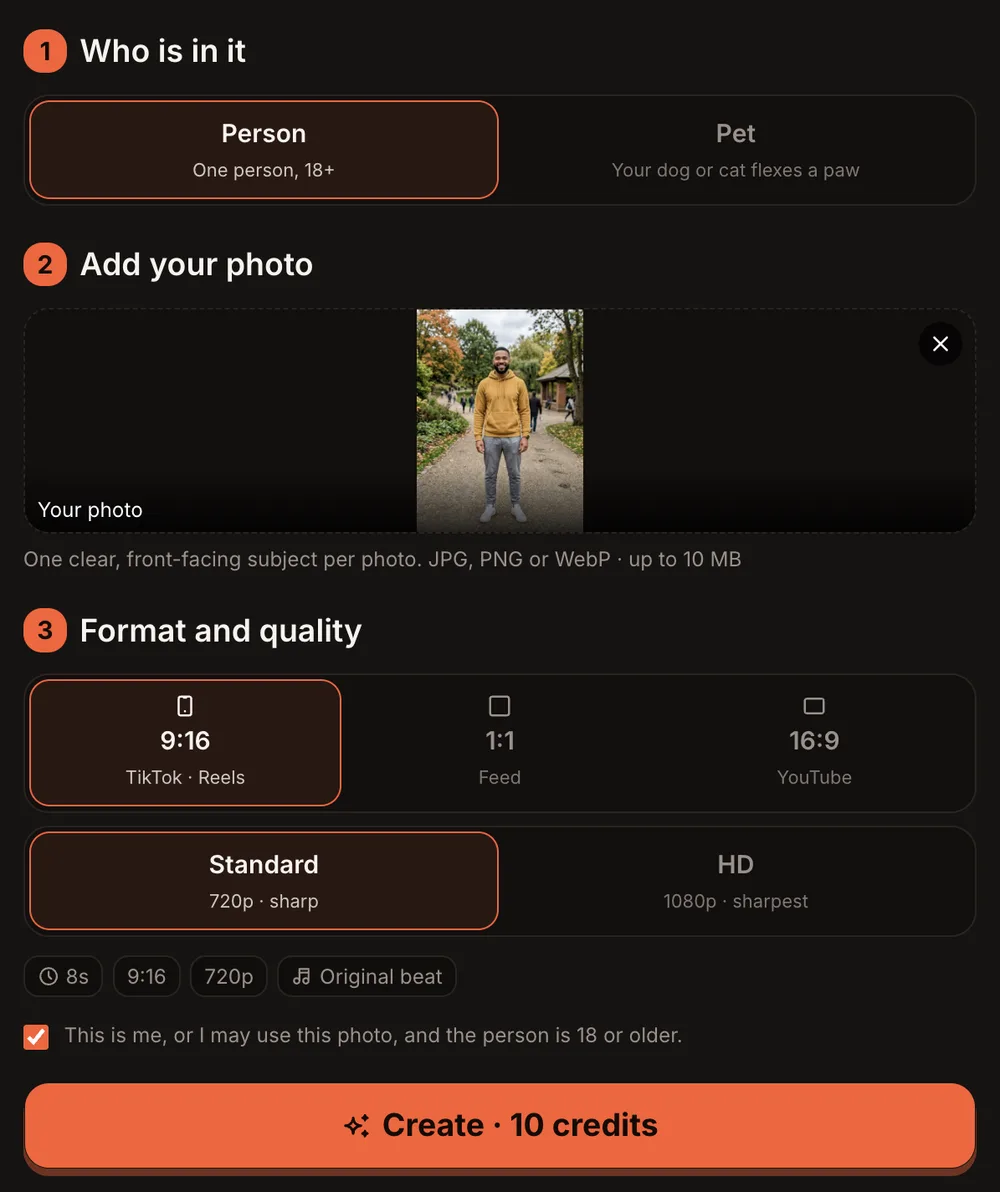
Standard is 720p and HD is 1080p on this trend; the button reads Create · 10 credits.
Step 3: Choose the Format and Quality
Below the photo slot you will see "Format and quality." Pick the aspect ratio and resolution.
| Option | What you get |
|---|---|
| 9:16 (TikTok · Reels) | Vertical — fits TikTok, Instagram Reels, and YouTube Shorts |
| 1:1 (Feed) | Square — fits Instagram feed posts and Facebook |
| 16:9 (YouTube) | Horizontal — fits YouTube and presentations |
| Standard | 720p · sharp — 10 credits |
| HD | 1080p · sharpest — 20 credits |
| Length | 8 seconds |
| Sound | A light, warm original beat (not the TikTok trend sound) |
On this trend, Standard is 720p and HD is 1080p, which is sharper than most other trends on the site. The Standard option label reads "720p · sharp" and the HD label reads "1080p · sharpest."
Step 4: Press Create and Wait for the Email
Check the consent checkbox, then press the orange button. It reads "Create · 10 credits" for Standard or "Create · 20 credits" for HD.
Rendering usually takes 3 to 12 minutes. You can close the tab — we email you when the video is ready. If a render fails, the credits come back to your account automatically.
Both of our sample clips — the man in the mustard hoodie and the orange tabby cat — rendered in about two minutes each at 720p.
Step 5: Check the Heart and Post It
Your finished Bicep Heart AI video lands in My videos as an MP4 with no watermark. Press "Download MP4" to save it, or press "Make another" to start a new one.
Before you post, check these details:
- The face — Does it look like the person or pet in the photo?
- The heart — Do the hand and bicep (or the bent leg and the paw) form a clear heart shape?
- The hands or paws — Are the fingers or paw pads positioned naturally?
- The outfit — Does it match the clothing or fur from the photo?
If something clearly did not work, press "Report a problem" in My videos within 7 days. We review every report and either return the credits or refund the payment for that video.
One more thing: the clip uses a light, warm original beat, not the TikTok trend sound. Add the bicep heart sound yourself in TikTok's editor when you post.
Pet mode: an orange tabby bends one front leg like a flexed bicep and tucks the other paw against the elbow. 8 seconds, Standard 720p.
Bicep Heart AI Video Ideas
- A thank-you to a friend. Upload their photo (with permission) and send the clip in a message. The heart pose says it without words.
- A gym buddy. Someone you train with will get the joke — a flex that is really affection.
- A crush. Subtle enough to be playful, direct enough to get the point across.
- Your pet. An orange tabby forming a heart with its paws is hard to scroll past.
- A reply to a comment. Someone leaves a kind comment on your post — reply with a Bicep Heart AI video of yourself instead of text.
Best Photos for the Bicep Heart AI Video
- Waist-up framing. The generator needs to see the face, both arms, and the upper body.
- Face toward the camera. A straight-on or slight-angle shot works best. Heavy side profiles can make the face less recognizable.
- Both arms visible. If one arm is behind the back or cropped out, the flex-and-curl motion may not land right.
- Good lighting on the face and arms. Natural light or even indoor light. Dark or heavily shadowed photos make it harder to keep skin tone accurate.
- For pets, sitting up. A photo of a dog or cat sitting upright and looking at the camera gives the generator the clearest starting point for the paw pose.
Common Problems and What to Try
| Problem | What to try |
|---|---|
| The heart shape is not clear | Use a photo where both arms are fully visible and not crossed. Try again with a slightly different photo angle. |
| The face does not look right | Upload a well-lit photo with the face pointing toward the camera. Avoid sunglasses or hats that cover the forehead. |
| The pet does not hold the pose | Use a photo of the pet sitting upright. Lying-down or mid-action shots make the pose harder to generate. |
| The outfit changed | Make sure the clothing is clearly visible in the photo, not hidden by another person or object. |
| The video clearly did not work at all | Press "Report a problem" in My videos within 7 days. We review every report and either return the credits or refund the payment for that video. |
Bicep Heart AI Video FAQ
Can a pet actually do the bicep heart?
In the generated video, yes. The pet version bends one front leg at the elbow like a flexed bicep and tucks the other paw against it to outline a heart. It is not realistic anatomy — it is a fun interpretation of the trend.
Why is the Standard option 720p instead of 480p?
This trend uses 720p for Standard and 1080p for HD. Most other trends on AI Trend Video are 480p for Standard and 720p for HD. The higher baseline resolution here helps keep the hand and bicep details sharp.
How long is the video, and how long does it take?
Each Bicep Heart AI video is 8 seconds long. Rendering usually takes 3 to 12 minutes. You can close the tab and we will email you when it is done. Both of our sample clips finished in about two minutes at 720p.
Does the video include the TikTok trend sound?
No. The clip comes with a light, warm original beat. Add the bicep heart trend sound yourself in TikTok's editor before you post.
How much does a Bicep Heart AI video cost?
10 credits for Standard (720p) and 20 credits for HD (1080p). One-time credit packs start at $9.99 for 10 credits and never expire. Monthly plans start at $39.99 for 50 credits a month. There is no free trial.
Can two people do the bicep heart together in one video?
Not right now. Each Bicep Heart AI video uses one photo of one person or one pet. To feature two people, make two separate videos and stitch them together in your editing app.
Make Your Own Bicep Heart AI Video
The trend is simple — one flex, one curl, one heart — and the Bicep Heart AI video generator handles the motion for you from a single photo. Upload a clear, waist-up shot (or a pet sitting up), pick your format and quality, and download the MP4 when the email arrives.
Looking for more? The Hit the Road Dude AI video also works with a pet, and the Babydoll Dance AI video fits up to three friends.
Photos and videos are private to your account and never shown in a public gallery. Only use photos of adults (18+) who agreed to appear, or your own pets. No children, celebrities, or public figures. AI Trend Video is independent and not affiliated with any artist, label, brand, or platform named in this post.