

How to Make the Chipmunks Dance AI Video (2026)
Turn Any Photo Into a Chipmunks Dance AI Video With Up to Three Friends Bouncing, Spinning and Rushing the Camera on a Backyard Tennis Court
The Chipmunks Dance AI video generator puts the people from your photos into the trio dance that blew up on TikTok in October 2026. Upload one to three photos, pick your format and quality, and get a 12-second MP4 of your crew doing the full routine — spins, hair flips and all — on a green tennis court at sunset. No app to install, no prompt to write.
This tutorial covers where the trend came from, what the AI keeps from your photos, and every step from uploading to posting.
What Is the Chipmunks Dance Trend?
The chipmunks dance is a TikTok trio dance from October 2026. Three friends or sisters stand in a row, spin, twirl a finger, flip their hair and take turns stepping to the front, all set to a sped-up, high-pitched edit of Dead or Alive's 1984 hit "You Spin Me Round (Like a Record)" that sounds like the cartoon chipmunks.
It started as a Halloween idea. On October 15, 2026, the three sisters of @wenersisters danced it dressed as the three girl chipmunks from the cartoon films, reaching 4.9 million views by November 4. On October 27, the sisters of @bopieandjo danced it in sweats on a backyard tennis court at sunset — 8.3 million views and 1.4 million likes by November 4. On October 29, a costume trio by @kimberlykimpena reached 7.6 million views. Our template follows the tennis court version.
Made on AI Trend Video from three photos of made-up friends: pink hoodie in the centre, lavender on the left, mint on the right. 12 seconds, 9:16, Standard 720p.
The Chipmunks Dance, Second by Second
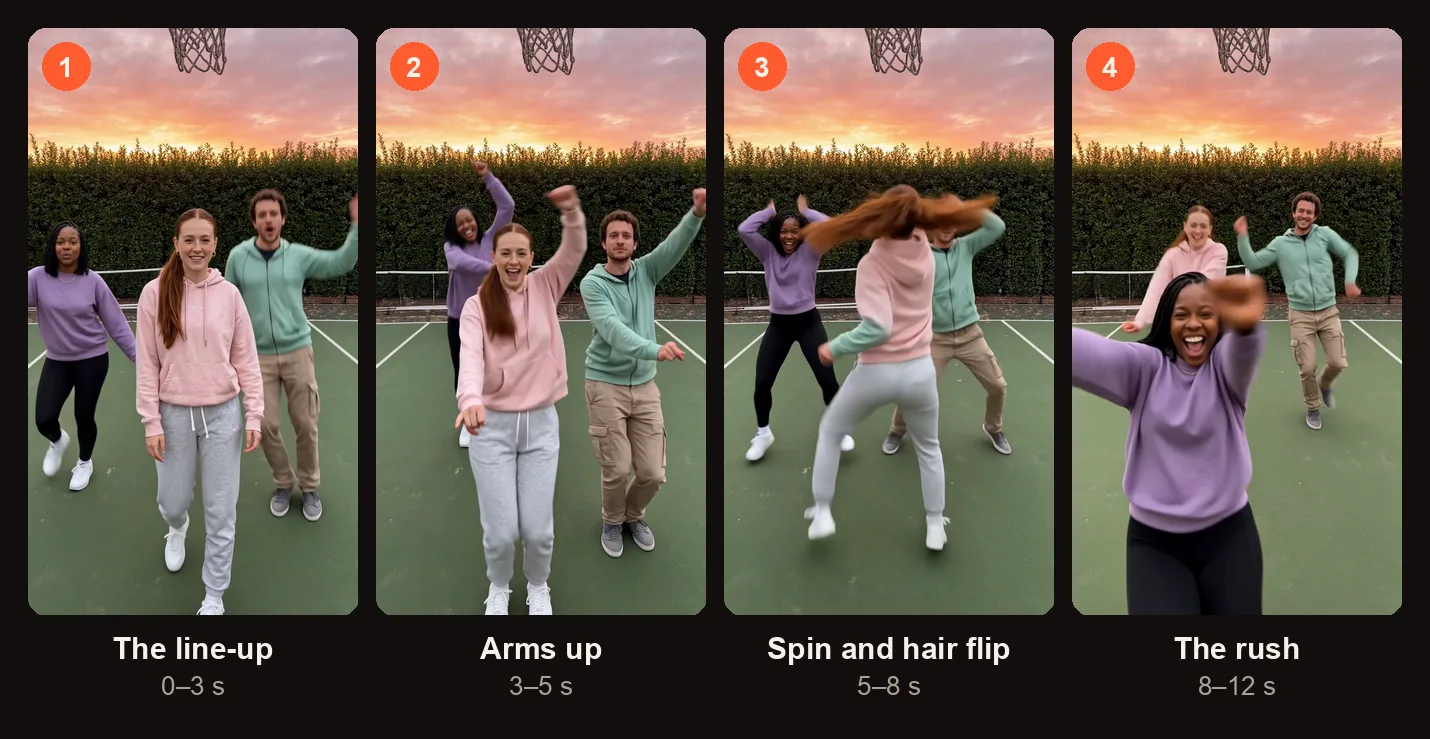
The four beats of the 12-second routine, from the sample on this page.
| Time | What happens |
|---|---|
| 0–3 s | The line-up: three in a row with the centre dancer a step in front, bouncing to the beat. |
| 3–5 s | Arms up together. |
| 5–8 s | Spins and hair flips as the line swaps places. |
| 8–12 s | One by one, each dancer rushes right up to the phone, grinning into the lens. |
The whole routine runs twelve seconds. It looks simple, but the timing of the swaps and the camera rush is what makes the Chipmunks Dance AI video fun to watch on repeat.
What the Chipmunks Dance AI Video Keeps From Your Photos
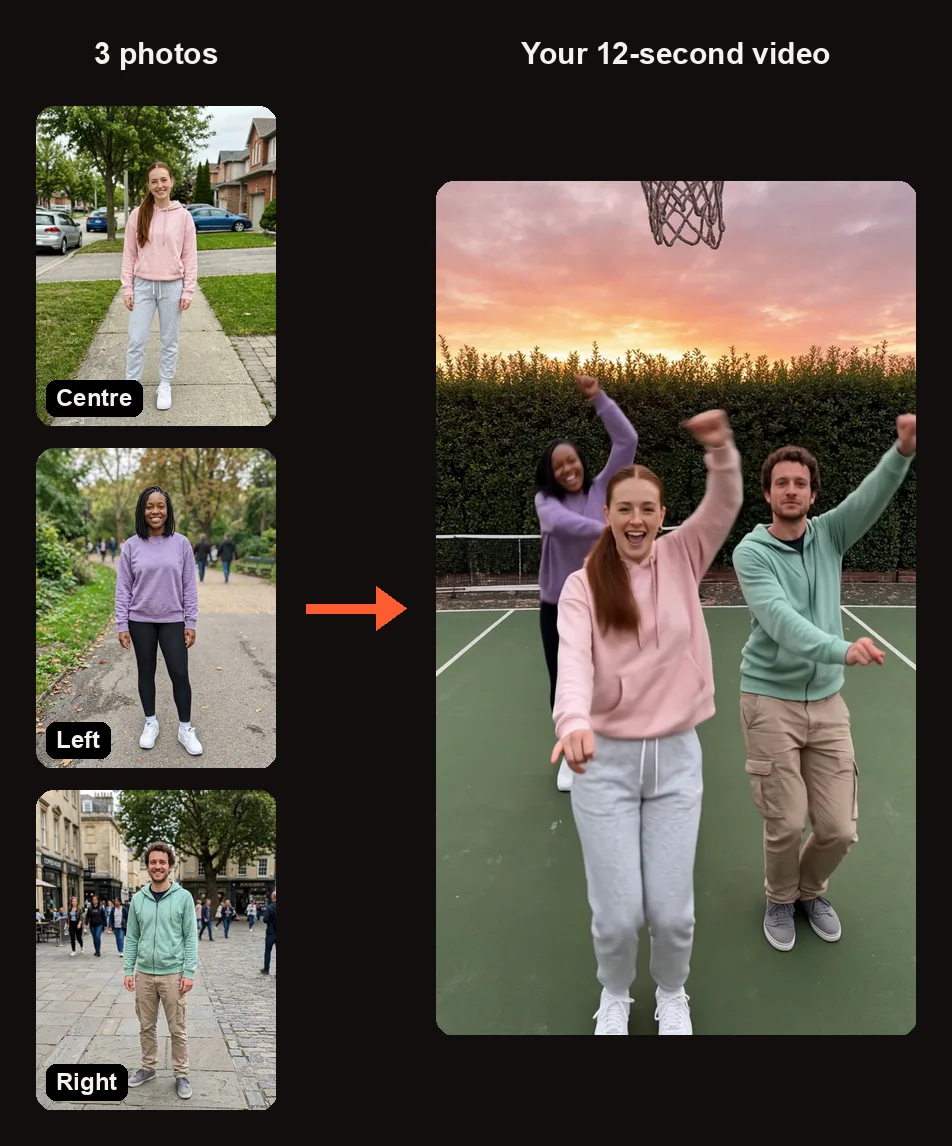
Three photos in, one trio on the tennis court. Each person keeps their own outfit.
Every person in the video keeps the face, hairstyle, skin tone, body shape and exact outfit from their own photo. Nobody is drawn as a chipmunk — if you want the Halloween look, wear the ears or the costume in the photo before you upload it.
| Spot | Photo | What happens |
|---|---|---|
| Centre | Required | This dancer starts a step in front and leads the routine. |
| Left | Optional | Dances on the left side of the line-up. If left empty, a made-up friend in a pastel lavender or mint green sweatsuit fills the spot. |
| Right | Optional | Dances on the right side of the line-up. If left empty, a made-up friend in a pastel lavender or mint green sweatsuit fills the spot. |
You can make a Chipmunks Dance AI video with just one photo. The centre spot needs a real person; the other two can be made-up friends that the tool creates for you.
How to Make a Chipmunks Dance AI Video
Open the Chipmunks Dance AI video generator in your browser on any device. When you press Create, you sign in with Google — no app download needed.
Step 1: Line Up Your Trio
The studio shows three photo slots labeled "Centre," "Left" and "Right." The Centre slot says "Tap to add a photo" and is required; Left and Right say "Optional." Under the slots you will see: "Empty spots are danced by made-up friends."
If you have a group photo of all three people, tap "Cast from a group photo." Tap each face in the photo to fill the slots. Only the cut-out faces are uploaded.
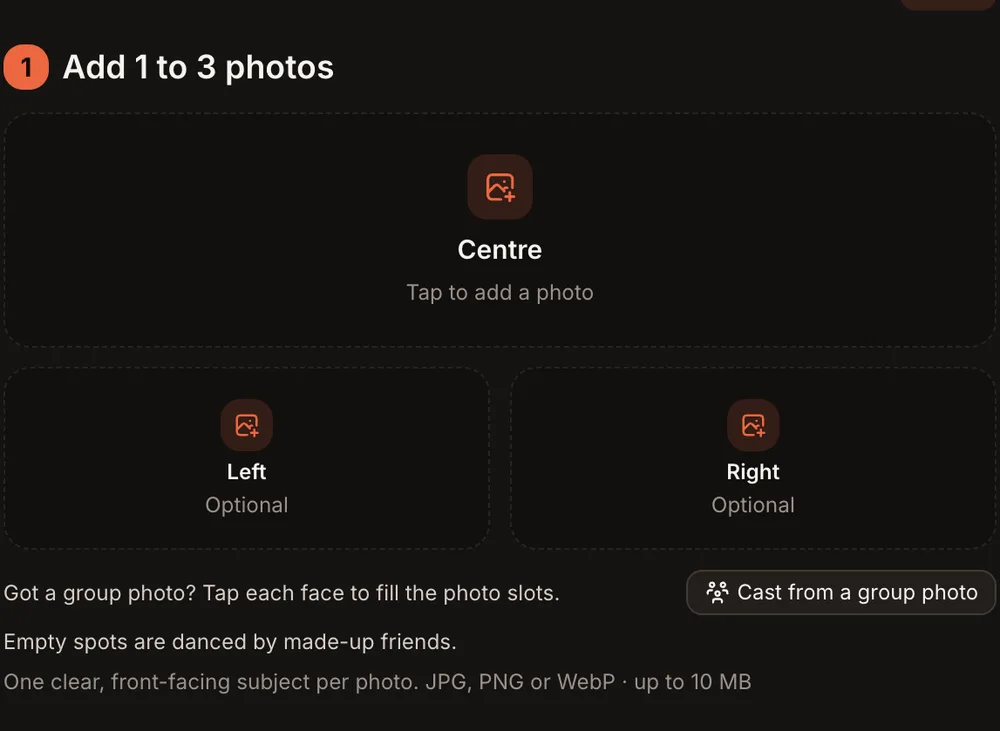
Centre needs a photo; Left and Right are optional.
Step 2: Add Clear, Full-Body Photos
For the best result, use one photo per person. Each photo should show one adult from head to toe, face turned toward the camera, in good lighting. The outfit in the photo is the outfit in the video, so pick something you want to see in the dance.
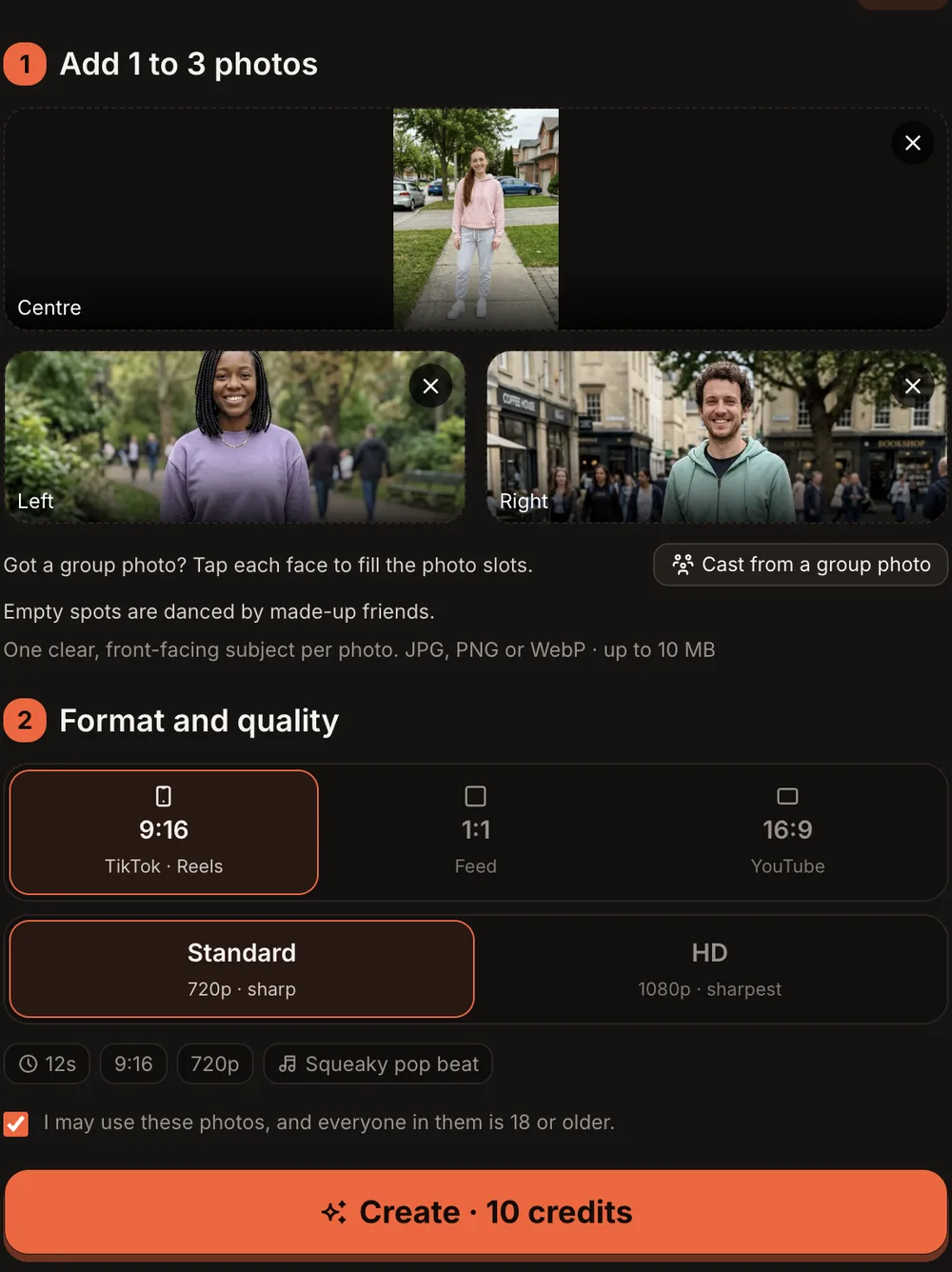
All three spots filled, 9:16 and Standard (720p): the button reads Create · 10 credits.
Step 3: Choose the Format and Quality
Under "Format and quality," pick the aspect ratio for where you plan to post, then pick Standard or HD.
| Option | What you get |
|---|---|
| 9:16 (TikTok · Reels) | Vertical video for TikTok or Instagram Reels. |
| 1:1 (Feed) | Square video for Instagram feed posts. |
| 16:9 (YouTube) | Widescreen video for YouTube. |
| Standard | 720p · sharp. 10 credits. |
| HD | 1080p · sharpest. 20 credits. |
| Length | 12 seconds. |
| Sound | An original squeaky, sped-up pop beat with high-pitched vocal chops — not the Dead or Alive song. |
Once your photos are in, the orange button at the bottom reads "Create · 10 credits" for Standard or "Create · 20 credits" for HD. Check the consent box and press it.
Step 4: Press Create and Wait for the Email
Rendering usually takes 3 to 12 minutes. You can close the tab; the tool emails you when the video is ready. Your finished Chipmunks Dance AI video lands in My videos as an MP4 with no watermark.
If a render fails, the credits come back automatically.
Step 5: Check the Dance and Post It
Open My videos, play the clip and check these things:
- The faces: Does each dancer look like the person in the photo?
- The spots: Does each person start in the spot you gave them?
- The outfits: Does each dancer wear the outfit from their photo?
- The rush: Does the line take turns rushing up to the phone at the end?
If something clearly did not work, press "Report a problem" in My videos within 7 days. Every report is reviewed, and credits are returned or the payment for that video is refunded.
When you are ready to post, add the sped-up "You Spin Me Round" sound in TikTok's editor before publishing. The video's built-in audio is an original beat, not the song.
Chipmunks Dance AI Video Ideas
- Sisters or roommates: The classic trio. Everyone uploads their own photo and you settle the Centre spot argument over text.
- Halloween costume trio: Wear the chipmunk ears or the full costume in your photos. The video keeps whatever you are wearing.
- Group chat dare: Drop the link in a group chat and let three friends each send a photo. Cast them from one group shot or upload separately.
- Solo with two made-up friends: Upload just your photo to the Centre slot. The tool fills Left and Right with made-up dancers in pastel sweatsuits.
- Throwback with old photos: Use older photos of the three of you as adults — a road trip, a vacation, a wedding — and watch those outfits show up in the dance.
Best Photos for the Chipmunks Dance AI Video
- Full body, head to toe. The routine is a full-body dance, so cropped headshots cut off the footwork and outfit.
- Face toward the camera. A clear, front-facing shot gives the AI the most to work with for the close-up camera rush.
- Good, even lighting. Outdoor daylight or well-lit indoor shots work best. Avoid heavy shadows across the face.
- One person per photo. If you have a group shot, use the "Cast from a group photo" button instead of cropping manually.
- Wear the outfit you want in the video. The dancer wears exactly what the person wears in the photo. If you want chipmunk ears, put them on before you take the picture.
Common Problems and What to Try
| Problem | What to try |
|---|---|
| A face does not look right. | Upload a clearer photo where the face is well-lit and turned toward the camera. Avoid sunglasses or anything covering the face. |
| The outfit changed or blurred. | Use a full-body photo with the whole outfit visible, not hidden by another person or a bag. |
| The wrong person is in the wrong spot. | Check which slot each photo is in. Centre is the lead dancer; Left and Right are beside them. Re-upload to the correct slot. |
| The video failed to render. | Credits return automatically for failed renders. Try again, or try a different photo. |
| The video rendered but something is clearly wrong. | Press "Report a problem" in My videos within 7 days. The team reviews every report and either returns the credits or refunds the payment for that video. |
Chipmunks Dance AI Video FAQ
Is one photo enough?
Yes. Put your photo in the Centre slot and leave Left and Right empty. The tool fills those spots with made-up friends wearing pastel lavender or mint green sweatsuits.
Can I use one group photo instead of three separate photos?
Yes. Tap "Cast from a group photo," then tap each face in the photo to assign it to Centre, Left or Right. Only the cut-out faces are uploaded.
Will we look like chipmunks?
No. Everyone keeps their real face, hairstyle, skin tone and body shape. Nobody is drawn as a chipmunk. If you want the Halloween chipmunk look, wear the ears or the costume in your photo.
Does the video include the "You Spin Me Round" song?
No. The Chipmunks Dance AI video comes with an original squeaky, sped-up pop beat with high-pitched vocal chops. It is not the Dead or Alive song. Add the sped-up "You Spin Me Round" sound in TikTok's editor when you post.
How long is the video and how long does it take?
The video is 12 seconds. Rendering usually takes 3 to 12 minutes. You can close the tab and the tool emails you when the video is ready.
How much does a Chipmunks Dance AI video cost?
Every trend costs the same. Standard (720p) is 10 credits. HD (1080p) is 20 credits. One-time credit packs start at $9.99 for 10 credits and never expire. Monthly plans start at $39.99 for 50 credits a month. There is no free trial.
Make Your Own Chipmunks Dance AI Video
Pick your photos, choose your spots, and the Chipmunks Dance AI video generator handles the rest — spins, hair flips, camera rush and all, in about three to twelve minutes. Your photos and videos stay private to your account and are never shown in a public gallery.
If you liked this trend, try the Babydoll Dance AI video for another dance that fits up to three friends, or the Bicep Heart AI video for something different.
AI Trend Video is independent and not affiliated with any artist, label, brand or platform named in this guide.