

500 Days of Summer AI
500 Days of Summer AI recreates the best-known meet-cute in indie film with your own faces. One of you rides the office elevator in big headphones, the other hears the music leaking out and says "I love the Smiths." Add two photos, or just yours, and you get the 500 days of summer elevator scene as a 10-second clip with both voices, in 16:9 like a film or 9:16 for TikTok.
- 1 or 2 photos
- Both lines spoken
- 10 seconds
- 16:9 · 9:16 · 1:1
Quick answer: To make a 500 Days of Summer AI video, put the one in the headphones in Headphones and the one who says the line in Who says it (or leave it to a made-up coworker), choose 16:9 for the film look or 9:16 for TikTok, pick Standard (720p) or HD (1080p) and create. The clip is in My videos a few minutes later.
What People Are Making
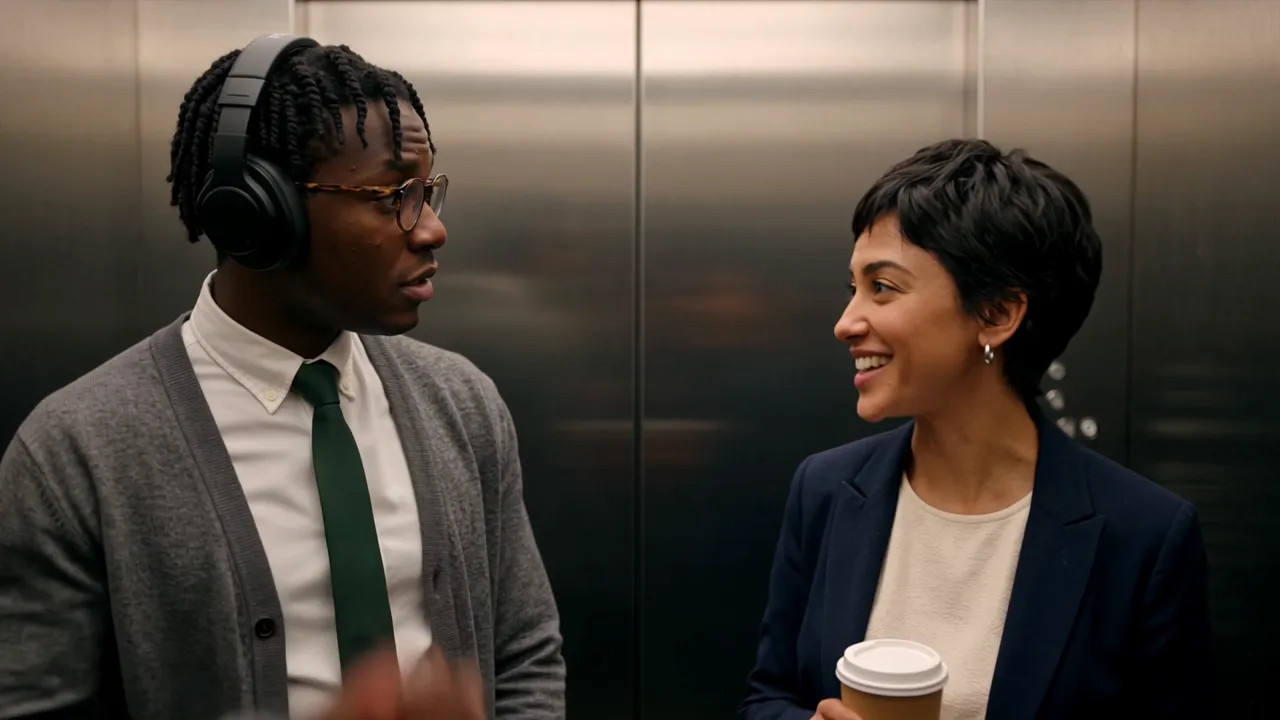
This 500 days of summer elevator scene came from the two photos next to it, with no editing afterwards. Both are made-up people. Your own video keeps the faces, hair and outfits from your photos, and every render times the lines a little differently.


500 Days of Summer AI sample: the elevator in 16:9
Two coworkers stand side by side in a brushed steel elevator: a young man with short twists and round glasses in a grey cardigan and green tie, black headphones on and eyes closed, and a young woman with a pixie cut in a navy blazer, holding a coffee. She glances over, leans in and says "I love the Smiths." He slides one ear cup off: "Sorry?" She smiles: "I said, I love the Smiths." 10 seconds in 16:9, made in about two and a half minutes at 720p.
How to Make a 500 Days of Summer AI Video
- 1
Cast Tom’s part
Put a clear, waist-up photo of the one who wears the headphones in Headphones. They are lost in the music and ask "Sorry?".
- 2
Cast Summer’s part, or skip it
Add the one who says the line to Who says it. Leave it empty and a made-up coworker with a coffee says it instead.
- 3
Pick the format and create
Choose 16:9 for the film look, 9:16 for TikTok and Reels or 1:1, then Standard 720p for 10 credits or HD 1080p for 20. Your 500 Days of Summer AI clip lands in My videos a few minutes later.
Best Photos for the 500 Days of Summer Elevator Scene
Waist-up and well lit
The camera stays at chest height in a small elevator, so a sharp waist-up photo with an easy-to-read face works best. The headphones are added for you.
Office clothes fit
In the film it is a weekday at the office. A cardigan, a blazer or a tie makes your 500 Days of Summer AI clip feel like the real thing.
Any two adults
Tom and Summer are just the parts. Friends, partners or coworkers can play either one; swap the photos to switch.
Adults who said yes
Only use photos of adults who agreed to be in the video. No children, celebrities, public figures or photos of the film’s actors.
The 500 Days of Summer Elevator Scene, Second by Second
Every 500 Days of Summer AI video plays the same 10 seconds, with the camera still and both of you in the frame.
0–2 s
The doors close
Two coworkers side by side, one of them nodding along inside big headphones.
2–4 s
The song leaks out
The other one hears it, recognises the band and smiles to themselves.
4–6 s
"I love the Smiths."
Said quietly, leaning in a little.
6–8 s
"Sorry?"
One ear cup slides off and the listener turns.
8–10 s
Said again
"I said, I love the Smiths." A stunned look, then a shy grin as the doors open.
500 Days of Summer AI Ideas
The 500 days of summer elevator scene is a two-line flirt, so it works best with someone you want to send it to. A few ideas:
Your own meet-cute
Recreate how you two met, or how you wish you had, and post it on your anniversary.
Swap Tom and Summer
Make it twice with the parts switched and let your followers vote on who said the line better.
The office crush, safely
Cast yourself in Headphones and leave Who says it to a made-up coworker. Nobody at work has to know.
Movie night invite
Send the 16:9 version to a friend with "rewatch this weekend?" before you queue up the film.
Post it with the trend sound
Your clip has its own voices and music, so post it as is or put the trending sound over it on TikTok.
What Is the 500 Days of Summer Elevator Scene?
(500) Days of Summer is a 2009 romantic comedy about Tom, a greeting-card writer, and Summer, the new assistant at his office. Early in the film they share the office elevator: Tom has his headphones on, Summer hears the music, recognises the band and says "I love the Smiths." He does not catch it, so she says it again and leaves him speechless. Fans have quoted that 500 days of summer elevator scene for years.
Original posts
- @searchlightpics on TikTok
February 1, 2024
The studio posts the elevator scene from the film, captioned "I LOVE THE SMITHS".
Play counts on November 10, 2026.
In November 2026 it turned into a TikTok trend: people restage both parts with a friend, partner or crush, and AI video tools drop two photos straight into the elevator. Google searches for "i love the smiths" rose more than tenfold in the first ten days of the month, and searches for the 500 days of summer meme rose with them.
500 Days of Summer AI makes the moment with your own faces: an original scene in a modern office elevator, both lines spoken, music faintly leaking from the headphones and the shy grin at the end. It is a new scene inspired by the film, not footage from it, and the music is new, not a Smiths song. It uses the same studio as our I Love The Smiths AI page, so pick whichever name you searched for.
AI Trend Video is independent and not affiliated with Searchlight Pictures, the makers or cast of (500) Days of Summer, The Smiths, TikTok or CapCut.
500 Days of Summer AI FAQ
How do I make a 500 Days of Summer AI video?
Add a photo for Headphones, and one for Who says it if you like, pick a format and create. The 10-second video is ready in a few minutes as an MP4.
Is it the same as I Love The Smiths AI?
Yes. Both pages make the same elevator scene in the same studio. 500 Days of Summer AI is simply the name many people search for.
Is this footage from the film?
No. Every 500 Days of Summer AI clip is a new scene made from your photos. Nothing from the film, its actors or its soundtrack is used.
Can I look like Tom and Summer?
You stay yourself: your face, hair and outfit come from your photo. Photos of the film’s actors or any other celebrity are not allowed.
Do I need two photos?
No. With only your photo you wear the headphones and a made-up coworker says the line.
Which format looks most like the film?
16:9. It frames you both side by side like a film shot. Choose 9:16 for TikTok, Reels and Shorts, or 1:1 for the feed.
What song is playing?
Your clip has an original indie guitar track leaking from the headphones, not a Smiths song. Add the trending sound in TikTok if you want it.
How long is the clip?
Ten seconds, in 16:9, 9:16 or 1:1. Standard is 720p and HD is 1080p, with no watermark.
How much does it cost?
Every trend costs the same: 10 credits for a Standard video and 20 for HD. One-time packs start at $9.99 for 10 credits and never expire; monthly plans start at $39.99 for 50 credits a month. There is no free trial.
What if my video looks wrong?
A failed render returns its credits automatically. If a finished video clearly did not work, report it from My videos within 7 days and we return the credits or refund the payment.
Who can see my photos and videos?
Only you. Photos and videos stay private in your account, and your photo goes to our video provider only to make the video.
Do I need an app?
No. It runs in your phone or computer browser, and the MP4 is ready to post on TikTok, Reels or Shorts.
Still have a question? support@aitrendvideo.io