

AI Christmas Dance Video Generator
Get your friends, family or coworkers into a Christmas dance video without a single rehearsal. AI Christmas Dance puts up to three people from your photos in Christmas sweaters and Santa hats, lines them up by a glowing tree and dances a 10-second routine: jingle-bell hands, a spin and a toy-soldier march. Add one photo and made-up friends fill the other spots.
- 1 to 3 photos
- 10 seconds
- 9:16 · 1:1 · 16:9
- Jingle pop beat
Quick answer: To make an AI Christmas dance video, add a photo for the centre spot, add up to two friends or leave their spots to made-up dancers, choose 9:16, 1:1 or 16:9, pick Standard (720p) or HD (1080p) and press Create. The 10-second Christmas dance video lands in My videos a few minutes later.
What People Are Making
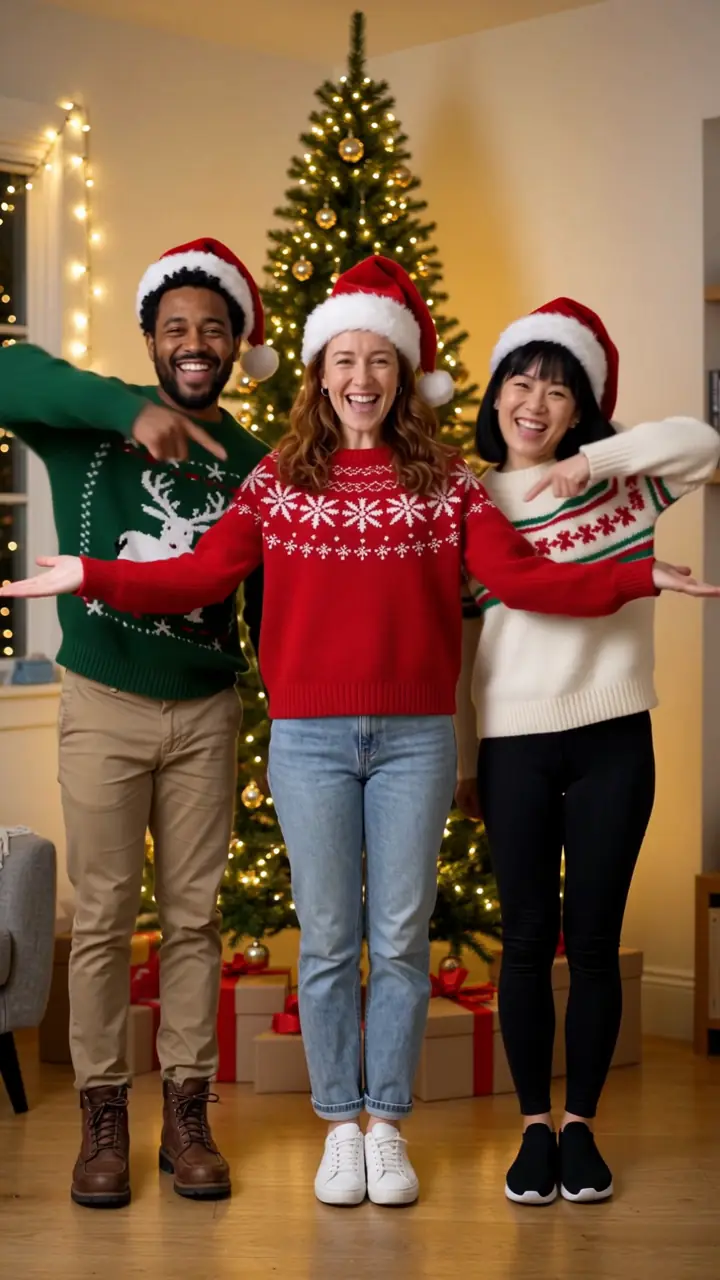
This AI Christmas dance clip came from the three photos next to it, with no editing afterwards. The three friends are made-up people. Your own video keeps each face, hairstyle and build from your photos, and every render dances the routine a little differently.
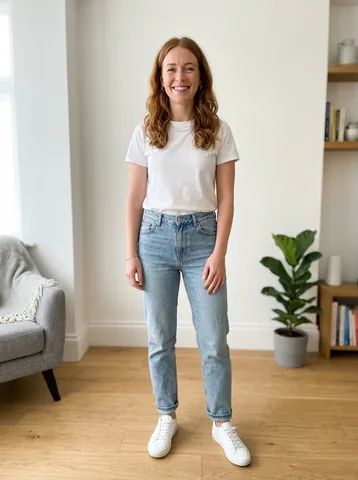
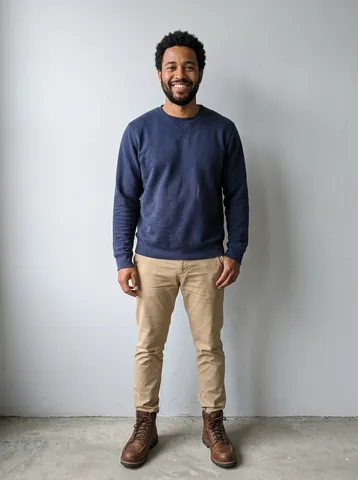
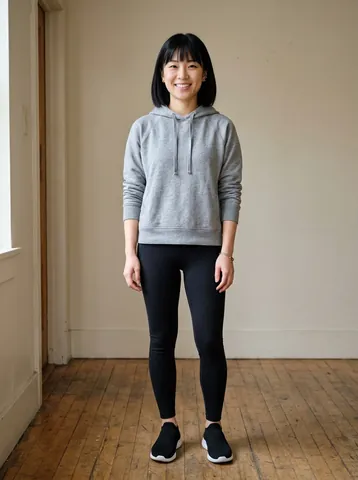
AI Christmas dance sample: three friends by the tree
Three photos, three spots: a woman with wavy auburn hair in the centre, a bearded man on the left and a woman with a black bob on the right. The video dresses them in red, green and cream Christmas sweaters and Santa hats, keeps their own jeans, chinos, leggings and shoes, and dances the routine by the tree: hands on hips, a high five, jingle-bell fists, a spin and a pointing finish. 10 seconds in 9:16, made in about two and a half minutes at 720p.
How to Make an AI Christmas Dance Video
- 1
Line up your crew
The centre spot needs a photo; Left and Right are optional. A spot you leave empty is danced by a made-up friend, so one photo is enough for a full AI Christmas dance.
- 2
Choose the format
Pick 9:16 for TikTok and Reels, 1:1 for the feed or 16:9 for YouTube, then Standard 720p for 10 credits or HD 1080p for 20.
- 3
Download and share
Your Christmas dance video lands in My videos as an MP4 with no watermark, and we email you when it is ready. Add your favourite holiday sound in TikTok or Instagram when you post.
Best Photos for an AI Christmas Dance
Full body, please
The routine is steps, spins and a march, so photos that show legs and shoes give the most natural AI Christmas dance.
One face per photo
Got a family photo from last year? Tap "Cast from a group photo" in the studio and tap each face to cut it out for a spot.
No outfit needed
Everyone gets a Christmas sweater and a Santa hat in the video, so any everyday photo works. Faces and hair come from your photos.
Adults who said yes
Only upload photos of adults who agreed to be in your Christmas dance video. No children, celebrities or public figures.
The AI Christmas Dance, Second by Second
Every AI Christmas dance video plays the same 10-second routine in a cozy living room at night, with a fixed camera at full-body distance.
0–2 s
The bounce
Three in a row in front of the lit tree, hands on hips, bouncing to the beat.
2–4 s
Jingle bells
Jazz hands, a high five, then both fists shaking at shoulder height like ringing bells.
4–6 s
The spin
A hip sway, then everyone spins around, Santa hat pompoms swinging.
6–8 s
Toy soldiers
A bouncy march on the spot, arms swinging.
8–10 s
The finish
The centre dancer spreads both arms, the other two point at them, and everyone laughs at the camera.
Christmas Dance Video Ideas
A Christmas dance video is the easiest holiday post of the year. A few ways to use yours:
The family group chat
Cast your siblings or your parents and send the AI Christmas dance to the family chat on December 1.
Office party opener
Put three coworkers in the sweaters and play the clip on the big screen before the team party starts.
A card that moves
Post the 1:1 version with "Merry Christmas from all of us" instead of a photo card.
The couple edition
Put your partner in the centre and yourself on the left, and let a made-up friend take the right spot.
Friends far apart
Friends in three cities can still dance side by side: one photo each, one Christmas dance video.
What Is the Christmas Dance Trend?
Every November and December, Christmas dance videos fill TikTok and Reels: friends, couples and families in festive sweaters doing a short routine by the tree to a holiday song. There is no single dance. Each season brings new versions of the same idea.
Original posts
675Kplays
@ksisterslove on TikTokNovember 17, 2025
Two best friends dance a new Christmas routine.
4.9Mplays
@masonhedge00 on TikTokOctober 15, 2026
A Christmas dance that opened the 2026 season.
Play counts on November 6, 2026.
On November 17, 2025, @ksisterslove posted two best friends dancing a new Christmas routine with the caption "Tag your friends". On October 15, 2026, @masonhedge00 opened this season with a Christmas dance to "All I Want for Christmas Is You" that passed 4.9 million plays.
AI Christmas Dance gives you the format without the rehearsal: the people from your photos, in Christmas sweaters and Santa hats, dancing in sync by a lit tree. Unlike a filmed routine, an AI Christmas dance needs no tree, no living room and no practice: one photo per person is enough. Searches for "Christmas dance" climb every November and peak in December, so now is the time to make yours.
Our clip uses an original beat with sleigh bells, not a holiday hit, so add the song you like in the app when you post. AI Trend Video is independent and not affiliated with any creator, artist or brand named here.
AI Christmas Dance FAQ
How do I make an AI Christmas dance video?
Add a photo for the centre spot, and up to two more for Left and Right, pick a format and press Create. The 10-second Christmas dance video is ready in a few minutes as an MP4.
Do I need three photos?
No. One photo is enough: you dance in the centre and made-up friends take the other two spots. You can also pick all three faces from one group photo.
Do we need Christmas outfits in the photos?
No. The AI Christmas dance puts everyone in a knitted Christmas sweater and a red Santa hat, so everyday photos work. Faces, hair, skin tone and body shapes come from your photos.
Can I add my kids or my dog?
Not in this video: every dancer must be an adult who agreed to be in it. For a surprise for the kids, try our Santa video, where Santa visits your home at night and says your child’s name.
Does the Christmas dance video include a Christmas song?
No. It comes with an original upbeat track with sleigh bells and handclaps. To post with a holiday hit, pick it from the TikTok or Instagram sound library when you upload.
How long is an AI Christmas dance video?
Ten seconds, in 9:16 for TikTok, Reels and Shorts, 1:1 for the feed or 16:9 for YouTube. Standard is 720p and HD is 1080p, with no watermark.
Can I make an AI Christmas dance with coworkers?
Yes, as long as every coworker is an adult and happy to take part. Three photos give you a full office Christmas dance video for the team chat or the party screen.
Can I choose the sweater colours?
Not yet. In every AI Christmas dance the centre dancer wears red with snowflakes, the left dancer green with a reindeer and the right dancer cream with stripes, so put whoever you like in each spot.
How much does it cost?
Every trend costs the same: 10 credits for a Standard video and 20 for HD. One-time packs start at $9.99 for 10 credits and never expire; monthly plans start at $39.99 for 50 credits a month. There is no free trial.
What if my video looks wrong?
A failed render returns its credits automatically. If a finished video clearly did not work, report it from My videos within 7 days and we return the credits or refund the payment.
Who can see my photos and videos?
Only you. Photos and videos stay private in your account, and your photo goes to our video provider only to make the video.
Do I need an app?
No. It runs in your phone or computer browser, and the MP4 is ready to post on TikTok, Reels or Shorts.
Still have a question? support@aitrendvideo.io