

Wassup in a Minute AI
Wassup in a Minute AI draws you and up to two friends as anime characters in oversized streetwear and plays the edit everyone is posting: each of you sways side to side alone, hands in your pockets, then all three line up and point at the camera. Add one to three photos and the 10-second clip comes with a bouncy Jersey club beat.
- 1 to 3 photos
- Anime style
- 10 seconds
- 9:16 · 1:1 · 16:9
What People Are Making
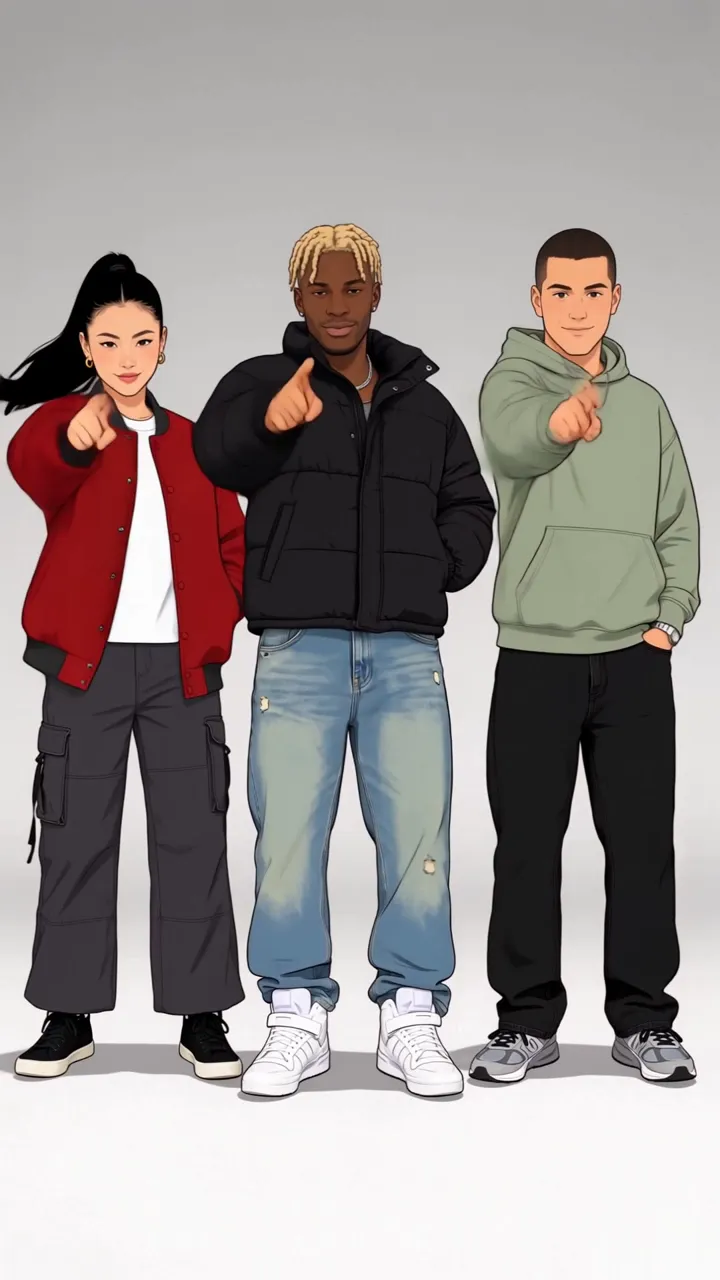
This wassup in a minute trend clip came from the three photos next to it, with no editing afterwards. All three are made-up people. Your own video keeps the hair, skin tone and outfit colours from your photos, drawn in anime style, and every render sways a little differently.
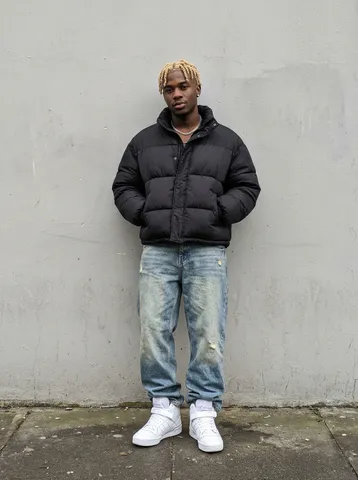
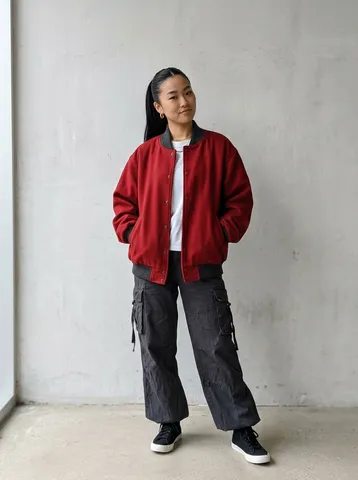
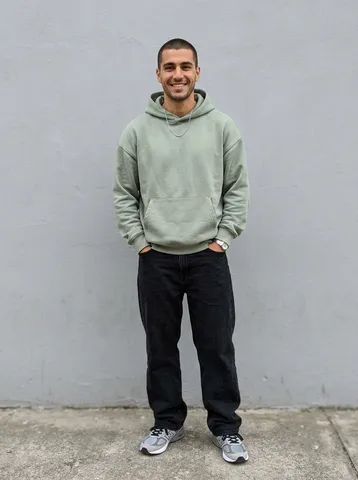
Wassup in a minute trend sample: three solos, one line-up
Three photos become three anime characters on a light grey background: a young man with bleached blond twists in a black puffer jacket and light jeans, a young woman with a high black ponytail in a red jacket and cargo pants, and a young man with a buzz cut in a sage green hoodie. Each one sways alone with hands in pockets, then all three stand side by side and point at the camera. 10 seconds in 9:16, made in about two and a half minutes at 720p.
How to Make a Wassup in a Minute AI Video
- 1
Cast Dancer 1
Put a clear, full-body photo in Dancer 1. That person opens the edit and stands in the middle of the final line-up.
- 2
Add the crew, or skip it
Add friends to Dancer 2 and Dancer 3. Leave a spot empty and a made-up anime character in streetwear takes that solo.
- 3
Pick the format and create
Choose 9:16 for TikTok and Reels, 1:1 or 16:9, then Standard 720p for 10 credits or HD 1080p for 20. Your Wassup in a Minute AI clip lands in My videos a few minutes later.
Best Photos for the Wassup in a Minute Trend
Show the fit
The wassup in a minute trend is all about the outfit, so use a head-to-toe photo. Your outfit colours carry over, and the cut gets oversized.
Clear face, clear hair
Hairstyle and hair colour are what make your anime version look like you. Skip hats and sunglasses.
Crew from one photo
Have a group photo? Tap "Cast from a group photo" in the studio and tap up to three faces.
Adults who said yes
Only use photos of adults who agreed to be in the video. No children, celebrities or public figures.
The Wassup in a Minute Trend, Second by Second
Every Wassup in a Minute AI video plays the same 10 seconds on a clean light background, cut on the beat.
0–2.5 s
Dancer 1 solo
Hands in pockets, a side-to-side sway and a small shoulder bounce.
2.5–5 s
Dancer 2 solo
The same sway, with a little head nod.
5–7.5 s
Dancer 3 solo
Side to side, shoulders bouncing.
7.5–10 s
The line-up
All three sway in sync, then point at the camera on the last beat.
Wassup in a Minute AI Ideas
The wassup in a minute trend works with any crew that likes to dress up. A few ideas:
The friend group
Three best friends, three solos. Post it with "us when someone says wassup".
The drip check
Everyone picks their best fit for the photo, and the crew decides whose solo hits hardest.
Team intro
Introduce your team, band or club, one swaying solo at a time.
Solo flex
One photo is enough: you take the first solo and two made-up anime characters back you up.
Post it with the trend sound
Your clip has its own beat, so post it as is or put the trending sound over it on TikTok.
What Is the "Wassup in a Minute" Trend?
"Wassup in a minute, wassup" is an animation meme from TikTok. Anime characters in oversized designer streetwear sway side to side on a plain background, one after another, to a Jersey club remix of "From Time" by Drake and Jhené Aiko, whose chopped hook sounds like "what’s up, in a minute, what’s up". People also search for it as "wassup been a minute".
Original posts
2.8Mplays
@ristyisvalid on TikTokOctober 23, 2026
Three Blue Lock characters sway in streetwear art by @aka_zayy, the post Know Your Meme names as the start.
3.8Mplays
@jimodeus on TikTokOctober 29, 2026
An anime take on the sway, captioned "my favorite trend rn".
Play counts on November 8, 2026.
Know Your Meme traces it to a TikTok posted on October 23, 2026, by @ristyisvalid: three characters from the anime Blue Lock swaying in streetwear drawn by the artist @aka_zayy. A CapCut tutorial followed on October 27, and the wassup in a minute trend spread through late October and early November, with people swapping in other characters, Roblox avatars and themselves.
Wassup in a Minute AI gives you the edit with your own crew: each of you drawn as an anime character in oversized streetwear, a solo sway each and the line-up at the end, set to a new Jersey club beat.
The drawings and the beat are new; the original art, characters and song are not used. AI Trend Video is independent and not affiliated with the creators of the original edit, Blue Lock, the song’s artists, TikTok or CapCut.
Wassup in a Minute AI FAQ
How do I make a Wassup in a Minute AI video?
Add a photo for Dancer 1, plus Dancer 2 and Dancer 3 if you like, pick a format and create. The 10-second video is ready in a few minutes as an MP4.
Is it "wassup in a minute" or "wassup been a minute"?
Both are used. The hook is heard as "what’s up, in a minute, what’s up", and people search for it both ways. It is the same anime sway edit.
What song is the wassup in a minute trend?
A Jersey club remix of "From Time" by Drake and Jhené Aiko. Your clip uses an original Jersey club beat instead; add the trending sound in TikTok if you want it.
Will I look like an anime character?
Yes. You are drawn in a flat 2D anime style in oversized streetwear, keeping your face shape, hairstyle, hair colour, skin tone and outfit colours.
Do I need three photos?
No. With one photo, you take the first solo and made-up anime characters fill the other two spots.
Can I be a Blue Lock character?
No. The trend started with Blue Lock fan art, but we only draw the people in your photos, not characters from any series.
Who stands where?
Dancer 1 sways first and stands in the middle of the final line-up, then come Dancer 2 and Dancer 3. Swap the photos to change the order.
Can my pet do the wassup in a minute dance?
Not yet. Every spot in Wassup in a Minute AI is a person drawn as an anime character, so pets are not cast in this trend.
Can I post it on TikTok?
Yes. Download the MP4 and post it on TikTok, Reels or Shorts, and add the trending sound there if you want the original hook.
How long is the clip?
Ten seconds, in 9:16 for TikTok, Reels and Shorts, 1:1 for the feed or 16:9 for YouTube. Standard is 720p and HD is 1080p, with no watermark.
How much does it cost?
Every trend costs the same: 10 credits for a Standard video and 20 for HD. One-time packs start at $9.99 for 10 credits and never expire; monthly plans start at $39.99 for 50 credits a month. There is no free trial.
What if my video looks wrong?
A failed render returns its credits automatically. If a finished video clearly did not work, report it from My videos within 7 days and we return the credits or refund the payment.
Who can see my photos and videos?
Only you. Photos and videos stay private in your account, and your photo goes to our video provider only to make the video.
Do I need an app?
No. It runs in your phone or computer browser, and the MP4 is ready to post on TikTok, Reels or Shorts.
Still have a question? support@aitrendvideo.io