

Santa Video Call AI
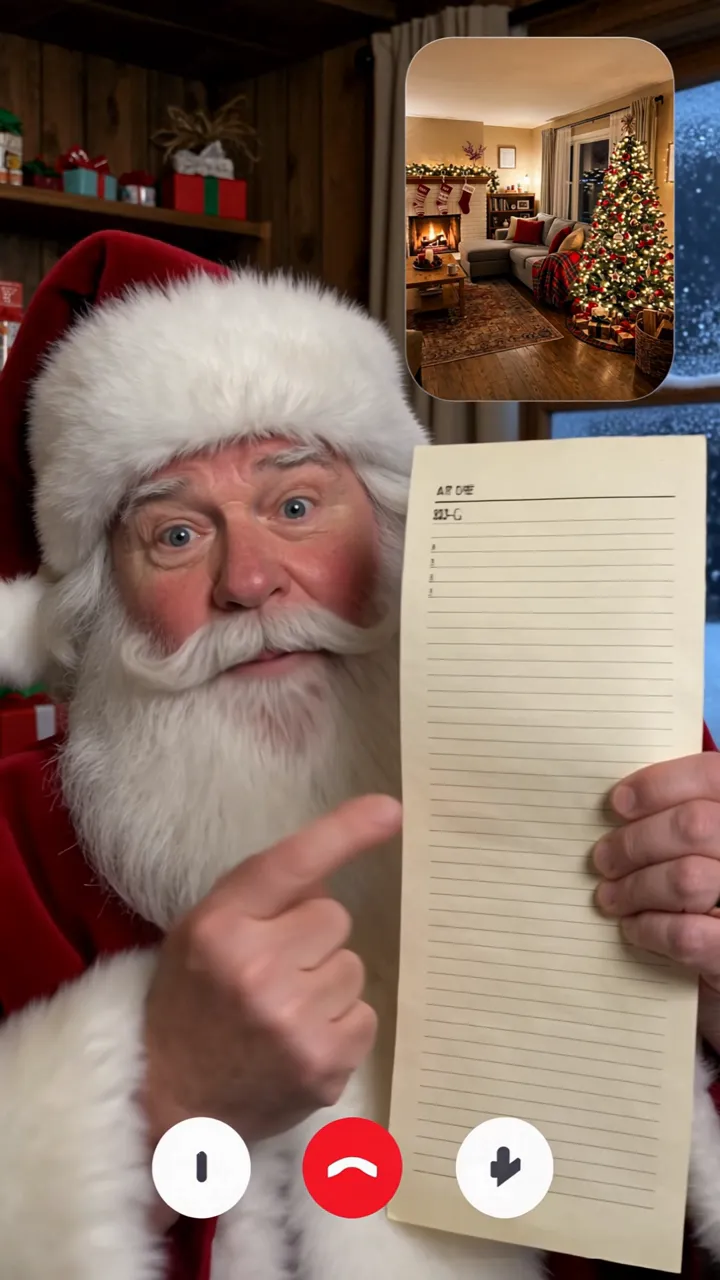
Santa Video Call AI makes a 10-second video from Santa that looks like a real call: Santa picks up in his North Pole workshop, says hello with the name you type and holds up his nice list. Your own living room shows in the small self-view window, so the Santa video call looks like it came to your house.
- 1 photo of your room
- Santa says the name
- 10 seconds
- 9:16 · 16:9 · 1:1
What People Are Making
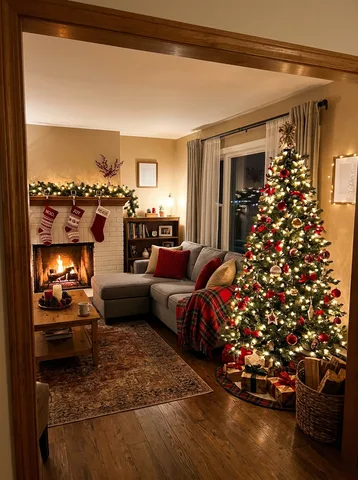
This Santa video call came from the living room photo next to it and the name "Lily", with no editing afterwards. The room is AI-made. Your own call shows your room in the corner window and Santa says your name; every render plays out a little differently.
Santa video call sample: hello from the workshop
Santa answers in his workshop, with toy shelves and a snowy window behind him and the living room from the photo, tree and fireplace included, in the small window at the top. He waves, says "Ho ho ho! Hello, Lily! It’s Santa, calling from the North Pole", then holds up his list and points at it: "You’re on my nice list this year! See you on Christmas Eve!" 10 seconds in 9:16, made in about two minutes at 720p.
How to Make a Santa Video Call
- 1
Photograph the room
Take a photo of the living room or the tree with nobody in it. It appears in the small self-view window, like the phone that answers the call.
- 2
Type the name
Write the name Santa says, like Lily or Max. Letters only, up to 30 characters.
- 3
Pick the format and create
Choose 9:16 for a phone call look, 16:9 for a laptop or TV, or 1:1, then Standard 720p for 10 credits or HD 1080p for 20. The video from Santa lands in My videos and we email you.
Tips for a Believable Santa Video Call
Show the tree
A lit tree in the room photo makes the small window look like Christmas at your house.
Nobody in the photo
Use a photo of the empty room: no people, pets or faces. Santa is the only person in the Santa video call.
Play it on a phone
Choose 9:16 and show the clip full screen on a phone, so the video from Santa feels like a call coming in.
One call for siblings
Brothers and sisters can share one call: type "Leo and Ava" and Santa says both names.
What Happens in the 10-Second Santa Video Call
Every Santa video call follows the same script, from hello to the nice list, filmed as if Santa holds the phone himself.
0–2 s
Santa picks up
The call connects and Santa leans into the camera, waving, in his cozy workshop.
2–6 s
"Hello, Lily!"
He says "Ho ho ho! Hello" with the name you typed, and that he is calling from the North Pole.
6–10 s
The nice list
Santa holds up his list: "You’re on my nice list this year! See you on Christmas Eve!" Then a wink.
When to Play Your Video From Santa
A video from Santa is best when nobody expects it. A few good moments:
The nice list reveal
Play the Santa video call on December 1 to start the countdown to Christmas.
Christmas Eve bedtime
One last call from Santa before bed: "See you on Christmas Eve!"
A reward for a good day
Save the video from Santa for the day they tidy their room or share with a sibling.
For the grandparents
Make one call per grandchild and send them all to the family chat.
The phone rings
The week before Christmas, hand your child your phone with the clip paused on the first frame, then press play as if Santa is calling from the North Pole.
What Is a Santa Video Call?
A Santa video call is a call, live or pre-recorded, where Santa appears on a phone, tablet or laptop screen and talks to a child by name. Families have played personalized videos from Santa for well over a decade, and every December searches for a Santa video call, a video from Santa or a call from Santa climb sharply.
A live call needs a booked time slot and a Santa actor. A pre-recorded video from Santa can be played whenever you like, as often as you like, which is why many parents save one for the moment the kids least expect it.
Santa Video Call AI makes that pre-recorded call from one photo and one name: Santa in his North Pole workshop, your own room in the corner of the screen and Santa’s warm voice saying the name, with his nice list in hand. It is not a live call and Santa cannot answer questions, so it works best as a surprise you press play on.
The video is made by AI, so whether to keep the magic going is up to you. AI Trend Video is independent and not affiliated with any video call app or Santa service.
Santa Video Call AI FAQ
How do I make a Santa video call?
Upload a photo of your room, write the name Santa should say and create. The Santa video call is ready in a few minutes as a 10-second MP4.
Is it a live call with Santa?
No. It is a pre-recorded video from Santa that looks like a video call. Santa cannot hear or answer, so play it as a surprise.
Does Santa say my child's name?
Yes. Santa says "Hello" with the name you typed, up to 30 characters of letters, and tells them they are on his nice list.
Why do I need a photo of my room?
Your room shows in the small self-view window in the corner, as if the call were answered at your house. Use a photo with nobody in it.
Can my child be in the video?
No. Santa is the only person in the Santa video call, and the room photo must be empty, so no child’s face goes into it.
Is this a FaceTime call?
No. It is an MP4 video styled like a phone video call, with no app names or logos. Play it full screen on any phone, tablet or TV.
Can I change what Santa says?
Santa always says hello with the name, that he is calling from the North Pole and that they are on his nice list. Other lines are not available yet.
Can one video from Santa greet two kids?
Yes. Type both names, like "Leo and Ava", and Santa says them together in one call.
Can I play the Santa video call on the TV?
Yes. Pick 16:9 and play the video from Santa on the TV on Christmas morning, or cast it from your phone, so the whole family can watch Santa hold up the nice list.
When should I make my Santa video call?
Any time before Christmas. Make the video from Santa once the tree is up, keep it on your phone and play it on December 1, on Christmas Eve or whenever the moment feels right.
How is it different from the Santa cam?
In our Santa Caught on Camera video, a home camera catches Santa leaving presents in your room. In the Santa video call, Santa calls from the North Pole. Many families make both.
How much does it cost?
Every trend costs the same: 10 credits for a Standard video and 20 for HD. One-time packs start at $9.99 for 10 credits and never expire; monthly plans start at $39.99 for 50 credits a month. There is no free trial.
What if my video looks wrong?
A failed render returns its credits automatically. If a finished video clearly did not work, report it from My videos within 7 days and we return the credits or refund the payment.
Who can see my photos and videos?
Only you. Photos and videos stay private in your account, and your photo goes to our video provider only to make the video.
Do I need an app?
No. It runs in your phone or computer browser, and the MP4 is ready to post on TikTok, Reels or Shorts.
Still have a question? support@aitrendvideo.io