

Put the Rollie on My Wrist AI
Put the Rollie on My Wrist AI puts the two of you in the couple trick everyone is copying on TikTok this month. Add one photo of each of you: one lies across the other’s shoulders, the one carrying smiles at the camera and turns around, and the hidden face pops up right where the other head was. The rollie on my wrist trend clip keeps its own sound, "it don’t even make sense, put the Rollie on my wrist", so your 10 seconds play like the original.
- 2 photos
- Original clip sound
- 10 seconds
- 9:16
What People Are Making
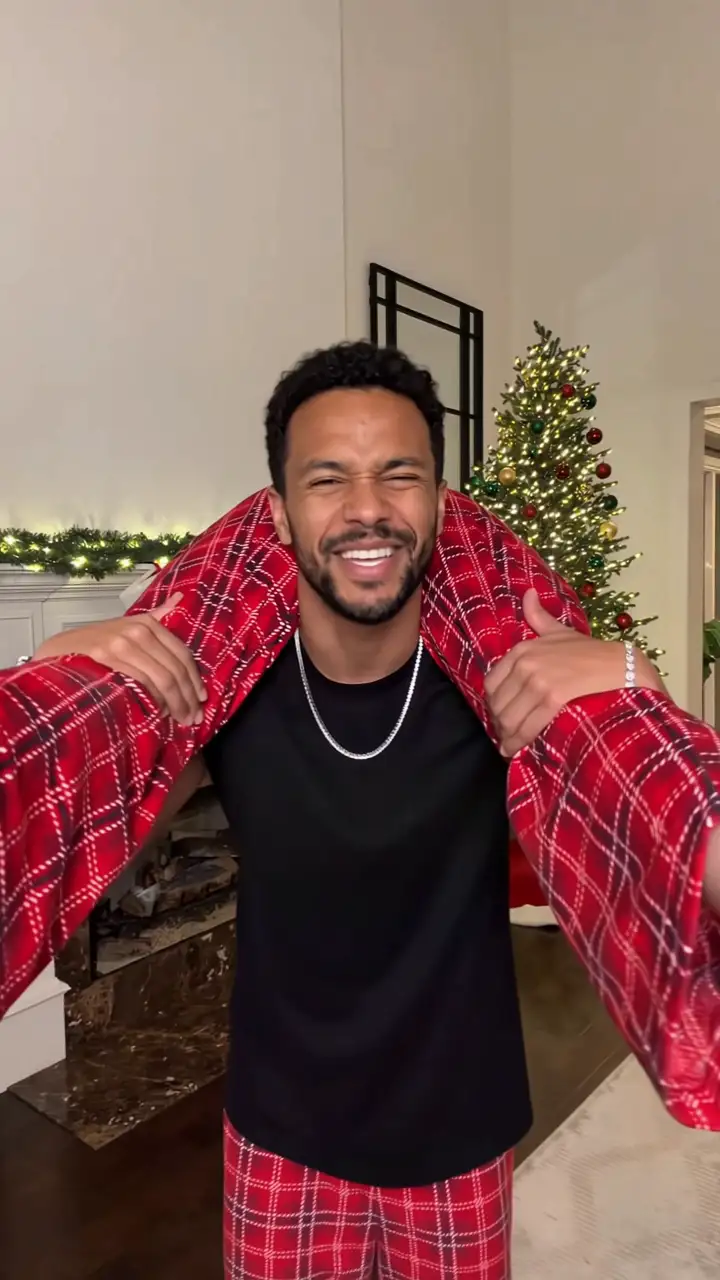
This Put the Rollie on My Wrist AI clip came from the two photos next to it, with no editing afterwards. Both are made-up people. Your own video keeps the faces and hair from your photos, in the plaid pajamas of the clip; the living room, the tree, the carry and the sound come from the template clip.


Put the Rollie on My Wrist AI sample: the reveal
Her photo becomes the one who rides and his the one who carries: a man with short curly hair and a beard smiles at the camera with her draped across his shoulders, turns his back, and a woman with long black hair and bangs pops up in front, mouths the words and grins. Both wear red plaid pajamas, and the sound is the original. 10 seconds in 9:16, made in about three and a half minutes at 720p.
How to Make a Put the Rollie on My Wrist AI Video
- 1
Add both photos
Put a clear, chest-up photo of the rider in Who rides and of the one who lifts in Who carries. Have one photo of you both? Tap Cast from a group photo and pick each face.
- 2
Pick the quality
Choose Standard 720p for 10 credits or HD 1080p for 20. The clip is 9:16, ready for TikTok, Reels and Shorts.
- 3
Create
Press Create. Your Put the Rollie on My Wrist AI clip lands in My videos a few minutes later, and we email you when it is ready.
Best Photos for Put the Rollie on My Wrist AI
Faces close and clear
The one who rides fills the frame at the end, so use a sharp, chest-up photo for Who rides. Skip sunglasses.
Face the camera
Front-facing photos keep both faces steady through the turn, the moment the rollie on my wrist trend is all about.
Any outfit works
You both wear the red plaid pajamas of the clip, and the one who carries wears a black sleeveless top, so your own clothes do not matter.
Adults who said yes
Only use photos of adults who agreed to be in the video. No children, celebrities, public figures or photos of the creators of the original.
The Rollie on My Wrist Trend, Second by Second
Every video plays the same 10 seconds of the rollie on my wrist trend, filmed on a phone in a living room with a lit Christmas tree.
0–3 s
The carry
The one who carries smiles at the camera and mouths the words, with the rider lying across both shoulders, pajama legs and arms hanging down.
3–4.5 s
The turn
The carrier turns around, back to the camera, and the rider swings over the shoulder.
4.5–9 s
The face in front
The rider’s face comes up where the other head was, leans into the lens on "cause I’m the one" and grins.
9–10 s
Held frame
The last frame holds on the rider’s smile, ready to loop.
Rollie on My Wrist Trend Ideas
The rollie on my wrist trend works for couples, best friends and siblings. A few ideas:
Tag your partner
Make one of you two and ask your followers who is really carrying who.
Best friends
Two friends make the reveal funnier, especially if the smaller one does the carrying.
Pajama season
The clip is already in plaid pajamas by the tree, ready for a December post.
A matching pair
The same couple posted a Snowman version the same day; make both and post them as a set.
Your own caption
The clip comes without text, so add "put the Rollie on my wrist" or your own line when you post it.
What Is the Rollie on My Wrist Trend?
The rollie on my wrist trend is a couple trick on TikTok. One partner lies across the other’s shoulders, the one carrying smiles at the camera and turns around, and the rider’s face comes up in front, right where the carrier’s head was, as if the two heads had swapped. It plays to a sped-up sound whose first line goes "it don’t even make sense, put the Rollie on my wrist", which is where the name comes from.
Original posts
- @nataliireynoldss on TikTok
November 8, 2026
The pajama version by the Christmas tree. 38.2M plays and 3.5M likes.
12.6Mplays
@r_phillips520 on TikTokNovember 8, 2026
The post that named it, "put the roley on my wrist".
804Kplays
@777emilyyyy on TikTokOctober 24, 2026
An earlier shoulder carry on the same sound.
Play counts on November 16, 2026.
Couples used the same sound in October for a simpler shoulder carry captioned "cause i’m the one"; @777emilyyyy posted hers on October 24, 2026. On November 8, 2026 the trick got its name: @r_phillips520 posted "put the roley on my wrist" (12.6 million plays), and the same day @nataliireynoldss and her boyfriend did it in matching Christmas pajamas, the version most people copy, with 38 million plays in eight days. CapCut templates followed within days.
Put the Rollie on My Wrist AI does the same with your photos: the two people become you, with your faces and hair, in the pajamas, while the room, the tree, the carry, the turn and the sound stay as they are in the clip. One explicit word in the sound is muted.
AI Trend Video is independent and not affiliated with @nataliireynoldss, @r_phillips520, TikTok or CapCut. The trick is for fun remakes; do not use it to impersonate anyone.
Put the Rollie on My Wrist AI FAQ
How do I make a Put the Rollie on My Wrist AI video?
Add a photo in Who rides and one in Who carries, pick a quality and create. The 10-second clip is ready in a few minutes as a 9:16 MP4.
Does it have the trend sound?
Yes. Your rollie on my wrist trend clip keeps the sound of the original, with one explicit word muted, so you do not need to add it.
Who should ride and who should carry?
Anyone 18 or older can take either part. The rider is the face that pops up at the end.
Can I do it alone?
No. The trick needs two people, so it takes two photos. One photo of you both works too: tap each face.
Do we keep our own clothes?
No. You both wear the pajamas of the rollie on my wrist trend clip; your faces come from your photos.
Does anyone really have to lift anyone?
No. The AI makes the whole trick from two photos, so nobody has to lift anyone or film anything.
How long is the clip?
Ten seconds in 9:16 for TikTok, Reels and Shorts; the last second holds on the final frame. Standard is 720p and HD is 1080p, with no watermark.
How much does it cost?
Every trend costs the same: 10 credits for a Standard video and 20 for HD. One-time packs start at $9.99 for 10 credits and never expire; monthly plans start at $39.99 for 50 credits a month. There is no free trial.
What if my video looks wrong?
A failed render returns its credits automatically. If a finished video clearly did not work, report it from My videos within 7 days and we return the credits or refund the payment.
Who can see my photos and videos?
Only you. Photos and videos stay private in your account, and your photo goes to our video provider only to make the video.
Do I need an app?
No. It runs in your phone or computer browser, and the MP4 is ready to post on TikTok, Reels or Shorts.
Still have a question? support@aitrendvideo.io