

BigXthaPlug Give It All AI
BigXthaPlug Give It All AI puts you at the hanging mic of the rap performance everyone is remaking this month. Add one photo and you step into the packed cinema lobby of the From The Block video: you sway into the hook, grin at the crowd and throw a hand up as the verse kicks in, while everyone behind you goes off. The give it all trend clip keeps the song, so your 10 seconds sound exactly like the performance.
- 1 photo
- Original song
- 10 seconds
- 9:16
What People Are Making
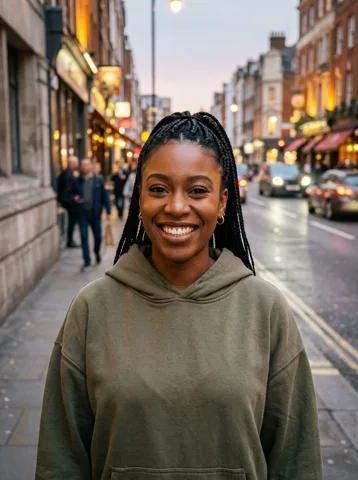
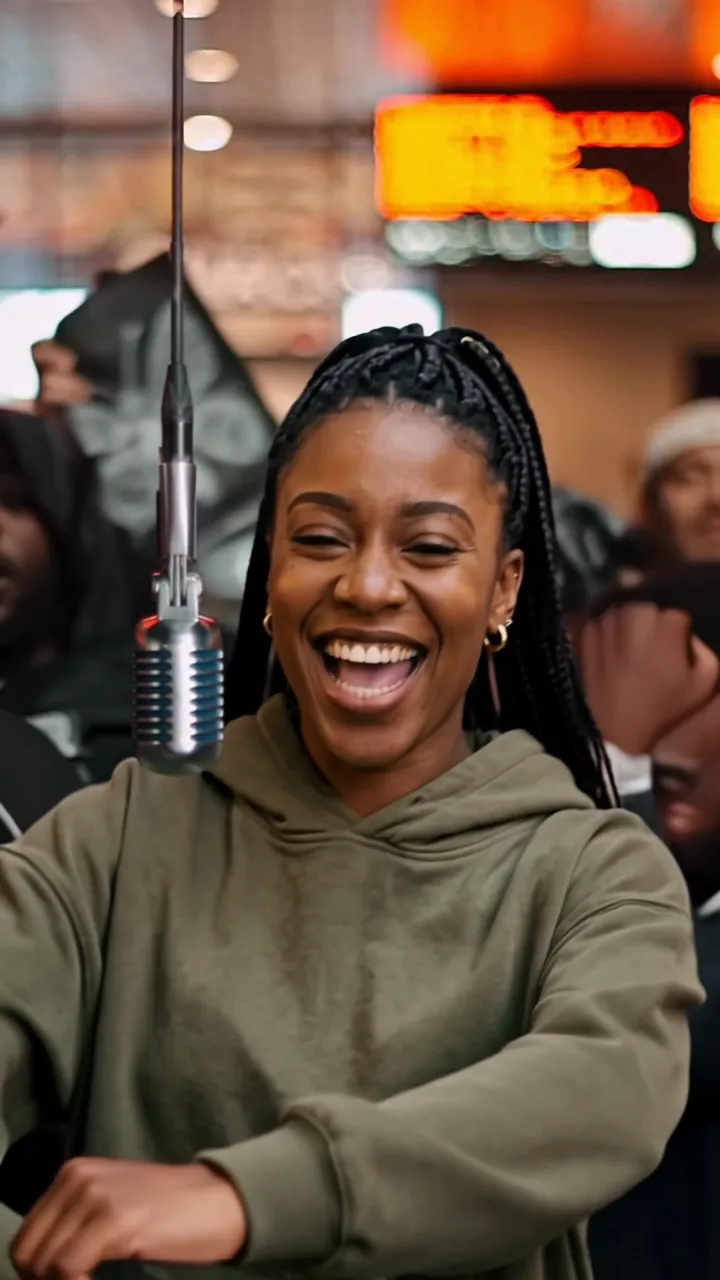
This BigXthaPlug Give It All AI clip came from the one photo next to it, with no editing afterwards. She is a made-up person. Your own video keeps the face, hair and outfit from your photo; the mic, the crowd, the cinema lobby, the camera moves and the song come from the template clip.
BigXthaPlug Give It All AI sample: a new rapper at the mic
Her photo becomes the rapper at the hanging mic: a young woman with long black box braids, in an olive hoodie and gold hoops, sways into the hook, grins at the crowd and throws a hand up when the camera cuts to the side, while the packed lobby goes off behind her. The sound is the original song. 10 seconds in 9:16, made in about two and a half minutes at 720p.
How to Make a BigXthaPlug Give It All AI Video
- 1
Add your photo
Put a clear, chest-up photo of the one who raps in Rapper. The face, hair and outfit in that photo replace the rapper at the mic.
- 2
Pick the quality
Choose Standard 720p for 10 credits or HD 1080p for 20. The clip is 9:16, ready for TikTok, Reels and Shorts.
- 3
Create
Press Create. Your BigXthaPlug Give It All AI clip lands in My videos a few minutes later, and we email you when it is ready.
Best Photos for BigXthaPlug Give It All AI
Chest up and clear
The camera stays close on the rapper, so use a sharp, chest-up photo where the face is easy to read. Skip sunglasses.
Face the camera
A front-facing photo keeps your face steady through the sway, the grin and the side angle at the end of the give it all trend.
Dress for the lobby
Your outfit replaces the rapper’s. A hoodie, a denim jacket or a cap fits the crowd around you.
Adults who said yes
Only use a photo of an adult who agreed to be in the video. No children, celebrities, public figures or photos of BigXthaPlug.
The Give It All Trend, Second by Second
Every BigXthaPlug Give It All AI video plays the first 10 seconds of the performance, filmed in a cinema lobby under glowing showtime boards.
0–3.5 s
The hook
You sway at the hanging mic through the "give it all to me" hook, smiling, the crowd packed in behind you.
3.5–6 s
Into the verse
The first bars, a big grin and your hands at your chest while the crowd bounces along.
6–8 s
Hand up
The camera cuts in from the side and you throw a hand up toward the crowd.
8–10 s
Eyes closed
You lean into the mic with your eyes closed, rapping the next line as the lobby lights glow behind you.
BigXthaPlug Give It All AI Ideas
The give it all trend works as a flex, a hype clip or an inside joke. A few ideas:
The group chat rapper
Put the friend who raps along to everything at the mic and send it to the chat.
Birthday hype
Make the birthday person the star of the lobby and post it on the day.
Game day energy
Post it before the big game with the whole team tagged in the caption.
A stage debut
Give the friend who wants to be a rapper their first packed lobby, crowd and all.
Your own caption
Add your own line on TikTok; the clip already has the song.
What Is the Give It All Trend?
"Give It All" is a song by the Dallas rapper BigXthaPlug from his fourth album, Better Over Time, released on October 30, 2026, built on a soulful "give it all to me" hook. A few days later he performed it for From The Block, the performance series filmed by 4 Shooters Only: one take at a hanging vintage microphone in a packed cinema lobby, under glowing showtime boards, with the crowd rapping along around him.
Original posts
- 4 Shooters Only on YouTube
November 2026
The full From The Block performance of "Give It All". About 1M views.
- @4shootersonly on Instagram
November 3, 2026
The performance as a square reel, opening on the hook.
379Kplays
@winskychoute on TikTokNovember 6, 2026
A repost of the performance.
Play counts on November 15, 2026.
Clips of the performance spread on TikTok in early November, and a repost by @winskychoute from November 6 passed 379,000 plays. People then started putting their own photo at the mic with AI, and the give it all trend became a one-photo effect in template apps.
BigXthaPlug Give It All AI does the same with your photo: the rapper at the mic becomes you, with your face, hair and outfit, while the crowd, the lobby, the camera moves and the song stay as they are in the clip.
AI Trend Video is independent and not affiliated with BigXthaPlug, his label, From The Block, 4 Shooters Only or TikTok. The clip is for fun remakes; do not use it to impersonate anyone.
Source: Wikipedia on BigXthaPlug
BigXthaPlug Give It All AI FAQ
How do I make a BigXthaPlug Give It All AI video?
Add one photo for Rapper, pick a quality and create. The 10-second video is ready in a few minutes as a 9:16 MP4.
Does it have the song?
Yes. Your give it all trend clip keeps the sound of the first 10 seconds of the performance, the hook and the first bars, so you do not need to add the song.
Do I have to rap?
No. You only add a photo; your face takes over the rapper’s, with the same lip movement and hand gestures.
Is there swearing in the clip?
No. The 10 seconds are the hook and the opening bars of the song, with no explicit words.
Can my friends be in it?
Not in this clip: only the rapper at the mic changes, and the crowd stays as it is. Make one for each friend instead and post the give it all trend as a series.
Can I put BigXthaPlug or a celebrity in it?
No. Use only a photo of an adult who agreed to be in your video. Photos of BigXthaPlug, other celebrities and public figures are not allowed.
Can I pick a different part of the song?
Not yet. Every BigXthaPlug Give It All AI clip uses the same 10 seconds, the opening of the performance that started the give it all trend.
How long is the clip?
Ten seconds in 9:16 for TikTok, Reels and Shorts. Standard is 720p and HD is 1080p, with no watermark.
How much does it cost?
Every trend costs the same: 10 credits for a Standard video and 20 for HD. One-time packs start at $9.99 for 10 credits and never expire; monthly plans start at $39.99 for 50 credits a month. There is no free trial.
What if my video looks wrong?
A failed render returns its credits automatically. If a finished video clearly did not work, report it from My videos within 7 days and we return the credits or refund the payment.
Who can see my photos and videos?
Only you. Photos and videos stay private in your account, and your photo goes to our video provider only to make the video.
Do I need an app?
No. It runs in your phone or computer browser, and the MP4 is ready to post on TikTok, Reels or Shorts.
Still have a question? support@aitrendvideo.io