

Goodbye 2026 Welcome 2027 AI Video
Say goodbye 2026, welcome 2027 with a video instead of a text. Add your photo, or two for you and your plus one, and you climb onto giant stone numbers on a snowy summit at dawn. The 6 crumbles, a golden 7 rises in its place, the sun breaks through and fireworks go off. Ten seconds, ready for New Year’s Eve.
- 1 or 2 photos
- 10 seconds
- 9:16 · 1:1 · 16:9
- Fireworks and big beat
What People Are Making
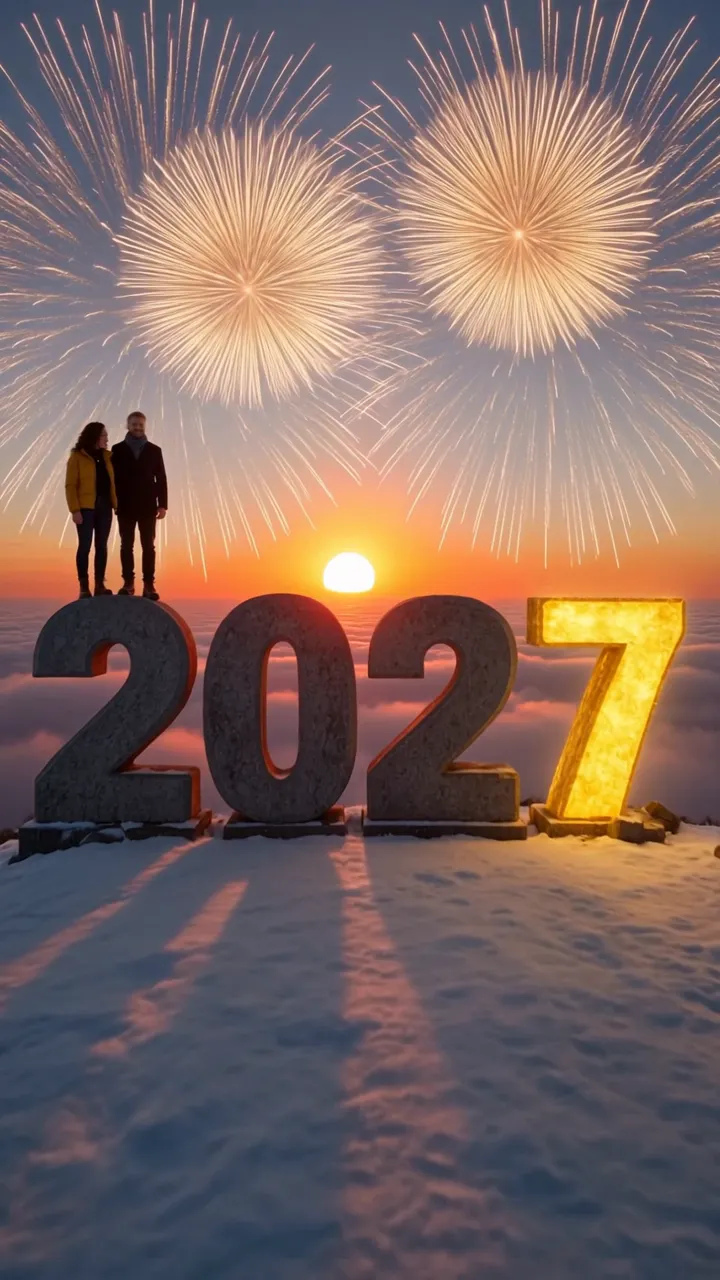
This Goodbye 2026 Welcome 2027 clip came from the two photos next to it, with no editing afterwards. Both people are made-up. Your own video keeps the faces, hair and outfits from your photos, and every render plays the moment a little differently.


Goodbye 2026 Welcome 2027 sample: the golden 7
A woman in a mustard puffer jacket and a man in a navy coat stand on giant stone numbers reading 2026 above the clouds and wave. The 6 bursts into rubble, a glowing golden 7 takes its place, the sun comes up and fireworks fill the sky, and they finish on the golden 7 with their arms up. 10 seconds in 9:16, made in about three minutes at 720p.
How to Make a Goodbye 2026 Welcome 2027 Video
- 1
Upload your photo
Put a clear, full-body photo in You. Put a partner, friend or family member in Plus one, or leave it empty to climb solo.
- 2
Choose the format
Pick 9:16 for stories, TikTok and Reels, 1:1 for the feed or 16:9 for YouTube, then Standard 720p for 10 credits or HD 1080p for 20.
- 3
Save it for midnight
Your goodbye 2026 video lands in My videos as an MP4 with no watermark, and we email you when it is ready. Share it on December 31 or on the morning of New Year’s Day.
Best Photos for a Goodbye 2026 Video
Standing, head to toe
You climb and jump in this clip, so a full-body photo of you standing gives the most natural moves.
Winter clothes look right
Your outfit comes from your photo, and the summit is snowy, so a coat or jacket fits the scene best.
Two from one photo
Got a couple photo from last New Year? Tap "Cast from a group photo" in the studio and pick both faces.
Adults who said yes
Only upload photos of adults who agreed to be in your goodbye 2026 welcome 2027 video. No children or public figures.
Goodbye 2026 Welcome 2027, Second by Second
Every Goodbye 2026 Welcome 2027 video plays the same 10 seconds on a snowy mountain summit at dawn, above a sea of clouds.
0–3 s
On top of 2026
You climb onto the giant stone numbers 2026 and wave goodbye to the camera.
3–6 s
The 6 crumbles
The stone 6 cracks into dust and snow, and a golden 7 rises in its place: 2027.
6–8 s
Sunrise and fireworks
The sun breaks over the clouds behind the 2027 and golden fireworks burst.
8–10 s
Jump into 2027
You jump onto the golden 7 with your arms up under the fireworks, with confetti in the air.
Goodbye 2026 Welcome 2027 Ideas
The clip says it without a caption, but here are a few ways to share it:
Your New Year’s Eve post
Put the 9:16 version in your story at midnight with "goodbye 2026, welcome 2027".
The couple countdown
Put you and your partner on the numbers and send it before the countdown starts.
Year in photos, then this
Share your best photos of 2026 first and end the carousel with the goodbye 2026 clip.
The family chat
Make one for each sibling or friend and send them all to the group on January 1.
A New Year card that moves
Send the 1:1 version instead of a New Year card: the giant numbers and the golden fireworks do the greeting.
What Is "Goodbye 2026 Welcome 2027"?
"Goodbye 2026, welcome 2027" is the line people post as the year turns: in Instagram and TikTok stories, in captions, on cards and in the family group chat. Every December the same phrase comes back with new numbers. Last year, US searches for "goodbye 2025" reached 33,100 in December 2025 alone, according to Google Keyword Planner.
The searches peak in the last days of December and the first days of January, when everyone is looking for a way to say it. Most people post a photo or a text. A goodbye 2026 video with you in it stands out in a feed full of fireworks stock clips.
Goodbye 2026 Welcome 2027 AI makes that video from one or two photos: giant stone numbers on a snowy summit, the 6 falling apart, a golden 7 rising, sunrise and fireworks. Make it any time in December and keep it ready for midnight.
The numbers are the only words in the clip, so add your own caption when you post. AI Trend Video is independent and not affiliated with any app or account that uses the phrase.
Goodbye 2026 Welcome 2027 FAQ
How do I make a Goodbye 2026 Welcome 2027 video?
Upload your photo, and a second one if you like, pick a format and create. The 10-second goodbye 2026 video is ready in a few minutes as an MP4.
Can I add my partner or a friend?
Yes. Put their photo in Plus one and you climb the numbers together, then jump onto the 7 and hug. Leave Plus one empty for a solo video.
Do the numbers really say 2026 and 2027?
Yes. The giant numbers read 2026 at first and 2027 once the 6 turns into a golden 7. AI can sometimes draw a digit oddly; if yours comes out wrong, report it from My videos for your credits back.
Can I add my own text or name?
Not in the video: the numbers are the only writing. Write your own caption or text in TikTok, Instagram or your editor when you share it.
Is there music?
Yes: an original orchestral pop beat that builds to a drop, with wind, cracking stone and fireworks. You can swap in your own sound when you post.
When should I make it?
Any time in December. Make your goodbye 2026 welcome 2027 video early, download it and post it at midnight without waiting on the day.
Why giant stone numbers on a mountain?
The grey stone numbers are the old year, heavy and solid. When the 6 cracks and the golden 7 rises at sunrise, the New Year arrives in one moment, with fireworks over the clouds. It turns "goodbye 2026, welcome 2027" into a scene you can watch.
Is it only for New Year’s Eve?
It is made for the turn of the year, but it also works as a New Year’s Day story, a New Year card for the family chat or the last slide of your year in photos. The golden numbers and the fireworks say it all.
Can children be in it?
No. Everyone in the video must be an adult who agreed to be in it.
How long is the video?
Ten seconds, in 9:16 for stories, TikTok and Reels, 1:1 for the feed or 16:9 for YouTube. Standard is 720p and HD is 1080p, with no watermark.
How much does it cost?
Every trend costs the same: 10 credits for a Standard video and 20 for HD. One-time packs start at $9.99 for 10 credits and never expire; monthly plans start at $39.99 for 50 credits a month. There is no free trial.
What if my video looks wrong?
A failed render returns its credits automatically. If a finished video clearly did not work, report it from My videos within 7 days and we return the credits or refund the payment.
Who can see my photos and videos?
Only you. Photos and videos stay private in your account, and your photo goes to our video provider only to make the video.
Do I need an app?
No. It runs in your phone or computer browser, and the MP4 is ready to post on TikTok, Reels or Shorts.
Still have a question? support@aitrendvideo.io