

Coldplay Kiss Cam AI
Coldplay Kiss Cam AI puts you and your partner, best friend or sibling into the concert moment the whole internet replayed: a fan films the arena big screen, the two of you are hugging and swaying, you spot yourselves, one hides their face and the other ducks out of sight while the arena goes "Ooooh!". Add two photos, or just yours, and the coldplay kiss cam video is 10 seconds long, crowd and music included.
- 1 or 2 photos
- Arena crowd sound
- 10 seconds
- 9:16 · 1:1 · 16:9
Quick answer: To make a Coldplay Kiss Cam AI video, put the one in front in In front and the one hugging from behind in Behind (or leave it to a made-up partner), choose 9:16, 1:1 or 16:9, pick Standard (720p) or HD (1080p) and create. The coldplay kiss cam video is in My videos a few minutes later.
What People Are Making
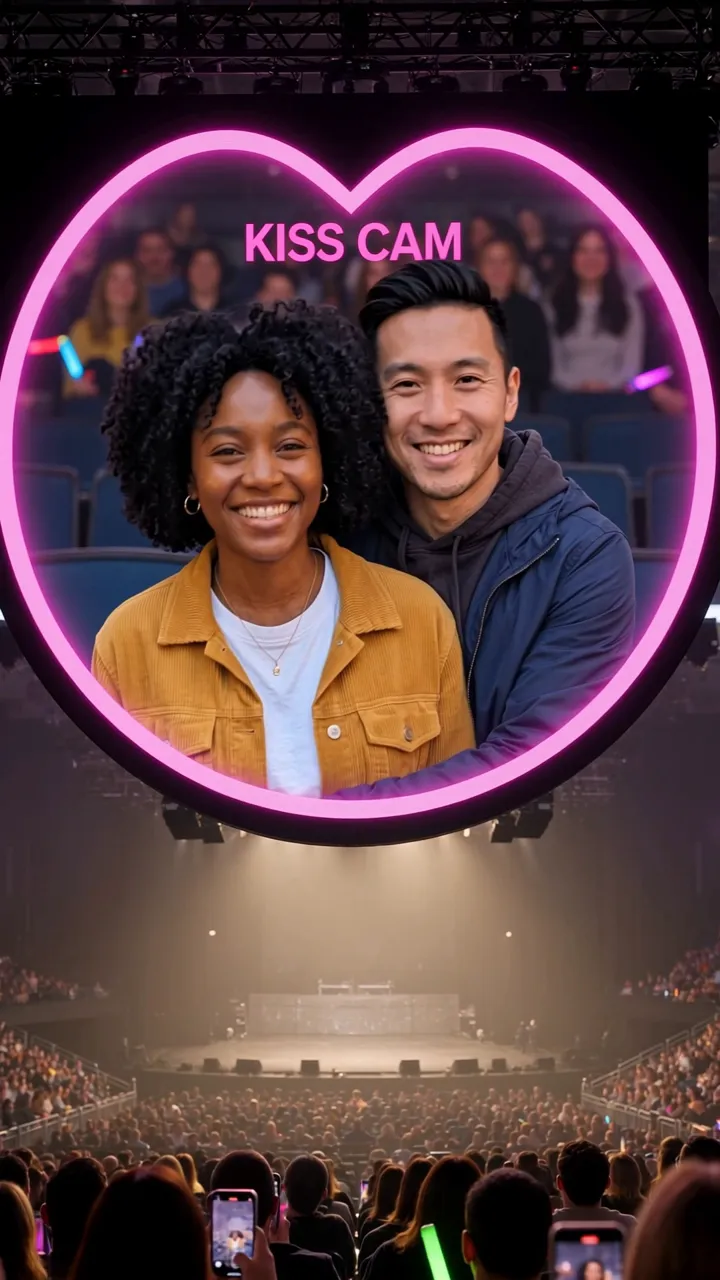
This coldplay kiss cam video came from the two photos next to it, with no editing afterwards. Both are made-up people. Your own video keeps the faces, hair and outfits from your photos, and every render plays the reaction a little differently.


Coldplay kiss cam video sample: caught mid-hug
A fan’s phone films the arena big screen, framed in a glowing pink heart with "KISS CAM" on top: a woman with black curly hair in a mustard corduroy jacket and a man in a navy windbreaker hug and smile. She looks up, sees herself and freezes, he drops out of sight behind the seats, she covers her face with both hands, and the screen ends on empty seats while the crowd points and cheers. 10 seconds in 9:16, made in about two and a half minutes at 720p.
How to Make a Coldplay Kiss Cam AI Video
- 1
Cast who stands in front
Put a clear, waist-up photo in In front. That person is the first one you see on the arena big screen, and the one who hides their face.
- 2
Cast who hugs from behind, or skip it
Add your partner or friend to Behind; they let go and duck out of sight. Leave it empty and a made-up partner hugs you instead.
- 3
Pick the format and create
Choose 9:16 for TikTok and Reels, 1:1 or 16:9, then Standard 720p for 10 credits or HD 1080p for 20. Your Coldplay Kiss Cam AI clip lands in My videos a few minutes later.
Best Photos for a Coldplay Kiss Cam Video
Faces big and clear
In a coldplay kiss cam video you two are seen on a big screen across the arena, so use sharp, well-lit photos where each face is easy to read. Waist-up works best.
Decide who ducks
In your Coldplay Kiss Cam AI clip the one in Behind drops out of sight and the one in In front covers their face and peeks out. Swap the photos to switch the roles.
Both from one photo
Have a photo of the two of you? Tap "Cast from a group photo" in the studio and tap each face.
Adults who said yes
Only use photos of adults who agreed to be in the video. No children, celebrities, public figures or the people from the real clip.
The Coldplay Kiss Cam Video, Second by Second
Every Coldplay Kiss Cam AI video plays the same 10 seconds, filmed on a fan’s phone from high in the stands.
0–3 s
On the big screen
The arena big screen, framed in a glowing pink heart, shows the two of you hugging and smiling, with no idea you are on it.
3–5 s
Spotted
You see yourselves. The smiles freeze and the eyes go wide.
5–7 s
Hide and duck
The one in front covers their face and turns away; the one behind lets go and drops out of sight.
7–10 s
"Ooooh!"
The arena laughs and points, there is a peek between the fingers, and then only empty seats on the screen.
Coldplay Kiss Cam AI Ideas
A coldplay kiss cam video works with anyone you would hug at a concert. A few ideas:
Tag your partner
Cast the two of you and post the coldplay kiss cam video with "when the kiss cam finds you".
Best friends, caught
Two friends, one hug, one arena big screen, zero explanation. Send it to the group chat and let them guess the story.
The concert recap
Open your concert or birthday recap with a Coldplay Kiss Cam AI clip, then cut to your real photos from the night.
Skipping something
Caption it with what you skipped to be there: the gym, a deadline, a family dinner.
Post it with the trend sound
Your clip has its own crowd and music, so post it as is or put the trending sound over it on TikTok.
What Is the Coldplay Kiss Cam Meme?
The coldplay kiss cam moment happened on July 16, 2025, at a Coldplay concert at Gillette Stadium in Foxborough, Massachusetts. During the band’s big-screen crowd segment, the camera landed on a couple hugging in the stands. As soon as they saw themselves, one turned away and hid her face and the other ducked out of shot, and singer Chris Martin joked about it from the stage. Videos of the screen shot from the stands were everywhere on TikTok, X and Instagram within a day.
Original posts
- NBC News
July 17, 2025
Reports the moment at the Foxborough show, the duck behind the seats and how fast the fan video spread.
- RNZ
July 18, 2025
Couple go viral after hiding from the kiss cam at a Coldplay concert.
Play counts on November 10, 2026.
It became one of the most remade memes of 2025: people restaged the hug and the duck at concerts, ball games and weddings, and AI video templates let anyone put two faces on the big screen. It still comes back whenever a big screen catches someone at the wrong moment, and Google searches for "kiss cam" rose again in late October 2026.
Coldplay Kiss Cam AI gives you that moment with your own faces: an original arena scene filmed from the stands, with the heart-framed big screen, the hug, the freeze, the hide and the duck. The music in your clip is new and is not a Coldplay song, and no one from the real video appears in it.
AI Trend Video is independent and not affiliated with Coldplay, Gillette Stadium, the people in the original clip, TikTok or CapCut.
Coldplay Kiss Cam AI FAQ
How do I make a Coldplay Kiss Cam AI video?
Add a photo for In front, and one for Behind if you like, pick a format and create. The 10-second video is ready in a few minutes as an MP4.
What was the Coldplay kiss cam?
A moment at a Coldplay concert near Boston in July 2025, when the stadium big screen showed a hugging couple who instantly hid from it. Your Coldplay Kiss Cam AI clip is a new scene inspired by it, not the real footage.
Do I need two photos?
No. With only your photo, your Coldplay Kiss Cam AI clip has you in front and a made-up partner hugging you from behind.
Who hides and who ducks?
The one in In front covers their face and turns away; the one in Behind lets go and drops out of sight. Swap the photos to switch.
Do we have to be a couple?
No. A coldplay kiss cam video works with friends, siblings or coworkers too, as long as both of you are adults and happy to be in it.
Does the video play a Coldplay song?
No. The arena music in your coldplay kiss cam video is an original pop-rock instrumental, with no vocals. Add the trending sound in TikTok if you want it.
Can I use photos of the people from the real video?
No. Use only photos of adults who are happy to be in your video. The couple from the original clip, celebrities and public figures are not allowed.
Can I change the arena or the reaction?
Not yet. Every Coldplay Kiss Cam AI video uses the same big screen and the same hug, hide and duck, because that is the moment people recognise.
How long is the clip?
A Coldplay Kiss Cam AI clip is ten seconds, in 9:16 for TikTok, Reels and Shorts, 1:1 for the feed or 16:9 for YouTube. Standard is 720p and HD is 1080p, with no watermark.
How much does it cost?
Every trend costs the same: 10 credits for a Standard video and 20 for HD. One-time packs start at $9.99 for 10 credits and never expire; monthly plans start at $39.99 for 50 credits a month. There is no free trial.
What if my video looks wrong?
A failed render returns its credits automatically. If a finished video clearly did not work, report it from My videos within 7 days and we return the credits or refund the payment.
Who can see my photos and videos?
Only you. Photos and videos stay private in your account, and your photo goes to our video provider only to make the video.
Do I need an app?
No. It runs in your phone or computer browser, and the MP4 is ready to post on TikTok, Reels or Shorts.
Still have a question? support@aitrendvideo.io