

Quiet on the Creek AI
Quiet on the Creek AI puts you in the shush-and-bounce dance that took over TikTok in the summer of 2026. Upload one photo, or two for the duo take, and you tiptoe down a fishing dock, whisper "shh, quiet on the creek" into the camera and bounce on the beat. No dance practice, no filming and no editing.
- 1 or 2 photos
- 10 seconds
- Whispered line + beat
- 9:16 · 1:1 · 16:9
What People Are Making
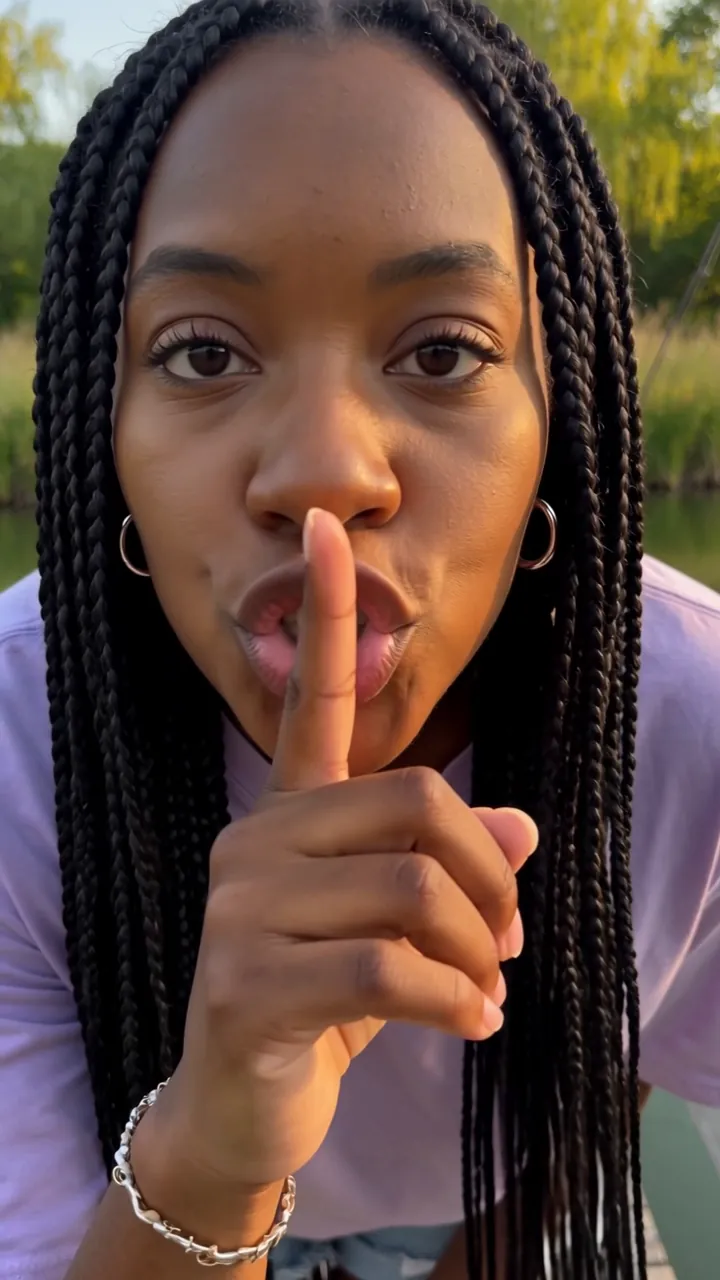
The clip below came out of Quiet on the Creek AI from the single photo next to it, with no editing afterwards. The dancer is a made-up person. Your own video keeps your face, hair and outfit from the photo, and every render plays the moves a little differently.
How to Make a Quiet on the Creek AI Video
- 1
Upload your photo
Put a clear photo of yourself in Dancer 1. Full body works best, since the Quiet on the Creek dance shows you on the dock while you tiptoe and bounce.
- 2
Bring a friend, or go solo
Use a second photo in Dancer 2 for the duo take: you cover your eyes, then your mouths, and shush the camera together. Leave it empty to dance alone.
- 3
Pick the format and create
Choose 9:16 for TikTok and Reels, 1:1 or 16:9, then Standard 720p for 10 credits or HD 1080p for 20. The creek clip lands in My videos a few minutes later.
Best Photos for a Quiet on the Creek AI Video
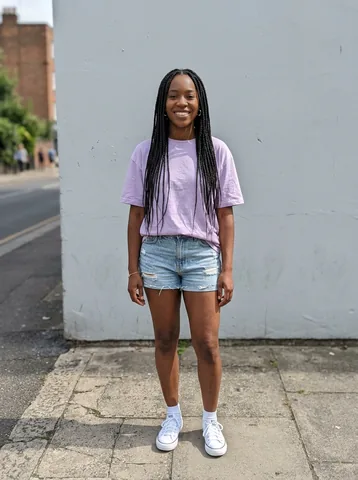
The whole you
The Quiet on the Creek dance opens with a full-body tiptoe down the dock, so a photo that shows your shoes gives the cleanest result. Waist-up photos work too.
Face the lens
You lean right into the camera to whisper the line, so use a sharp, front-facing photo in even light.
Your outfit, on the dock
What you wear in the photo is what you wear on the creek. Bright colours stand out on the creek.
Adults who said yes
Only use photos of adults who agreed to be in the video. No children, celebrities or public figures.
The Quiet on the Creek Dance, Second by Second
Every clip follows the moves of the TikTok trend on a fishing dock at golden hour. With two photos, you dance side by side.
0–2 s
The tiptoe
Big, sneaky steps down the dock toward the camera, one finger pressed to your lips.
2–4 s
The shush
You lean into the lens and whisper: "Shh... quiet on the creek."
4–7 s
Head tilt and bounce
A sly head tilt, then bent knees and shoulder shimmies as you bounce on the beat.
7–10 s
The finish
More bounce, a hair flip and a turn, ending on one last shush at the camera.
Quiet on the Creek Dance Ideas
Since the phrase is about keeping something on the low, the best posts pair the Quiet on the Creek dance with a caption about what you are hiding.
Location off
The artist's own favourite take: your location is off and the group chat wants answers. Post the shush on the dock and say nothing else.
News, not yet announced
A new job, a raise, a move: shush the camera now and announce it when it is official.
The late-night snack run
Bonnet on, the tiptoe was made for a quiet trip to the corner store.
Partners in crime
Make the duo Quiet on the Creek AI clip with the friend who keeps your secrets: two shushes, one secret, one creek.
What Is Quiet on the Creek?
"Quiet on the creek" comes from an Instagram Live in which the Florida rapper Saucy Santana and Yung Miami ate fish together. Remembering how he went fishing as a kid, he gave a tip: "You gotta be real quiet on the creek." In early July 2026, about two years later, someone reposted the clip on TikTok and the line spread fast.
Original posts
708Kplays
@complex on TikTokJuly 14, 2026
Complex News explains the phrase three days before the single.
3.1Mplays
@saucysantana on TikTokJuly 15, 2026
The artist teases the song: "QOTC! 7/17".
4.1Mplays
@angelaandchelsea on TikTokAugust 12, 2026
A duo take: two friends shush the camera and bounce.
Play counts on November 6, 2026.
He released "Quiet on the Creek" as a single on July 17, 2026. By late August The FADER reported the hashtag at No. 1 on TikTok music and the song entering Billboard's Hot R&B/Hip-Hop chart at No. 45. What carried it was the Quiet on the Creek dance: people shush the camera, tiptoe and bounce, acting out the feeling of keeping quiet.
Now the phrase means keeping something on the low: good news you have not announced, a corner-store run you hope nobody sees, a location that is switched off. Quiet on the Creek AI gives you the dance without filming it, and the fishing dock is a nod to where the line began: you have to be quiet on the creek or the fish swim off.
Our clip uses an original beat, not the song. AI Trend Video is not affiliated with the artist or his label.
Quiet on the Creek AI FAQ
How do I make a Quiet on the Creek AI video?
Upload one photo of yourself, or two for the duo, pick a format and create. The 10-second video is ready in a few minutes as an MP4.
What does "quiet on the creek" mean?
Keep it on the low. It started as a fishing tip, since fish swim off at any noise, and now means keeping news, plans or your whereabouts to yourself until the time is right.
Can I do the Quiet on the Creek dance with a friend?
Yes. Put a second photo in Dancer 2 and you both tiptoe in, cover your eyes and mouths, shush the camera and bounce in sync.
Does the video use the original song?
No. You whisper "Shh... quiet on the creek" over an original bouncy beat. To post with the trending sound, pick it from the TikTok or Instagram sound library when you upload.
Do I need to know the dance?
No. The tiptoe, the shush, the head tilt and the bounce are built in. All you bring is a photo.
What kind of photo works best?
A sharp, front-facing photo of one adult, ideally showing the whole body.
Why is the video set on a fishing dock?
Because the phrase began as a fishing tip: you have to be quiet on the creek or the fish swim off. The dock, the rod and the still water are a nod to that.
Can my pet do the Quiet on the Creek AI dance?
Not yet. Each dancer comes from a photo of an adult, and the solo and duo takes are the two versions on offer for now.
How long is a Quiet on the Creek AI video?
Ten seconds, in 9:16 for TikTok, Reels and Shorts, 1:1 for the feed or 16:9 for YouTube. Standard is 720p and HD is 1080p, with no watermark.
How much does it cost?
Every trend costs the same: 10 credits for a Standard video and 20 for HD. One-time packs start at $9.99 for 10 credits and never expire; monthly plans start at $39.99 for 50 credits a month. There is no free trial.
What if my video looks wrong?
A failed render returns its credits automatically. If a finished video clearly did not work, report it from My videos within 7 days and we return the credits or refund the payment.
Who can see my photos and videos?
Only you. Photos and videos stay private in your account, and your photo goes to our video provider only to make the video.
Do I need an app?
No. It runs in your phone or computer browser, and the MP4 is ready to post on TikTok, Reels or Shorts.
Still have a question? support@aitrendvideo.io