

Santa Nice List AI
Santa Nice List AI turns one photo and one name into the Christmas clip everyone is sharing this year: Santa unrolls his long list in his workshop, finds the name you typed and says it out loud, then a swirl of gold sparkles opens on a gold frame with you, a plus-one or your pet inside as a living portrait. The santa nice list video is 10 seconds long, with Santa’s voice and a music-box tune.
- 1 or 2 photos, or a pet
- Santa says the name
- 10 seconds
- 9:16 · 1:1 · 16:9
What People Are Making
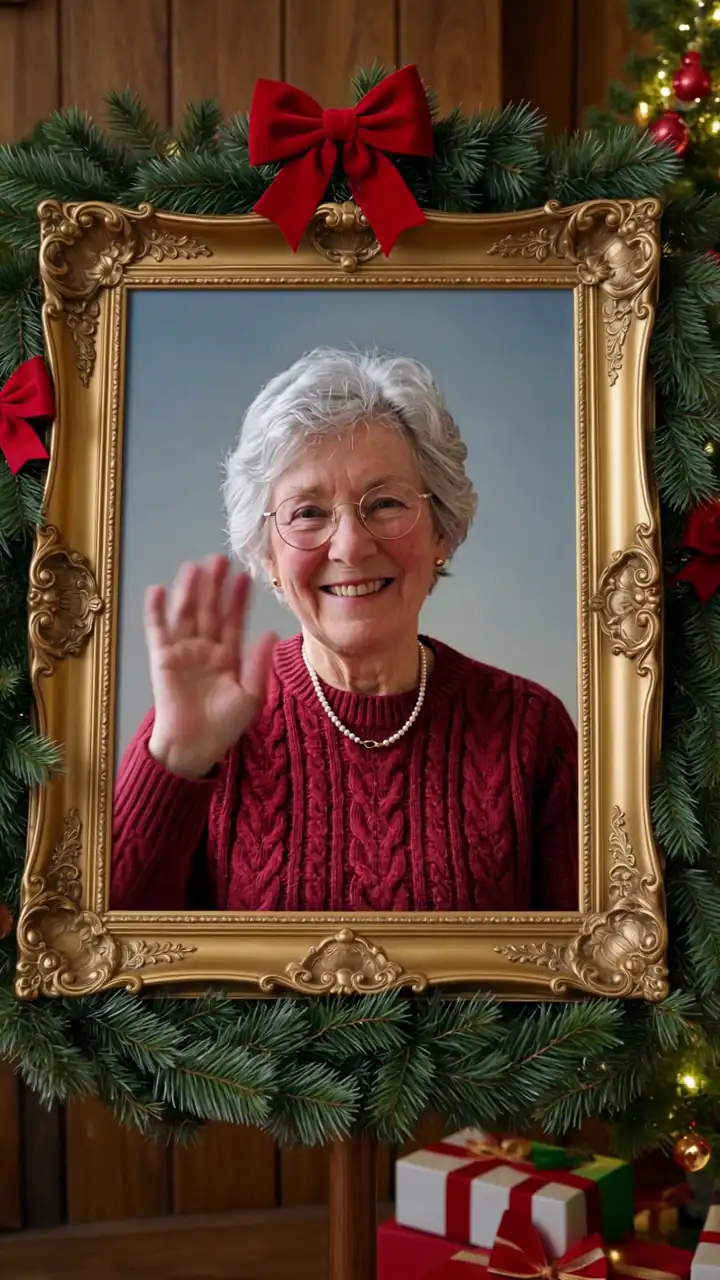
This santa nice list video came from the photo next to it and the name "Grandma Rose", with no editing afterwards. She is a made-up person. Your own video keeps the face, hair and clothes from your photo, the name Santa says is yours, and every render plays out a little differently.

Santa nice list video sample: Grandma Rose makes the list
Santa sits in a carved armchair by the fire in his toy workshop and unrolls a scroll that tumbles to the floor, with "NICE LIST" in gold letters at the top. He runs a gloved finger down the list, looks up and says "Well, well, Grandma Rose, you’re on the nice list." Gold sparkles fill the screen and clear on a gold frame with red bows, where the woman from the photo, silver hair and red cable-knit sweater, smiles and waves. 10 seconds in 9:16, made in about two and a half minutes at 720p.
How to Make a Santa Nice List AI Video
- 1
Add the photo
Put a clear, chest-up photo in You. Add a partner, friend or sibling to Plus one to share the frame, or use the Pet tab for your cat or dog.
- 2
Type the name
Write the name Santa finds on his list: a first name, "Grandma Rose" or two names at once. Letters only, up to 30 characters.
- 3
Pick the format and create
Choose 9:16 for TikTok and Reels, 1:1 or 16:9, then Standard 720p for 10 credits or HD 1080p for 20. Your Santa Nice List AI clip lands in My videos and we email you.
Best Photos for a Santa Nice List Video
Face big and clear
Santa Nice List AI ends on a portrait from the chest up, so use a sharp photo where the face fills a good part of the picture. Skip sunglasses and hats.
Dress for Christmas
Your clothes carry over into the frame. A red sweater or a festive jumper makes the santa nice list video feel like a Christmas card.
Two people, two photos
For a couple or best friends, use one photo each, or tap "Cast from a group photo" in the studio and pick two faces.
Adults and pets only
Use photos of adults who agreed, or your own pet. No children, celebrities or public figures.
What Happens in the 10-Second Santa Nice List Video
Every Santa Nice List AI video follows the same script, from the long scroll to the gold frame.
0–2 s
The scroll
Santa sits in his carved armchair in the candle-lit workshop and unrolls a list so long it rolls across the floor.
2–5 s
"You’re on the nice list!"
He runs a finger down the list, stops, looks over his glasses and says the name you typed.
5–7 s
Gold sparkles
Santa chuckles and opens his hand; sparkles rise from the scroll and swirl across the screen.
7–10 s
The gold frame
The light clears on an ornate gold frame by the tree, with you, your plus-one or your pet inside, smiling at the camera.
Santa Nice List AI Ideas
Santa Nice List AI works for anyone you love, two-legged or four. A few ideas:
For the grandparents
Put Grandma or Grandpa on the list and send the santa nice list video to the family chat.
Couples
Two photos, one frame and both names on the list. Good for a Christmas card or an anniversary post.
The good boy
Pick Pet and let Santa announce that your dog or cat made the list, chewed slippers and all.
Office party
Put a coworker on the nice list for the team chat, with their OK.
December countdown
Post one a day until Christmas: a friend, a parent, the dog, then you.
What Is the Santa Nice List Trend?
The santa nice list trend is a CapCut AI template that took off on TikTok in early November 2026. Santa sits in a carved armchair, unrolls a scroll so long it rolls across the floor, holds up his Naughty & Nice list, and gold sparkles swirl into an ornate gold frame that holds the uploaded photo.
Original posts
480Kplays
@krjxejaig5 on TikTokNovember 6, 2026
The CapCut template how-to: Santa checks his list and the uploaded photo appears in a gold frame.
Play counts on November 9, 2026.
On November 6, 2026, the TikTok account @krjxejaig5 posted a how-to for the template in Spanish: Santa is checking his list, and you made the nice list. By November 9 the post had about 480,000 plays. The wish behind it is much older: every December, millions of people in the US look up Santa’s nice list, and "santa nice list" alone reached about 90,500 Google searches in December 2025.
Santa Nice List AI makes the same moment from your own photo, with one thing the template does not have: Santa says your own name out loud when he finds it on the list. The frame can hold one person, two people or a pet, and the santa nice list video comes with Santa’s voice and a new music-box melody.
Each Santa Nice List AI video is made from your own photo. AI Trend Video is independent and not affiliated with the template’s creator, TikTok or CapCut.
Santa Nice List AI FAQ
How do I make a Santa Nice List AI video?
Add a photo, enter a first name and create. The 10-second santa nice list video is ready in a few minutes as an MP4.
Does Santa say my name?
Yes. Santa finds the name you entered on his list and says it before "You’re on the nice list!" Letters only, up to 30 characters, so "Grandma Rose" or "Sam and Jordan" both work.
Can my pet be on the nice list?
Yes. In Santa Nice List AI, choose Pet, add a clear photo of your cat or dog and enter its name. It sits on a red velvet cushion inside the gold frame.
Can two people share the frame?
Yes. Santa Nice List AI can frame two people: add a second photo to Plus one and you appear side by side in the gold frame. Type both names so Santa reads them together.
Can I put my child on the nice list?
Not with a photo: only adults and pets can be in the frame. For a child, try our Santa call video, where Santa says their name and only a photo of your room is needed.
Is it the CapCut template?
No. It is our own version of the santa nice list trend, made from your photo with AI. There is no template watermark, and the name Santa says is the one you chose.
What does Santa say?
"Well, well..." then the name, then "You’re on the nice list!" The lines are fixed; only the name changes.
Is there a naughty list version?
Not yet. In Santa Nice List AI, Santa only finds names on the nice list.
Does the video have sound?
Yes: Santa’s voice, a soft music-box Christmas melody, sleigh bells and a magic shimmer at the reveal. Add the trending sound in TikTok if you like.
How long is the clip?
Ten seconds, in 9:16 for TikTok, Reels and Shorts, 1:1 for the feed or 16:9 for YouTube and the TV. Standard is 720p and HD is 1080p, with no watermark.
When should I post my santa nice list video?
Any time from now to Christmas: as a December 1 countdown post, on a digital Christmas card or in the family chat on Christmas Eve.
How much does it cost?
Every trend costs the same: 10 credits for a Standard video and 20 for HD. One-time packs start at $9.99 for 10 credits and never expire; monthly plans start at $39.99 for 50 credits a month. There is no free trial.
What if my video looks wrong?
A failed render returns its credits automatically. If a finished video clearly did not work, report it from My videos within 7 days and we return the credits or refund the payment.
Who can see my photos and videos?
Only you. Photos and videos stay private in your account, and your photo goes to our video provider only to make the video.
Do I need an app?
No. It runs in your phone or computer browser, and the MP4 is ready to post on TikTok, Reels or Shorts.
Still have a question? support@aitrendvideo.io